REAR CRANKSHAFT OIL SEAL REMOVAL

-
REMOVE AUTOMATIC TRANSMISSION ASSEMBLY (for Automatic Transmission)
-
REMOVE MANUAL TRANSMISSION ASSEMBLY (for Manual Transmission)
-
REMOVE DRIVE PLATE AND RING GEAR SUB-ASSEMBLY (for Automatic Transmission)
-
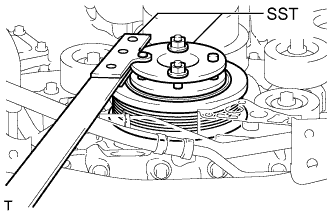
Using SST, hold the crankshaft.
- SST
- 09213-54015 ( 91651-60855 )
- 09330-00021
-
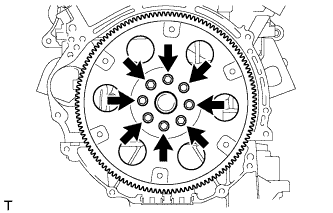
Remove the 8 bolts, rear spacer, drive plate and front spacer.
Note
Do not reuse the bolts.
-
-
REMOVE CLUTCH COVER ASSEMBLY (for Manual Transmission)
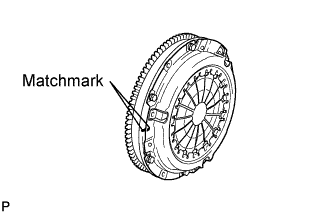
-
Put matchmarks on the clutch cover and flywheel.
-
Loosen each set bolt one turn at a time until spring tension is released.
-
Remove the 6 set bolts, and pull off the clutch cover.
Note
Do not drop the clutch disc.
-
-
REMOVE CLUTCH DISC ASSEMBLY (for Manual Transmission)
Note
Keep the lining part of the clutch disc, pressure plate and surface of the flywheel away from oil and foreign matter.
-
REMOVE FLYWHEEL SUB-ASSEMBLY (for Manual Transmission)
-
Using SST, hold the crankshaft.
- SST
- 09213-54015 ( 91651-60855 )
- 09330-00021
-
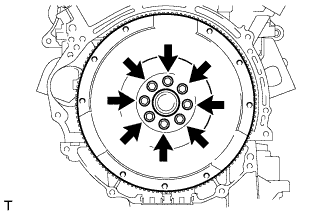
Remove the 8 bolts and flywheel.
Note
Do not reuse the bolts.
-
-
REMOVE REAR CRANKSHAFT OIL SEAL
-
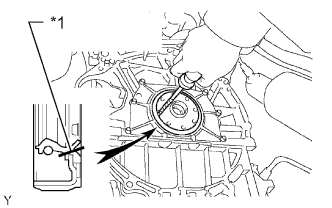
Text in Illustration *1 Cut Position Using a knife, cut off the lip of the oil seal.
-
Using a screwdriver, pry out the oil seal.
Note
Do not damage the surface of the oil seal press fit hole or crankshaft.
Tech Tips
Tape the screwdriver tip before use.
-