RAIN SENSOR INSTALLATION

-
INSTALL RAIN SENSOR TAPE
Tech Tips
The rain sensor tape is reusable. Only replace the tape if it is damaged or contaminated.
-
Clean the rain sensor sensing portion with a piece of cloth.
-
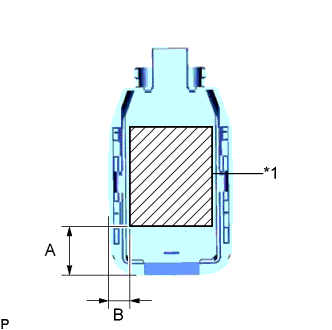
Text in Illustration *1 Rain Sensor Tape Peel off the smaller release sheet, and then attach the rain sensor tape to the rain sensor sensing portion as shown in the illustration.
Standard Clearance Area Measurement A 13.5 mm (0.531 in.) B 7.25 mm (0.285 in.) Tech Tips
Use your fingers to push out any air bubbles from under the tape.
-
-
INSTALL RAIN SENSOR
-
Clean the windshield glass with a piece of cloth.
Note
-
Make sure that there is no rain sensor tape residue remaining on the windshield glass. If there is, remove the residue.
-
If there is any rain sensor tape residue remaining on the windshield glass, replace the tape.
-
-
When installing a new rain sensor or when the rain sensor tape has been replaced:
-
Peel off the release sheet.
Tech Tips
Do not touch the silicone coated surfaces.
-
-
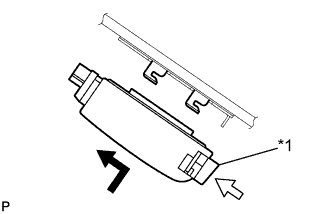
Text in Illustration *1 Stopper Gradually attach the rain sensor to the glass surface to prevent air bubbles from forming between them.
Tech Tips
Do not touch the silicone coated or glass surfaces.
-
Push in the stopper.
-
Connect the connector.
-
-
INSTALL RAIN SENSOR COVER (w/o Lane Departure Alert System)
-
Engage the 2 claws to install the rain sensor cover.
-
-
INSTALL LANE DEPARTURE WARNING CAMERA COVER NO.1 (w/ Lane Departure Alert System)
-
Engage the 4 guides and install the lane departure warning camera cover as shown in the illustration.
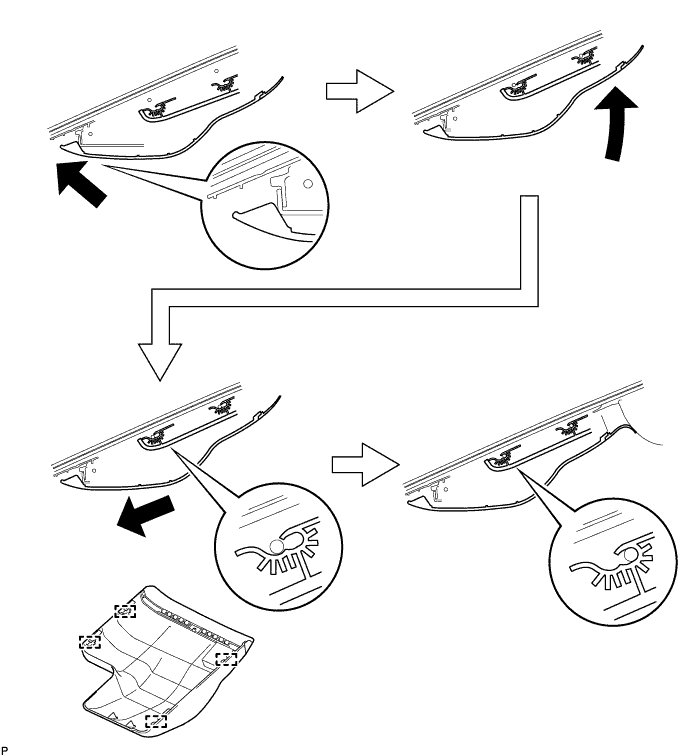
-
-
INSPECT LANE DEPARTURE WARNING CAMERA COVER NO.1
-
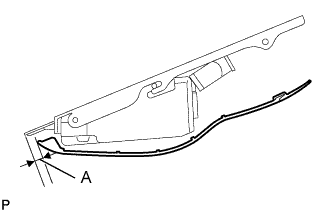
Check the clearance of area A.
Standard Clearance Area Measurement A 1.0 to 3.0 mm (0.0394 to 0.118 in.) Tech Tips
If the result is not as specified, the guides are not engaged properly. Reinstall the lane departure warning camera cover.
-
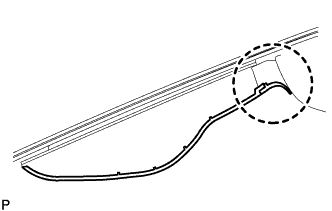
Check that the lip of the lane departure warning camera cover is as shown in the illustration.
Note
Be careful not to push in the lip of the lane departure warning camera cover as it is soft.
-