SMART ENTRY AND START SYSTEM (for Entry Function) Rear Door LH Entry Unlock Function does not Operate
DESCRIPTION
If the entry unlock function does not operate for the rear door LH only, but the entry lock function operates, the request code is being transmitted properly from the rear door LH. In this case, there may be a problem related to the touch sensor (connection between the certification ECU (smart key ECU assembly) and rear door outside handle assembly LH (for rear door LH) [unlock sensor]).
WIRING DIAGRAM
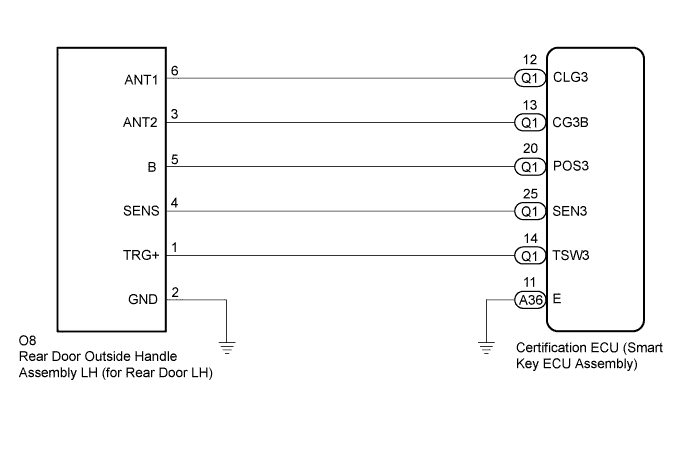
INSPECTION PROCEDURE
Note
-
The smart entry and start system (for Entry Function) uses a multiplex communication system (LIN communication system) and the CAN communication system. Inspect the communication function by following How to Proceed with Troubleshooting Click here. Troubleshoot the smart entry and start system (for Entry Function) after confirming that the communication systems are functioning properly.
-
When using the GTS with the vehicle engine switch off, connect the GTS to the vehicle and turn a courtesy light switch on and off at intervals of 1.5 seconds or less until communication between the GTS and the vehicle begins. Then select the Model Code "KEY REGIST" under manual mode and enter the following menus: Body Electrical / Entry&Start(CAN). While using the GTS, periodically turn a courtesy light switch on and off at intervals of 1.5 seconds or less to maintain communication between the GTS and the vehicle.
-
Check that there are no electrical key transmitter sub-assemblies in the vehicle.
-
Before performing the inspection, check that DTC B1242 (wireless door lock control) is not output Click here.
-
Before replacing the certification ECU (smart key ECU assembly), refer to the smart entry and start system (for Entry Function) precaution Click here.
-
After repair, confirm that no DTCs are output by performing the "DTC Output Confirmation Operation".
PROCEDURE
-
CHECK POWER DOOR LOCK CONTROL SYSTEM
-
When the door control switch on the multiplex network master switch assembly is operated, check that the doors unlock and lock according to the switch operation Click here.
OK Door locks operate normally.
NG 
GO TO POWER DOOR LOCK CONTROL SYSTEM Click here
OK 
-
-
READ VALUE USING GTS
-
Connect the GTS to the DLC3.
-
Turn the engine switch on (IG).
-
Turn the GTS on.
-
Enter the following menus: Body Electrical / Main Body / Data List.
-
Read the Data List according to the display on the GTS.
Main Body Tester Display Measurement Item/Range Normal Condition Diagnostic Note RL-Door Lock Pos SW Rear door RH and LH unlock detection switch signal / ON or OFF ON: Rear door RH or LH unlocked
OFF: Rear door RH and LH locked
- OK On the GTS screen, the display changes between ON and OFF as shown in the chart above.
NG
GO TO LIGHTING SYSTEM (Proceed to Door Unlock Detection Switch Circuit) Click here
OK
-
-
READ VALUE USING GTS
-
Connect the GTS to the DLC3.
-
Turn the engine switch on (IG).
-
Turn the GTS on.
-
Enter the following menus: Body Electrical / Entry&Start / Data List.
-
Turn the GTS on.
Entry&Start Tester Display Measurement Item/Range Normal Condition Diagnostic Note Dr-Door Touch Sensor Rear door LH touch sensor (unlock sensor) / ON or OFF ON: Rear door LH touch sensor (unlock sensor) touched
OFF: Rear door LH touch sensor (unlock sensor) not touched
-
Displays whether the unlock sensor is on or off (even if the sensor is touched and contact is maintained, "ON" is displayed only momentarily).
-
Use this Data List item to help determine if there is an unlock sensor malfunction when the entry unlock function does not operate.
OK The GTS display changes correctly in response to the operation of the rear door outside handle assembly LH (for rear door LH). -
NG 
CHECK HARNESS AND CONNECTOR (REAR DOOR OUTSIDE HANDLE ASSEMBLY LH - CERTIFICATION ECU AND BODY GROUND) Click here
OK 
REPLACE CERTIFICATION ECU (SMART KEY ECU ASSEMBLY)
-
-
CHECK HARNESS AND CONNECTOR (REAR DOOR OUTSIDE HANDLE ASSEMBLY LH - CERTIFICATION ECU AND BODY GROUND)
-
Disconnect the O8 rear door outside handle assembly LH (for rear door LH) connector.
-
Disconnect the A36 and Q1 certification ECU (smart key ECU assembly) connectors.
-
Measure the resistance according to the value(s) in the table below.
Standard Resistance Tester Connection Condition Specified Condition O8-4 (SENS) - Q1-25 (SEN3) Always Below 1 Ω A36-11 (E) - Body ground Always Below 1 Ω O8-4 (SENS) or Q1-25 (SEN3) - Body ground Always 10 kΩ or higher
NG
REPAIR OR REPLACE HARNESS OR CONNECTOR
OK
-
-
CHECK REAR DOOR OUTSIDE HANDLE ASSEMBLY LH (FOR REAR DOOR LH) (REAR LH DOOR UNLOCK SENSOR SIGNAL INPUT)
-
Connect the O8 rear door outside handle assembly LH (for rear door LH) connector.
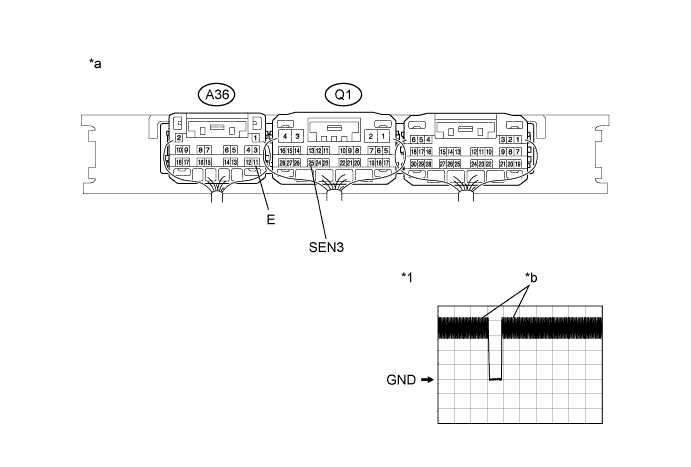
Text in Illustration *1 Waveform - - *a Component with harness connected
(Certification ECU (Smart Key ECU Assembly))
*b In actuality, sampling is being performed -
Connect the A36 and Q1 certification ECU (smart key ECU assembly) connectors.
-
Using an oscilloscope, check the waveform.
OK Tester Connection Condition Tool Setting Specified Condition Q1-25 (SEN3) - A36-11 (E) Procedure:
-
Engine switch off
-
Electrical key transmitter sub-assembly brought outside vehicle
-
All doors locked
-
Electrical key transmitter sub-assembly not sufficiently close to vehicle
-
Rear door LH unlock sensor not touched → touched
2 V/DIV., 500 ms/DIV. Pulse generation (See waveform) -
NG
REPLACE REAR DOOR OUTSIDE HANDLE ASSEMBLY LH (FOR REAR DOOR LH) Click here
OK
REPLACE CERTIFICATION ECU (SMART KEY ECU ASSEMBLY)
-