PARKING BRAKE CABLE REMOVAL

Tech Tips
-
The following procedure is for the No. 1 parking brake cable assembly and No. 3 parking brake cable assembly.
-
Use the same procedure for the No. 3 parking brake cable assembly and No. 2 parking brake cable assembly.
-
REMOVE PARKING BRAKE PEDAL SUB-ASSEMBLY (for LHD)
-
REMOVE PARKING BRAKE PEDAL SUB-ASSEMBLY (for RHD)
-
REMOVE NO. 1 PARKING BRAKE CABLE ASSEMBLY (for LHD)
-
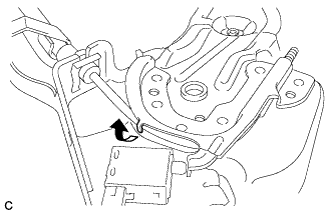
Pull up the parking brake pedal claw.
Note
Do not damage the No. 1 parking brake cable assembly.
-
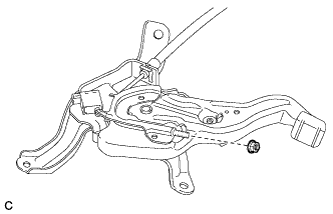
Remove the adjusting nut.
-
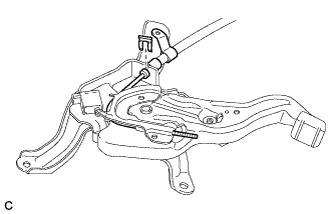
Remove the clip from the No. 1 parking brake cable assembly.
-
Remove the No. 1 parking brake cable assembly from the parking brake pedal assembly.
-
-
REMOVE NO. 1 PARKING BRAKE CABLE ASSEMBLY (for RHD)
-
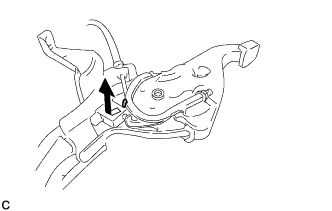
Pull up the parking brake pedal claw.
Note
Do not damage the No. 1 parking brake cable assembly.
-
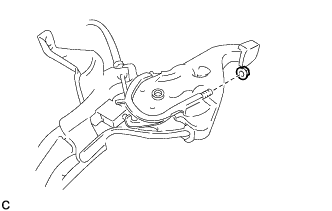
Remove the adjusting nut.
-
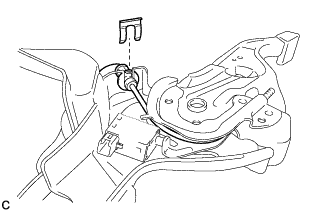
Remove the clip from the No. 1 parking brake cable assembly.
-
Remove the No. 1 parking brake cable assembly from the parking brake pedal assembly.
-
-
REMOVE REAR DOOR SCUFF PLATE LH
-
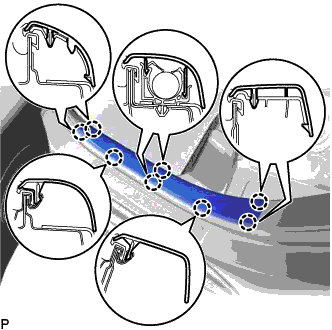
Disengage the 8 claws and remove the rear door scuff plate LH.
-
-
REMOVE CENTER PILLAR LOWER GARNISH LH
-
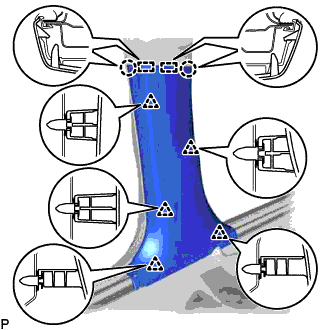
Disengage the 2 claws and 2 guides.
-
Disengage the 5 clips and remove the center pillar lower garnish LH.
-
-
REMOVE FRONT DOOR SCUFF PLATE RH
Tech Tips
Use the same procedure as for the LH side Click here.
-
REMOVE COWL SIDE TRIM BOARD RH
Tech Tips
Use the same procedure as for the LH side Click here.
-
REMOVE REAR DOOR SCUFF PLATE RH
Tech Tips
Use the same procedure as for the LH side.
-
REMOVE CENTER PILLAR LOWER GARNISH RH
Tech Tips
Use the same procedure as for the LH side.
-
REMOVE FRONT SEAT ASSEMBLY LH
-
REMOVE FRONT SEAT ASSEMBLY RH
Tech Tips
Use the same procedure as for the LH side.
-
REMOVE AUDIO AMPLIFIER COVER
-
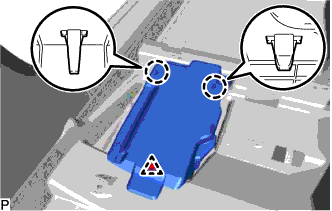
Using a clip remover, remove the clip.
-
Disengage the 2 claws and remove the audio amplifier cover.
-
-
REMOVE STEREO COMPONENT AMPLIFIER ASSEMBLY WITH BRACKET
-
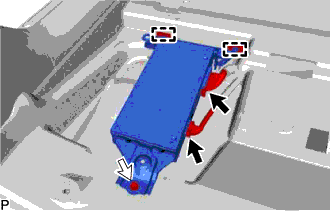
Disconnect each connector.
-
Remove the bolt.
-
Disengage the 2 guides and remove the stereo component amplifier assembly with bracket.
-
-
REMOVE AUDIO AMPLIFIER COVER (w/ Telematics Transceiver)
-
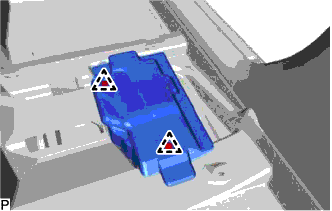
Using a clip remover, remove the 2 clips and audio amplifier cover.
-
-
REMOVE TELEMATICS TRANSCEIVER WITH MAYDAY BATTERY (w/ Telematics Transceiver)
-
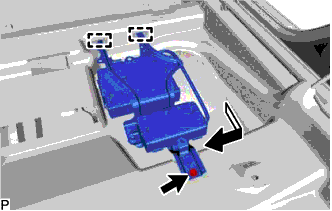
Remove the bolt and disengage the 2 guides.
-
Pull out the telematics transceiver with mayday battery in the direction indicated by the arrow shown in the illustration.
-
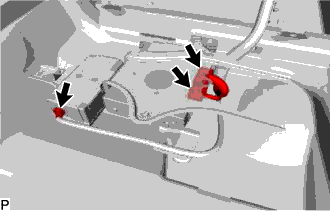
Disconnect each connector.
-
-
REMOVE FLOOR CARPET HOOK
-
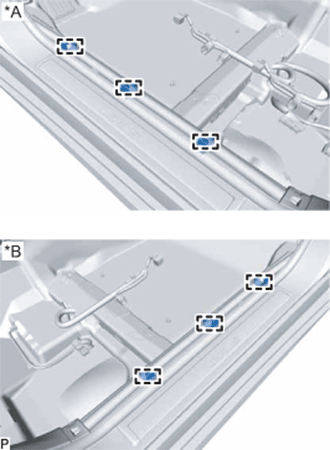
Text in Illustration *A for LH Side *B for RH Side Disengage the 6 guides.
-
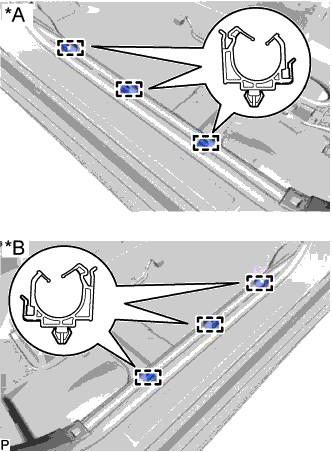
Text in Illustration *A for LH Side *B for RH Side Disengage the 6 clamps and remove the 6 floor carpet hooks.
-
-
REMOVE FRONT FLOOR CAUTION PLATE COVER
-
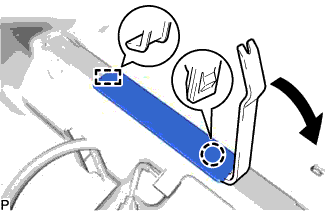
Using a moulding remover, disengage the claw and guide, and remove the front floor caution plate cover.
-
-
REMOVE NO. 2 CONSOLE BOX MOUNTING BRACKET
-
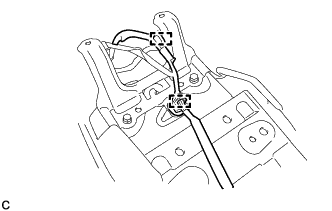
Disengage the 2 clamps and separate the wire harness from the No. 2 console box mounting bracket.
-
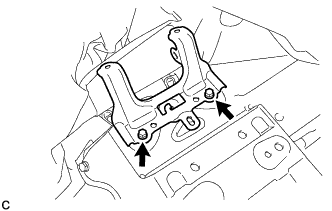
Remove the 2 bolts and No. 2 console box mounting bracket.
-
-
REMOVE NO. 4 CROSS MEMBER FLOOR REINFORCEMENT SUB-ASSEMBLY
-
Turn back the floor carpet to a position where the No. 4 cross member floor reinforcement sub-assembly can be removed.
-
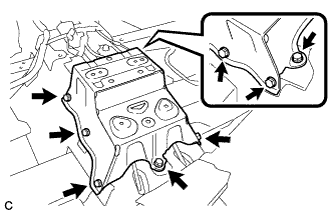
Remove the 8 bolts and No. 4 cross member floor reinforcement sub-assembly.
-
-
REMOVE NO. 4 PARKING BRAKE CABLE ASSEMBLY
-
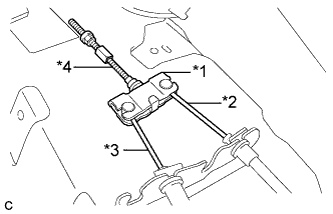
Text in Illustration *1 Parking Brake Equalizer *2 No. 2 Parking Brake Cable Assembly *3 No. 3 Parking Brake Cable Assembly *4 No. 4 Parking Brake Cable Assembly Separate the No. 3 parking brake cable assembly from the parking brake equalizer.
-
Separate the No. 2 parking brake cable assembly to remove the parking brake equalizer.
-
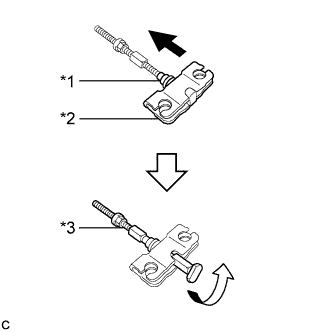
Text in Illustration *1 Rubber Boot *2 Parking Brake Equalizer *3 No. 4 Parking Brake Cable Assembly Slide the parking brake equalizer and rubber boot.
-
Remove the No. 4 parking brake cable assembly from the parking brake equalizer.
-
-
REMOVE FRONT EXHAUST PIPE ASSEMBLY (for 2AR-FE)
-
REMOVE FRONT NO. 2 FLOOR HEAT INSULATOR (for 2AR-FE)
-
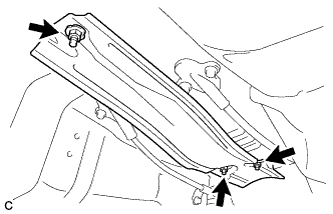
Remove the 3 nuts and front No. 2 floor heat insulator.
-
-
REMOVE PARKING BRAKE SHOE LEVER
-
REMOVE NO. 2 FLOOR UNDER COVER (for LH Side)
-
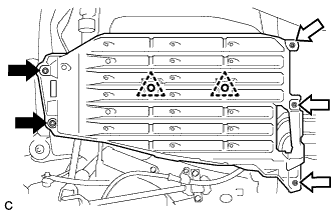
Remove the 2 bolts and 2 clips.
Text in Illustration 
Bolt 
Nut (attached to under cover) -
Disengage the 3 nuts and remove the No. 2 floor under cover.
-
-
REMOVE NO. 1 FLOOR UNDER COVER (for RH Side)
-
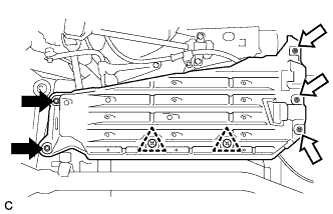
Remove the 2 bolts.
Text in Illustration Bolt Nut (attached to under cover) -
Disengage the 3 nuts and 2 clips, and remove the No. 1 floor under cover.
-
-
REMOVE NO. 3 PARKING BRAKE CABLE ASSEMBLY
-
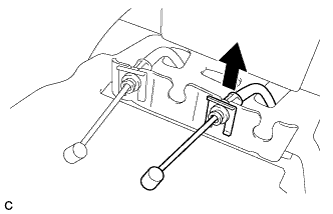
Remove the clip from the No. 3 parking brake cable assembly.
-
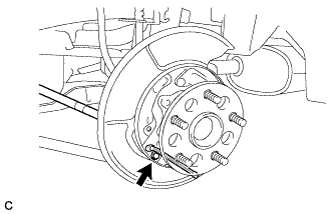
Remove the bolt and separate the No. 3 parking brake cable assembly.
-
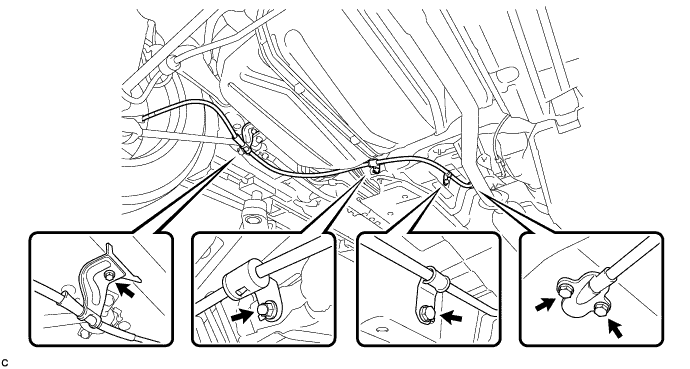
Remove the 4 bolts, nut and No. 3 parking brake cable assembly.
-
-
REMOVE NO. 2 PARKING BRAKE CABLE CLAMP
-
Remove the No. 2 parking brake cable clamp.
-