LANE DEPARTURE ALERT SYSTEM (w/ Dynamic Radar Cruise Control System), Diagnostic DTC:C1AA3

| DTC Code | DTC Name |
|---|---|
| C1AA3 | Vehicle Speed Sensor Circuit |
DESCRIPTION
The lane departure warning camera receives vehicle speed signals from the skid control ECU via CAN communication to control the lane departure alert system. When the lane departure warning camera receives information that there is a malfunction in the vehicle speed sensor, DTC C1AA3 is stored.
| DTC No. | DTC Detection Condition | Trouble Area |
|---|---|---|
| C1AA3 | While driving with the lane departure alert system activated and the lane departure alert main switch on, a signal indicating a malfunction in the vehicle speed sensor is received from the skid control ECU for 5 seconds or more. |
|
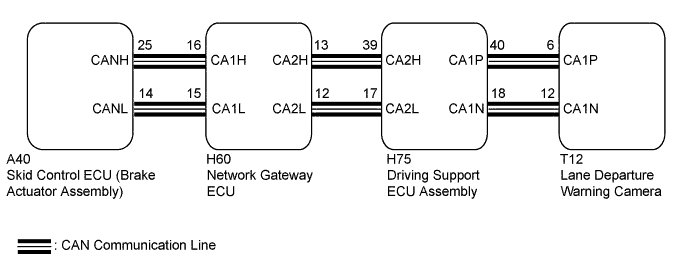
WIRING DIAGRAM
INSPECTION PROCEDURE
Note
When the lane departure warning camera is replaced with a new one, adjustment of the lane departure warning camera beam axis must be performed Click here.
PROCEDURE
-
CHECK FOR DTCs (ABS/VSC/TRAC)
-
Connect the GTS to the DLC3.
-
Turn the engine switch on (IG).
-
Enter the following menus: Chassis / ABS/VSC/TRAC / Trouble Codes.
-
Check if DTCs are output.
Result Result Proceed to Vehicle stability control system DTCs are not output. A Vehicle stability control system DTCs are output. B -
Turn the engine switch off.
B 
GO TO DTC CHART (VEHICLE STABILITY CONTROL SYSTEM) Click here
A 
-
-
CLEAR DTCs
-
Connect the GTS to the DLC3.
-
Turn the engine switch on (IG).
-
Enter the following menus: Chassis / Lane Departure Alert / Trouble Codes.
-
Clear DTCs.
-
Turn the engine switch off.
NEXT
-
-
CHECK FOR DTCs (LANE DEPARTURE ALERT)
-
Perform the following to make sure the DTC detection conditions are met.
Tech Tips
If the detection conditions are not met, the system cannot detect the malfunction.
-
Drive the vehicle at a speed between 50 km/h (32 mph) and 220 km/h (138 mph) and operate the lane departure alert system.
-
-
Connect the GTS to the DLC3.
-
Turn the engine switch on (IG).
-
Enter the following menus: Chassis / Lane Departure Alert / Trouble Codes.
-
Check for DTCs.
OK DTC C1AA3 is not output. -
Turn the engine switch off.
NG
REPLACE LANE DEPARTURE WARNING CAMERA Click here
OK 
USE SIMULATION METHOD TO CHECK Click here
-