FRONT EVAPORATOR TEMPERATURE SENSOR INSTALLATION

-
INSTALL EVAPORATOR TEMPERATURE SENSOR (NO. 1 COOLER THERMISTOR)
-
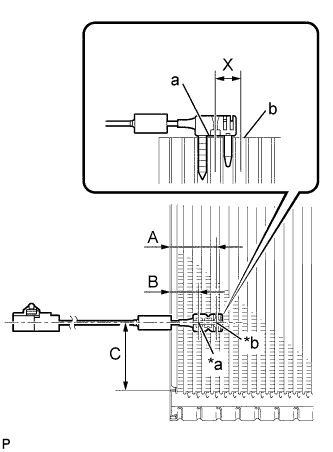
Text in Illustration *a Fixed Part *b Sensor Part Install the evaporator temperature sensor (No. 1 cooler thermistor) as shown in the illustration.
Part Length A 34.3 mm 1.35 in. B 20.9 mm 0.823 in. C 50.0 mm 1.97 in. Note
-
Be sure to insert the thermistor only once because reinserting it into the same position will not allow it to be firmly secured.
-
When reusing the evaporator, insert the thermistor one row next to the one that has been used previously (X in the illustration).
-
After inserting the thermistor, do not apply excessive force to the wire.
-
Directly insert the thermistor until the edge of plastic case "a" comes into contact with evaporator "b".
-
-
-
INSTALL NO. 1 COOLER EVAPORATOR SUB-ASSEMBLY
-
Sufficiently apply compressor oil to 2 new O-rings and the fitting surface of the No. 1 cooler evaporator sub-assembly.
Compressor oil ND-OIL 8 or equivalent -
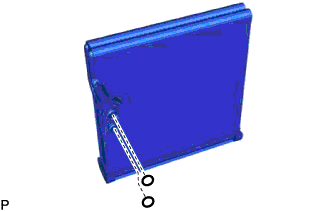
Install the 2 O-rings to the No. 1 cooler evaporator sub-assembly.
Note
Keep the O-rings and O-ring fitting surfaces free of foreign matter.
-
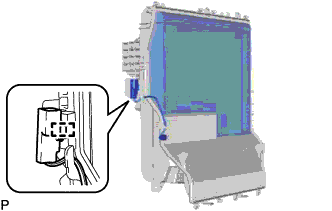
Install the No. 1 cooler evaporator sub-assembly with evaporator temperature sensor (No. 1 cooler thermistor) to the plate cover.
-
Engage the clamp.
Tech Tips
Completely cover the tube with the grommet.
-
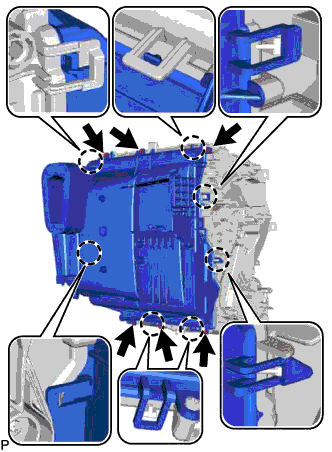
Engage the 7 claws.
-
Install the plate cover with the 6 screws.
-
-
INSTALL COOLER EXPANSION VALVE
-
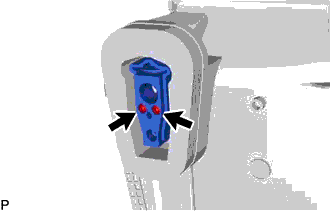
Using a 4 mm hexagon wrench, install the cooler expansion valve with the 2 hexagon bolts.
- Torque:
- 3.5 N*m { 36 kgf*cm, 31 in.*lbf }
-
-
INSTALL HEATER PACKING
-
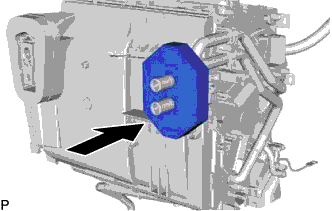
Install the heater packing as shown in the illustration.
-
-
INSTALL AIR CONDITIONING HARNESS ASSEMBLY
-
Engage each clamp to install the air conditioning harness assembly.
-
Connect each connector.
-
-
INSTALL BLOWER ASSEMBLY
-
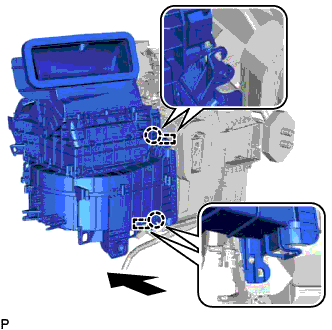
Engage the 2 claws.
-
Engage the 2 guides as shown in the illustration.
-
Install the blower assembly with the 2 screws.
-
Connect the connector.
-
Engage each clamp.
-
-
INSTALL AIR CONDITIONING UNIT ASSEMBLY