REPAIR INSTRUCTION CUSTOMIZE PARAMETERS
-
CUSTOMIZE POWER TILT AND POWER TELESCOPIC STEERING COLUMN SYSTEM
Tech Tips
The following items can be customized.
Note
-
When the customer requests a change in a function, first make sure that the function can be customized.
-
Record the current settings before customizing.
-
Customizing with the GTS
-
Connect the GTS to the DLC3.
-
Turn the engine switch on (IG).
-
Turn the GTS on.
-
Enter the following menus: Body Electrical / Tilt & Telescopic / Utility / Customize.
-
Select the setting by referring to the table below.
Tilt & Telescopic Tester Display Default Content Setting Relevant ECU Autoaway/Return function ON Turn on/off the auto away/return function ON/OFF Multiplex tilt and telescopic ECU
-
-
-
CUSTOMIZE LEXUS PARKING ASSIST-SENSOR SYSTEM
-
Customizing with the GTS
Note
-
When the customer requests a change in a function, first make sure that the function can be customized.
-
Be sure to make a note of the current settings before customizing.
-
When troubleshooting a function, first make sure that the function is set to the default setting.
-
Connect the GTS to the DLC3.
-
Turn the engine switch on (IG).
-
Turn the clearance sonar main switch on.
-
Turn the GTS on.
-
Enter the following menus: Body Electrical / Clearance Sonar / Utility / Customize Setting.
-
Select the setting by referring to the table below.
Warning Display Default Content Setting Relevant ECU Fr Sensor Onset Range Wide Sets the detection operation range for the front center sensors. Narrow or Wide
-
Narrow: 600 mm (23.6 in.)
-
Wide: 1000 mm (39.4 in.)
Clearance warning ECU assembly Rr Sensor Onset Range Wide Sets the detection operation range for the rear center sensors. Narrow or Wide
-
Narrow: 600 mm (23.6 in.)
-
Wide: 1500 mm (59.1 in.)
Clearance warning ECU assembly Keep Sense Buzzer Avail Sounds the buzzer when the distance between the vehicle and obstacle does not change for more than 3 seconds. Not Avail or Avail
-
Not Avail: Not Available
-
Avail: Available
Clearance warning ECU assembly Fr & Rr Buzzer Volume M2 Changes the buzzer volume setting. L, M1, M2, M3 or H
-
L: Low volume
-
M1: Medium low volume
-
M2: Medium volume
-
M3: Medium high volume
-
H: High volume
Clearance warning ECU assembly Sensor Display Default Content Setting Relevant ECU Sensor Condition N Avail Makes the front sensors available when the shift lever is in N. Not Avail or Avail
-
Not Avail: Not Available
-
Avail: Available
Clearance warning ECU assembly Reverse Range Front Sensor Fcrn Changes the operation setting for the front sensors when the shift lever is in R. F, Fcrn or F Stop
-
F: All front sensors are available
-
Fcrn: Front corner sensors are available
-
F Stop: All Front sensors are not available
Clearance warning ECU assembly Non P/R Range Rear Sensor R Stop Changes the operation setting for the rear sensors when the shift lever is in any position other than P or R. R, Rcrn or R Stop
-
R: All rear sensors are available
-
Rcrn: Rear corner sensors are available
-
R Stop: All rear sensors are not available
Clearance warning ECU assembly Display Display Default Content Setting Relevant ECU Display Mode*1 All The display mode setting (when the LEXUS parking assist-sensor system is normal). All or Undisp Clearance warning ECU assembly
-
*1: This item is used to allow or prevent the LEXUS parking assist-sensor system from being displayed on the multi-display assembly. For this model, some vehicles are not equipped with the multi-display assembly. For those vehicles, the Display Mode item is not available.
-
-
-
Customizing with multi-display assembly (w/ Navigation System)
Note
-
When the customer requests a change in a function, first make sure that the function can be customized.
-
Be sure to make a note of the current settings before customizing.
-
When troubleshooting a function, first make sure that the function is set to the default setting.
-
Turn the engine switch on (IG).
-
Turn the clearance sonar main switch on.
-
Enter the following menus: Setup / Vehicle / LEXUS park assist.
-
Select the setting by referring to the table below.
Display Default Content Setting Relevant ECU Alert volume 3 Sets the buzzer alert volume. 1, 2, 3, 4 or 5
-
1: Low volume
-
2: Medium low volume
-
3: Medium volume
-
4: Medium high volume
-
5: High volume
Clearance warning ECU assembly Display On The display mode setting (when the LEXUS parking assist-sensor system is normal). On or Off Clearance warning ECU assembly Distance Front Wide Sets the detection operation range for the front center sensors. Narrow or Wide
-
Narrow: 600 mm (23.6 in.)
-
Wide: 1000 mm (39.4 in.)
Clearance warning ECU assembly Distance Rear Wide Sets the detection operation range for the rear center sensors. Narrow or Wide
-
Narrow: 600 mm (23.6 in.)
-
Wide: 1500 mm (59.1 in.)
Clearance warning ECU assembly -
-
-
-
CUSTOMIZE POWER DOOR LOCK CONTROL SYSTEM
Tech Tips
The following items can be customized.
Note
-
When the customer requests a change in a function, first make sure that the function can be customized.
-
Be sure to make a note of the current settings before customizing.
-
When troubleshooting a function, first make sure that the function is set to the default setting.
-
Customizing with the GTS
-
Connect the GTS to the DLC3.
-
Turn the engine switch on (IG).
-
Turn the GTS on.
-
Enter the following menus: Customize Setting / Door Lock.
-
Select the setting by referring to the table below.
Display Default Content Setting Relevant ECU Unlock Key Twice ON*1
OFF*2
Function that unlocks only the driver door when the driver door key cylinder is turned to unlock once, and unlocks all doors when it is turned to unlock twice. For the OFF setting, turning it once unlocks all doors. OFF or ON Main body ECU (Multiplex network body ECU) Auto Lock ON*3
OFF*4
Function that locks all doors when the vehicle speed reaches a certain level. OFF or ON Main body ECU (Multiplex network body ECU) Auto Lock/Shift OFF Function that locks all doors when the shift lever is moved out of P, with the engine switch on (IG) and all doors closed. OFF or ON Main body ECU (Multiplex network body ECU) Auto Unlock/Shift OFF Function that unlocks all doors when the shift lever is moved to P from any position other than P with the engine switch on (IG). OFF or ON Main body ECU (Multiplex network body ECU) All Unlock/Open-Close ON*4
OFF*3
Function that unlocks the other doors when the driver door is opened within approximately 43 seconds after the engine switch is turned off. OFF or ON Main body ECU (Multiplex network body ECU)
-
*1: for G.C.C countries
-
*2: except G.C.C countries
-
*3: for G.C.C countries and China
-
*4: except G.C.C countries and China
-
-
-
Customizing with the Multi-display
-
Turn the engine switch on (IG).
-
Enter the following menus: MENU / Setup / Vehicle / Vehicle customization / Door lock settings.
-
Select the setting by referring to the table below.
Display Default Content Setting Relevant ECU Unlock on second key turn On*1
Off*2
Function that unlocks only the driver door when the driver door key cylinder is turned to unlock once, and unlocks all doors when it is turned to unlock twice. For the OFF setting, turning it once unlocks all doors. On or Off Main body ECU (Multiplex network body ECU) Speed sensitive auto locking On*3
Off*4
Function that locks all doors when the vehicle speed reaches a certain level. On or Off Main body ECU (Multiplex network body ECU) Auto lock by shift from P Off Function that locks all doors when the shift lever is moved out of P, with the engine switch on (IG) and all doors closed. On or Off Main body ECU (Multiplex network body ECU) Auto unlock by shift to P Off Function that unlocks all doors when the shift lever is moved to P from any position other than P with the engine switch on (IG). On or Off Main body ECU (Multiplex network body ECU) Auto unlock by driver door On*4
Off*3
Function that unlocks the other doors when the driver door is opened within approximately 43 seconds after the engine switch is turned off. On or Off Main body ECU (Multiplex network body ECU)
-
*1: for G.C.C countries
-
*2: except G.C.C countries
-
*3: for G.C.C countries and China
-
*4: except G.C.C countries and China
-
-
-
Customizing with the combination meter assembly (w/o multi-display)
Tech Tips
-
Press and hold the DISP switch (steering pad switch assembly) when entering an item.
-
Briefly press the DISP switch (steering pad switch assembly) when selecting an item.
-
Turn the engine switch on (IG).
-
Enter the following menus: Settings / Vehicle.
-
Select the setting by referring to the table below.
Display Default Content Setting Relevant ECU Auto Lock by Speed On*1
Off*2
Function that locks all doors when the vehicle speed reaches a certain level. On or Off Main body ECU (Multiplex network body ECU) Auto Lock by Shift from P Off Function that locks all doors when the shift lever is moved out of P, with the engine switch on (IG) and all doors closed. On or Off Main body ECU (Multiplex network body ECU) Auto Unlock by Shift to P Off Function that unlocks all doors when the shift lever is moved to P from any position other than P with the engine switch on (IG). On or Off Main body ECU (Multiplex network body ECU) Auto Unlock by Driver Door On*2
Off*1
Function that unlocks the other doors when the driver door is opened within approximately 43 seconds after the engine switch is turned off. On or Off Main body ECU (Multiplex network body ECU)
-
*1: for G.C.C countries and China
-
*2: except G.C.C countries and China
-
-
Press and hold the DISP switch (steering pad switch assembly).
-
The setting completion screen will be displayed.
-
Return to the item selection screen.
-
-
-
CUSTOMIZE WIRELESS DOOR LOCK CONTROL SYSTEM
Tech Tips
The following items can be customized.
Note
-
When the customer requests a change in a function, first make sure that the function can be customized.
-
Be sure to make a note of the current settings before customizing.
-
When troubleshooting a function, first make sure that the function is set to the default setting.
-
Customizing with the GTS
-
Connect the GTS to the DLC3.
-
Turn the engine switch on (IG).
-
Turn the GTS on.
-
Enter the following menus: Customize Setting / Wireless Door Lock.
-
Select the setting by referring to the table below.
Display Default Content Setting Relevant ECU Wireless Control ON Function that turns wireless door lock OFF or ON Main body ECU (Multiplex network body ECU) Hazard Answer Back ON When the doors are locked by wireless operation, the hazard warning lights flash once.
When the doors are unlocked by wireless operation, the hazard warning lights flash twice.
OFF or ON Main body ECU (Multiplex network body ECU) Open Door Warning*1 ON The buzzer sounds when lock is pressed when any of the doors are ajar. OFF or ON Main body ECU (Multiplex network body ECU) Unlock 2 Operation ON*2
OFF*3
Function that unlocks driver door when unlock switch on electrical key transmitter sub-assembly is pressed once, and unlocks all doors when pressed twice. If setting is OFF, pressing unlock switch once makes all doors unlock. OFF or ON Main body ECU (Multiplex network body ECU) Panic Function*4 ON Function to operate theft deterrent system by pressing panic switch on electrical key transmitter sub-assembly for 0.8 seconds OFF or ON Main body ECU (Multiplex network body ECU) Trunk Lid Operation Long1 Function to change the operation method of opening the luggage compartment door by the electrical key transmitter sub-assembly.
1tim ON: Push the luggage open switch once
2tim ON: Push the luggage open switch twice
Long1: Push the luggage open switch for 0.8 seconds
Long2: Push the luggage open switch for 1.6 seconds
Prohibit: Wireless luggage compartment door open function is off
1tim ON, 2tim ON, Long1, Long2 or Prohibit Main body ECU (Multiplex network body ECU) Auto Lock Time 30 s Function that regulates the interval between unlocking and automatic relocking of doors 30 s, 60 s or 120 s Main body ECU (Multiplex network body ECU) Wireless Buzzer Resp*4 ON Wireless door lock buzzer response OFF or ON Main body ECU (Multiplex network body ECU) P/W Wireless Ope Buzz*5 ON Wireless power window buzzer response OFF or ON Main body ECU (Multiplex network body ECU) Wireless Buzzer Vol*4 Level 5 Wireless door lock buzzer volume Level 7, Level 6, Level 5, Level 4, Level 3, Level 2, Level 1 or Level0 Main body ECU (Multiplex network body ECU)
-
*1: except China
-
*2: for G.C.C countries
-
*3: except G.C.C countries
-
*4: for G.C.C countries, Taiwan and Brazil
-
*5: except China
-
-
-
Customizing with the multi-display
-
Turn the engine switch on (IG).
-
Enter the following menus: MENU / Setup / Vehicle / Vehicle customization / Door lock settings.
-
Select the setting by referring to the table below.
Display Default Content Setting Relevant ECU Remote 2-press unlock On*1
Off*2
Function that unlocks driver door when unlock switch on electrical key transmitter sub-assembly is pressed once, and unlocks all doors when pressed twice. If setting is OFF, pressing unlock switch once makes all doors unlock. On or Off Main body ECU (Multiplex network body ECU) Auto relock timer 30 s Function that regulates the interval between unlocking and automatic relocking of doors 30 s, 60 s or 120 s Main body ECU (Multiplex network body ECU) Lock/unlock feedback-lights On When the doors are locked by wireless operation, the hazard warning lights flash once.
When the doors are unlocked by wireless operation, the hazard warning lights flash twice.
On or Off Main body ECU (Multiplex network body ECU) Lock feedback volume*3 5 Wireless door lock buzzer volume off, 1, 2, 3, 4, 5, 6 or 7 Main body ECU (Multiplex network body ECU)
-
*1: for G.C.C countries
-
*2: except G.C.C countries
-
*3: for G.C.C countries, Taiwan and Brazil
-
-
-
Customizing with the combination meter assembly (w/o multi-display)
Tech Tips
-
Press and hold the DISP switch (steering pad switch assembly) when entering an item.
-
Briefly press the DISP switch (steering pad switch assembly) when selecting an item.
-
Turn the engine switch on (IG).
-
Enter the following menus: Settings / Vehicle.
-
Select the setting by referring to the table below
Display Default Content Setting Relevant ECU Remote 2-Press Unlock On*1
Off*2
Function that unlocks driver door when unlock switch on electrical key transmitter sub-assembly is pressed once, and unlocks all doors when pressed twice. If setting is OFF, pressing unlock switch once makes all doors unlock. On or Off Main body ECU (Multiplex network body ECU) Auto Relock Timer 30 s Function that regulates the interval between unlocking and automatic relocking of doors 30 s, 60 s or 120 s Main body ECU (Multiplex network body ECU) Lock/Unlock Feedback-Lights On When the doors are locked by wireless operation, the hazard warning lights flash once.
When the doors are unlocked by wireless operation, the hazard warning lights flash twice.
On or Off Main body ECU (Multiplex network body ECU) Lock/Unlock Feedback-Tone*3 5 Wireless door lock buzzer volume 0, 1, 2, 3, 4, 5, 6 or 7 Main body ECU (Multiplex network body ECU)
-
*1: for G.C.C countries
-
*2: except G.C.C countries
-
*3: for G.C.C countries, Taiwan and Brazil
-
-
Press and hold the DISP switch (steering pad switch assembly).
-
The setting completion screen will be displayed.
-
Return to the item selection screen.
-
-
-
CUSTOMIZE SMART ENTRY AND START SYSTEM (for Entry Function)
Tech Tips
The following items can be customized.
Note
-
When the customer requests a change in a function, first make sure that the function can be customized.
-
Record the current settings before customizing.
-
Customizing with the GTS
-
Connect the GTS to the DLC3.
-
Turn the engine switch on (IG).
-
Turn the GTS on.
-
Enter the following menus: Customize Setting / Wireless Door Lock, Entry & Start or Warning.
-
Select the setting by referring to the table below.
Wireless Door Lock Display Default Content Setting Relevant ECU Hazard Answer Back ON When the doors are locked by entry function, the hazard warning lights flash once.
When the doors are unlocked by entry function, the hazard warning lights flash twice.
OFF or ON Main body ECU (multiplex network body ECU) Open Door Warning*1 ON The buzzer sounds when the lock sensor on the door outside handle assembly is touched to perform entry lock with a door open. OFF or ON Main body ECU (multiplex network body ECU) Auto Lock Time 30 s Function that regulates the interval between unlocking and automatic relocking of doors. 30 s, 60 s or 120 s Main body ECU (multiplex network body ECU) Wireless Buzzer Resp*2 ON Function that sounds the answer-back buzzer when an entry lock or unlock operation is performed. OFF or ON Main body ECU (multiplex network body ECU) Wireless Buzzer Vol*2 Level 5 Buzzer answer back volume Level 7, Level 6, Level 5, Level 4, Level 3, Level 2, Level 1 or Level0 Main body ECU (multiplex network body ECU)
-
*1: w/ Door Ajar Warning Function
-
*2: w/ Wireless Buzzer Answer Back Function
Entry & Start Display Default Content Setting Relevant ECU Park Wait Time (Waiting time to permit unlocking door after locking) 2.5s Function that sets the period of time (lock confirmation time) that the door is prevented from being unlocked by operating the front door outside handle assembly after an entry lock operation is performed. 0.5s, 1.5s, 2.5s or 5s Certification ECU (smart key ECU assembly) Ignition Available Area
(Entry ignition available area)
All Function that sets the area that the electrical key transmitter sub-assembly must be in before the engine switch can be operated. Front or All Certification ECU (smart key ECU assembly) Trunk Open Mode ON Function that opens the luggage compartment door when the driver has the electrical key transmitter sub-assembly and presses the luggage door opening switch assembly. OFF or ON Certification ECU (smart key ECU assembly) Door Unlock Mode2 Driver*1
All*2
Function that chooses the doors to be operated by entry unlock operation. All or Driver Certification ECU (smart key ECU assembly) Auto Entry Cancel SW OFF Function that enables or disables the smart entry and start system. OFF or ON Certification ECU (smart key ECU assembly) Touch Activation Over Threshold Active The function that limits the consecutive entry lock operation to only 2 times can be changed between Active and Not Active. When in Not Active mode, there is no limit for the number of times that the consecutive entry lock operation can be performed. Active or Not Active Certification ECU (smart key ECU assembly) Engine Start Indicator ON Function that turns the smart warning light on the combination meter assembly on or off. OFF or ON Certification ECU (smart key ECU assembly)
-
*1: w/ Wireless Buzzer Answer Back Function
-
*2: w/o Wireless Buzzer Answer Back Function
Warning Display Default Content Setting Relevant ECU Key Low Battery Warning (Warn when transmitter battery becomes weak) ON Enables or disables the sounding of the buzzer when the transmitter battery is low and the engine switch is turned off after being on (IG) for 20 minutes or more. OFF or ON Certification ECU (smart key ECU assembly) -
-
-
Customizing with the multi-display
-
Turn the engine switch on (IG).
-
Enter the following menus: MENU / Setup / Vehicle / Vehicle customization / Door lock settings.
-
Select the setting by referring to the table below.
Display Default Content Setting Relevant ECU Select Doors to Unlock Driver's Door*1
All Doors*2
Function that sets which doors are unlocked by the entry unlock function. All Doors or Driver's Door Certification ECU (smart key ECU assembly) Entry and Start System On Function that enables or disables the smart entry and start system. On or Off Certification ECU (smart key ECU assembly)
-
*1: w/ Wireless Buzzer Answer Back Function
-
*2: w/o Wireless Buzzer Answer Back Function
-
-
-
Customizing using the combination meter assembly (w/o Multi-display)
Tech Tips
-
Press and hold the DISP (steering pad switch assembly) when entering an item.
-
Briefly press the DISP (steering pad switch assembly) when selecting an item.
-
Turn the engine switch on (IG).
-
Enter the following menus: Settings / Vehicle.
-
Select the setting by referring to the table below:
Display Default Content Setting Relevant ECU Select Doors to Unlock Driver's Door*1
All Doors*2
Function that sets which doors are unlocked by the entry unlock function. All Doors or Driver's Door Certification ECU (smart key ECU assembly) Entry and Start System On Function that enables or disables the smart entry and start system. On or Off Certification ECU (smart key ECU assembly)
-
*1: w/ Wireless Buzzer Answer Back Function
-
*2: w/o Wireless Buzzer Answer Back Function
-
-
Press and hold the DISP switch (steering pad switch assembly).
-
The setting completion screen will be displayed.
-
Return to the item selection screen.
-
-
Entry unlock mode switching function (manual operation)
-
The following entry unlock modes can be selected when using the entry unlock mode switching function.
-
All door unlock mode: When the sensor of a front door outside handle assembly is touched, an entry unlock operation is performed simultaneously for all doors.
-
Driver door unlock mode: When the sensor of the driver side door outside handle assembly is touched, an entry unlock operation is performed for the driver door only. If any other door handle is touched, an entry unlock operation is performed simultaneously for all doors.
-
-
When customizing through manual operation:
-
Turn the engine switch off.
-
Pressing the intrusion sensor cancel switch (cancel state). (w/ intrusion sensor cancel switch)
-
Check that the LED of the electrical key transmitter sub-assembly is not illuminated, and then press and hold the lock and unlock buttons of the electrical key transmitter sub-assembly for 5 seconds or more while the electrical key transmitter sub-assembly is in the actuation area.
-
Check the current setting.
Tech Tips
-
The mode changes from all door unlock mode to driver door unlock mode and then back to all door unlock mode.
-
The answer-back (wireless buzzer, buzzer in the combination meter assembly) operation for each mode is indicated in the table below.
Currently Selected Mode Answer-back (Wireless Buzzer) Answer-back (Buzzer in Combination Meter Assembly) All door unlock mode Buzzer sounds twice (short beeps) Buzzer sounds once Driver door unlock mode Buzzer sounds 3 times (short beeps) Buzzer sounds once
-
-
Release the lock and unlock buttons of the electrical key transmitter sub-assembly.
-
Check that the LED of the electrical key transmitter sub-assembly is not illuminated, and then press and hold the lock and unlock buttons of the electrical key transmitter sub-assembly for 5 seconds or more to change the mode.
Tech Tips
Repeat the procedure as necessary to select the desired mode.
-
Unlock the doors with the wireless operation, and then open any door
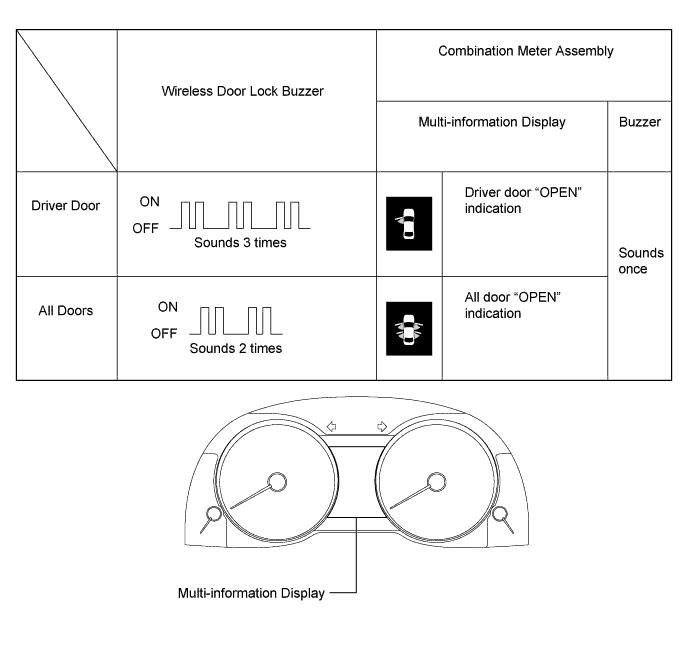
-
-
-
Entry cancel function (manual operation)
Tech Tips
While the smart entry and start system is canceled, it is possible to lock and unlock the doors with the wireless operation, and the start system can be operated by holding the electrical key transmitter sub-assembly near the engine switch.
-
The following functions are disabled when the smart entry and start system is canceled.
-
Entry unlock/lock functions
-
Entry luggage compartment door open function
-
Push start function
-
Key lock-in prevention function
-
Entry warning functions
-
-
When canceling the system through manual operation:
-
Make sure the following conditions are met:
-
The engine switch is off.
-
The driver door is closed.
-
The driver door is unlocked.
-
Press the unlock button of the electrical key transmitter sub-assembly.
-
Open the driver door within 5 seconds of completing the step above (driver door: close condition → opened).
-
With the driver door open, press the unlock button of the electrical key transmitter sub-assembly 2 times within 5 seconds of completing the step above.
Note
If the driver door is closed before or while pressing the unlock button, the entry cancel setting mode will end.
-
Close and open the driver door twice completing the above step (driver door: open condition → closed → opened → closed → opened).
-
With the driver door open, press the unlock button of the electrical key transmitter sub-assembly 2 times completing the step above.
Note
If the driver door is closed before or while pressing the unlock button, the entry cancel setting mode will end.
-
Close and open the driver door completing the step above (driver door: open condition → closed → opened).
-
Close the driver door within 5 seconds of completing the above step.
-
Check that the wireless buzzer sounds twice (short beeps) to confirm that the smart entry and start system has been canceled.
Tech Tips
Finish the step 5 to 7 within 30 seconds.
-
-
Perform the following procedure to restore the smart entry and start system to the active state from the canceled state.
-
Perform the procedures to cancel the smart entry and start system again.
-
Check that the wireless buzzer sounds once (short beep) to confirm that the smart entry and start system has been restored to the active state.
Tech Tips
-
The system changes between the canceled state and the active state each time the procedure to cancel the system through manual operation is performed.
-
The buzzer sounds twice when the system changes from the active state to the canceled state, and sounds once when the system changes from the canceled state to the active state.
-
-
-
-
-
CUSTOMIZE SMART ENTRY AND START SYSTEM (for Start Function)
Tech Tips
The following items can be customized.
Note
-
When the customer requests a change in a function, first make sure that the function can be customized.
-
Record the current settings before customizing.
-
Customizing with the GTS
-
Connect the GTS to the DLC3.
-
Turn the engine switch on (IG).
-
Turn the GTS on.
-
Enter the following menus: Customize Setting / Entry&Start or Warning.
-
Select the setting by referring to the table below.
Entry & Start Display Default Content Setting Relevant ECU Ignition Available Area
(Entry ignition available area)
All Function that sets the area that the electrical key transmitter sub-assembly must be in before the engine switch can be operated. Front or All Certification ECU (smart key ECU assembly) Engine Start Indicator ON Function that turns the smart warning light on the combination meter assembly on or off. OFF or ON Certification ECU (smart key ECU assembly) Warning Display Default Content Setting Relevant ECU Key Low Battery Warning (Warn when transmitter battery becomes weak) ON Enables or disables the sounding of the buzzer when the transmitter battery is low and the engine switch is turned off after being on (IG) for 20 minutes or more. OFF or ON Certification ECU (smart key ECU assembly)
-
-
Customizing with the multi-display
-
Turn the engine switch on (IG).
-
Enter the following menus: MENU / Setup / Vehicle / Vehicle customization / Door lock settings.
-
Select the setting by referring to the table below.
Display Default Content Setting Relevant ECU Entry and Start System On Function that enables or disables the smart entry and start system. On or Off Certification ECU (smart key ECU assembly)
-
-
Customizing using the combination meter assembly (w/o Multi-display)
Tech Tips
-
Press and hold the DISP (steering pad switch assembly) when entering an item.
-
Briefly press the DISP (steering pad switch assembly) when selecting an item.
-
Turn the engine switch on (IG).
-
Enter the following menus: Settings / Vehicle.
-
Select the setting by referring to the table below:
Display Default Content Setting Relevant ECU Entry and Start System On Function that enables or disables the smart entry and start system. On or Off Certification ECU (smart key ECU assembly) -
Press and hold the DISP switch (steering pad switch assembly).
-
The setting completion screen will be displayed.
-
Return to the item selection screen.
-
-
Entry cancel function (manual operation)
Tech Tips
While the smart entry and start system is canceled, it is possible to lock and unlock the doors with the wireless operation, and the start system can be operated by holding the electrical key transmitter sub-assembly near the engine switch.
-
The following functions are disabled when the smart entry and start system is canceled.
-
Entry unlock/lock functions
-
Entry luggage compartment door open function
-
Push-button start function
-
Key lock-in prevention function
-
Entry warning functions
-
-
When canceling the system through manual operation:
-
Make sure the following conditions are met:
-
The engine switch is off.
-
The driver door is closed.
-
The driver door is unlocked.
-
Press the unlock button of the electrical key transmitter sub-assembly.
-
Open the driver door within 5 seconds of completing the step above (driver door: close condition → opened).
-
With the driver door open, press the unlock button of the electrical key transmitter sub-assembly 2 times within 5 seconds of completing the step above.
Note
If the driver door is closed before or while pressing the unlock button, the entry cancel setting mode will end.
-
Close and open the driver door twice completing the above step (driver door: open condition → closed → opened → closed → opened).
-
With the driver door open, press the unlock button of the electrical key transmitter sub-assembly 2 times completing the step above.
Note
If the driver door is closed before or while pressing the unlock button, the entry cancel setting mode will end.
-
Close and open the driver door completing the step above (driver door: open condition → closed → opened).
-
Close the driver door within 5 seconds of completing the above step.
-
Check that the wireless buzzer sounds twice (short beeps) to confirm that the smart entry and start system has been canceled.
Tech Tips
Finish the step 5 to 7 within 30 seconds.
-
-
Perform the following procedure to restore the smart entry and start system to the active state from the canceled state.
-
Perform the procedures to cancel the smart entry and start system again.
-
Check that the wireless buzzer sounds once (short beep) to confirm that the smart entry and start system has been restored to the active state.
Tech Tips
-
The system changes between the canceled state and the active state each time the procedure to cancel the system through manual operation is performed.
-
The buzzer sounds twice when the system changes from the active state to the canceled state, and sounds once when the system changes from the canceled state to the active state.
-
-
-
-
-
CUSTOMIZE THEFT DETERRENT SYSTEM
Tech Tips
The following items can be customized.
Note
-
When the customer requests a change in a function, first make sure that the function can be customized.
-
Be sure to make a note of the current settings before customizing.
-
When troubleshooting a function, first make sure that the function is set to the default setting.
-
Customizing with the GTS
-
Connect the GTS to the DLC3.
-
Turn the engine switch on (IG).
-
Turn the GTS on.
-
Enter the following menus: Customize Setting / Security.
-
Select the setting by referring to the table below.
Display Default Content Setting Relevant ECU Intrusion Win Opened*1 OFF This function sets the sensitivity of the intrusion sensor when a door window is open. ON or OFF Main Body ECU (Multiplex Network Body ECU) Intrusion Sensor Sensitivity Level*1 N+Sound This function that adjusts sensitivity of the sensor that detects the invasion. Highest, High, Normal, N+Sound, Low or Lowest Security control with mechanism key*2 OFF This function makes it possible to cancel the security alarm with the mechanical key. ON or OFF
-
*1: w/ Intrusion Sensor Cancel Switch
-
*2: for China or except G. C. C. or Brazil
-
-
-
-
CUSTOMIZE LIGHTING SYSTEM (INT)
-
Customizing using the GTS
Tech Tips
The following items can be customized.
Note
-
When the customer requests a change in a function, first make sure that the function can be customized.
-
Be sure to make a note of the current settings before customizing.
-
When troubleshooting a function, first make sure that the function is set to the default setting.
-
Connect the GTS to the DLC3.
-
Turn the engine switch on (IG).
-
Turn the GTS on.
-
Enter the following menus: Customize Setting / Illuminated Entry.
-
Select the setting by referring to the table below.
Illuminated Entry Tester Display Default Content Setting Relevant ECU Lighting Time 15 s Changes the lighting time after closing all of the doors. (It will fade out immediately in case of turning the engine switch from off to on (ACC or IG).) 15 s, 7.5 s or 30 s Main body ECU (Multiplex network body ECU) I/L when ACC OFF ON Lights up the following lights when the engine switch is turned from on (ACC or IG) to off:
-
Engine Switch illumination
-
Roof Console Box Assembly (Front Interior Light)
-
Spot Light Assembly (Rear Interior Light)
ON or OFF Main body ECU (Multiplex network body ECU) I/L ON W/Door Key Unlock ON Lights up the following lights when doors are unlocked using a mechanical key or door control transmitter:
-
Engine Switch illumination
-
Roof Console Box Assembly (Front Interior Light)
-
Spot Light Assembly (Rear Interior Light)
-
No. 1 Interior Illumination Light Assembly (Front Footwell Lights)
-
No. 1 Interior Illumination Light Assembly (Rear Footwell Lights)*1
-
Front Door Trim Board Sub-assembly (Front Door Ambient Lights)*2
-
Rear Door Trim Board Sub-assembly (Rear Door Ambient Lights)*2
-
Interior Illumination Light Sub-assembly (Instrument Panel Ambient Light)*2
ON or OFF Main body ECU (Multiplex network body ECU) Room Light when Aprchd ON Lights up the following lights when a key enters any actuation area around the doors:
-
Engine Switch illumination
-
Roof Console Box Assembly (Front Interior Light)
-
Spot Light Assembly (Rear Interior Light)
ON or OFF Main body ECU (Multiplex network body ECU) Inside Foot Light ON Lights up the following lights:
-
No. 1 Interior Illumination Light Assembly (Front Footwell Lights)
-
No. 1 Interior Illumination Light Assembly (Rear Footwell Lights)*1
ON or OFF Main body ECU (Multiplex network body ECU) Light Control ON Dims (ON setting) or turns off (OFF setting) the following lights when all of the following conditions are met:
-
Condition
-
Engine switch is on (IG)
-
The shift lever is moved out of P.
-
All doors are closed.
-
Lights that operate
-
No. 1 Interior Illumination Light Assembly (Front Footwell Lights)
-
No. 1 Interior Illumination Light Assembly (Rear Footwell Lights)*1
-
Front Door Trim Board Sub-assembly (Front Door Ambient Lights)*2
-
Rear Door Trim Board Sub-assembly (Rear Door Ambient Lights)*2
-
Interior Illumination Light Sub-assembly (Instrument Panel Ambient Light)*2
ON or OFF Main body ECU (Multiplex network body ECU) Interior Light Control ON Lights up the following lights when the illuminated entry function is operating:
-
Engine Switch illumination
-
Roof Console Box Assembly (Front Interior Light)
-
Spot Light Assembly (Rear Interior Light)
-
No. 1 Interior Illumination Light Assembly (Front Footwell Lights)
-
No. 1 Interior Illumination Light Assembly (Rear Footwell Lights)*1
-
Front Door Trim Board Sub-assembly (Front Door Ambient Lights)*2
-
Rear Door Trim Board Sub-assembly (Rear Door Ambient Lights)*2
-
Interior Illumination Light Sub-assembly (Instrument Panel Ambient Light)*2
ON or OFF Main body ECU (Multiplex network body ECU) Interior Illumination Light*2 ON Lights up the following lights:
-
Front Door Trim Board Sub-assembly (Front Door Ambient Lights)
-
Rear Door Trim Board Sub-assembly (Rear Door Ambient Lights)
-
Interior Illumination Light Sub-assembly (Instrument Panel Ambient Light)
ON or OFF Main body ECU (Multiplex network body ECU)
-
*1: w/ Rear Footwell Light
-
*2: w/ Ambient Light
-
-
-
Customizing using the multi-display (w/ multi-display)
-
Turn the engine switch on (IG).
-
Enter the following menus: Setup / Vehicle / Vehicle customization / Light Settings.
-
Select the setting by referring to the table below:
Light Settings Display Default Content Setting Relevant ECU Interior light off timer 15 sec. Changes the lighting time after closing all of the doors. (It will fade out immediately in case of turning the engine switch from off to on (ACC or IG).) Off, 15 sec., 7.5 sec., or 30 sec. Main body ECU (Multiplex network body ECU)
-
-
Customizing using the combination meter assembly (w/o multi-display)
Tech Tips
-
Press and hold the DISP switch (steering pad switch assembly) when entering an item.
-
Briefly press the DISP switch (steering pad switch assembly) when selecting an item.
-
Turn the engine switch on (IG).
-
Enter the following menus: Settings / Vehicle or Ambient illumin*1
-
Select the setting by referring to the table below:
Vehicle Display Default Content Setting Relevant ECU Interior Light Off Timer 15 sec. Changes the lighting time after closing all of the doors. (It will fade out immediately in case of turning the engine switch from off to on (ACC or IG).) Off, 15 sec., 7.5 sec., or 30 sec. Main body ECU (Multiplex network body ECU) Ambient illumin*1 Display Default Content Setting Relevant ECU Ambient illumin (instrument panel) On Lights up the following lights:
-
Front Door Trim Board Sub-assembly (Front Door Ambient Lights)
-
Rear Door Trim Board Sub-assembly (Rear Door Ambient Lights)
-
Interior Illumination Light Sub-assembly (Instrument Panel Ambient Light)
On or Off Main body ECU (Multiplex network body ECU)
-
*1: w/ Ambient Light
-
-
Press and hold the DISP switch (steering pad switch assembly).
-
The setting completion screen will be displayed.
-
Return to the item selection screen.
-
-
-
CUSTOMIZE METER / GAUGE SYSTEM
-
Customizing with the GTS
-
Connect the GTS to the DLC3.
-
Turn the engine switch on (IG).
-
Turn the GTS on.
-
Enter the following menus: Customize Setting / Warning, Display.
-
Select the setting by referring to the table below.
Note
-
Be sure to record the current value before customizing.
Warning Tester Display Default Content Setting Relevant ECU Flasher Sound Volume Adjustment Medium Function to change the flasher sound volume Medium, Small, Large Combination meter assembly Lane Change Flashing Times Setting 3 Function to change the lane change flashing times OFF, 3, 5, 7 Combination meter assembly Display Tester Display Default Content Setting Relevant ECU ECO Drive Indicator Zone ON Function to change the ECO drive indicator zone OFF or ON Combination meter assembly ODO Display Time After IG OFF Setting 30s Function to change the ODO display time after engine switch is turned off 30s, 60s, 600s, OFF Combination meter assembly -
-
-
Customizing with the combination meter assembly
Tech Tips
-
Press and hold the DISP switch to enter an item.
-
Briefly press the DISP switch to select an item.
-
Turn the engine switch on (IG).
-
Select the following menu: Settings
-
Select the setting by referring to the table below.
Note
-
Be sure to record the current value before customizing.
Settings Combination meter assembly display Default Content Setting Relevant ECU Language *1 Function to change the language on the display English, French, Spanish, Chinese, Russian Combination meter assembly Units km(km/L) Function to change the units on the display km(km/L), km(L/100km) Combination meter assembly ECO lamp On(Self-lighting) ECO Off (3/5) Function to active/deactive the eco driving indicator light and meter ambient illumination (ECO lamp) On(Always) ECO On (1/5), On(Always) ECO Off (2/5), On(Self-lighting) ECO Off (3/5), Off ECO On (4/5), Off ECO Off (5/5) Combination meter assembly Drive monitor Outside Function to change the fixed display Fuel consumption, Cruising range, Outside Combination meter assembly Lamp brightness Standard Function to change the lamp brightness Bright or Standard Combination meter assembly SPORT lamp On Function to display/not display the meter ambient illumination (SPORT lamp) On or Off Combination meter assembly
-
*1: Changes according to the vehicle specification
-
-
Press and hold the DISP switch.
-
Return to the item selection screen.
-
-
-
CUSTOMIZE FRONT POWER SEAT CONTROL SYSTEM (w/ Memory)
Tech Tips
The following items can be customized.
Note
-
When the customer requests a change in a function, first make sure that the function can be customized.
-
Record the current settings before customizing.
-
Customizing with the GTS
-
Connect the GTS to the DLC3.
-
Turn the engine switch on (IG).
-
Turn the GTS on.
-
Enter the following menus: Customize Setting / Seat or Entry&Start.
-
Select the setting by referring to the table below.
Seat Display Default Content Setting Relevant ECU Seat Move Distance Standard Allows customizing of the seat movement distance for the power easy access system. OFF / Little / Standard Main Body ECU (multiplex network body ECU) Entry&Start Display Default Content Setting Relevant ECU Seat position/Tilt & Telesco memory recall setting D Door This customize function switches the condition of the seat position and Tilt & Telesco memory recall. Possible recall activation parameter "D-door unlock and open by smart system" or "Any door unlock and open with smart system". D Door / ANY Door Certification ECU (smart key ECU assembly)
-
-
Customizing with the multi-display (w/ Navigation System)
-
Turn the engine switch on (IG).
-
Enter the following menus: MENU / Setup / Vehicle / Vehicle customization / Other vehicle settings.
-
Select the setting by referring to the table below.
Display Default Content Setting Relevant ECU Driver's seat easy exit Full Allows customizing of the seat movement distance for the power easy access system. Off / Partial / Full Main Body ECU (multiplex network body ECU)
-
-
Customizing using the combination meter assembly (w/o Navigation System)
Tech Tips
-
Press and hold the DISP (steering pad switch assembly) when entering an item.
-
Briefly press the DISP (steering pad switch assembly) when selecting an item.
-
Turn the engine switch on (IG).
-
Enter the following menus: Settings / Vehicle.
-
Select the setting by referring to the table below.
Display Default Content Setting Relevant ECU Driver's Seat Easy Exit Full Allows customizing of the seat movement distance for the power easy access system. Off / Partial / Full Main Body ECU (multiplex network body ECU)
-
-
-
CUSTOMIZE SEAT BELT WARNING SYSTEM
Tech Tips
The following items can be customized.
Note
-
When the customer requests a change in a function, first make sure that the function can be customized.
-
Be sure to make a note of the current settings before customizing.
-
When troubleshooting a function, first make sure that the function is set to the default setting.
-
These buzzers should be ON for safe driving. Perform this procedure only if it is necessary to set the buzzer to OFF (disabled).
-
Customizing with the GTS
-
Connect the GTS to the DLC3.
-
Turn the engine switch is on (IG).
-
Turn the GTS on.
-
Enter the following menus: Customize Setting / Warning.
-
Select the setting by referring to the table below.
Warning Display Default Content Setting Relevant ECU Driver Side Seatbelt Warning Buzzer ON Function to sound the driver seat belt warning buzzer ON/OFF Combination meter assembly Front Passenger Side Seatbelt Warning Buzzer ON Function to sound the front passenger seat belt warning buzzer ON/OFF Tech Tips
This setting is only valid when the vehicle is driven at 20 km/h (12 mph) or more.
-
-
-
CUSTOMIZE AIR CONDITIONING SYSTEM
-
Customizing with the GTS
Tech Tips
The following items can be customized.
Note
-
When the customer requests a change in a function, first make sure that the function can be customized.
-
Be sure to make a note of the current settings before customizing.
-
When troubleshooting a function, first make sure that the function is set to the default setting.
-
Connect the GTS to the DLC3.
-
Turn the engine switch on (IG).
-
Turn the GTS on.
-
Enter the following menus: Customize Setting / Air Conditioner.
-
Select the setting by referring to the table below.
Air Conditioner Display Default Content Setting Relevant ECU Set Temperature Shift Normal Function to perform control with the shifted temperature versus the displayed temperature -2C, -1C, Normal, +1C, +2C Air Conditioning Amplifier Assembly Evaporator Control Automatic Function to set the evaporator control to the automatic position (AUTO) to save power or to the coldest position (MANUAL) to dehumidify the air and to prevent the windows from fogging up Automatic or Manual Air Conditioning Amplifier Assembly Compressor Mode Automatic Function to turn the A/C on automatically by pressing the AUTO button when the blower is on and the A/C is off Automatic or Manual Air Conditioning Amplifier Assembly Air Inlet Mode*2 Automatic In case of turning the A/C on to cool the cabin down quickly, this is the function to change the mode automatically to RECIRCULATION mode Automatic or Manual Air Conditioning Amplifier Assembly Foot/DEF Auto Mode ON Function to turn the airflow to FOOT/DEF automatically when AUTO mode is on ON or OFF Air Conditioning Amplifier Assembly Foot/DEF Automatic Blow Up Function ON Function to increase the blower level automatically when the defroster is on ON or OFF Air Conditioning Amplifier Assembly Ambient Temperature Shift Normal Function to display shifted ambient temperature versus actual ambient temperature -3C, -2C, -1C, Normal, +1C, +2C, +3C Air Conditioning Amplifier Assembly Emission Gas Sensor Shift Normal Function to change the sensitivity of the smog ventilation sensor Much Less, Less, Little Less, Normal, Little More, More, Much More Air Conditioning Amplifier Assembly ECO MODE Cancel OFF Function to cancel the ECO mode drive when item is on OFF or ON Air Conditioning Amplifier Assembly Refrigerant Shortage Check ON Function to cancel the refrigerant shortage check (check performed during normal operation) when item is off ON or OFF Air Conditioning Amplifier Assembly Fan speed increment control Normal Function to define how fast the AC blower goes to target speed when first activating the AC Slow, Normal, Fast Air Conditioning Amplifier Assembly Ion Generate Control*1 ON Function to generate ions is stopped when item is off ON or OFF Air Conditioning Amplifier Assembly
-
*1: w/ Ion Generator Assembly
-
*2: except G. C. C countries
-
-
-
Customizing using the Multi-display
-
Turn the engine switch on (IG).
-
Enter the following menus: MENU / Setup / Vehicle / Vehicle customization / Climate settings.
-
Select the setting by referring to the table below.
Climate settings Display Default Content Setting Relevant ECU Smog Sensor Sensitivity 0 Function to change the sensitivity of the smog ventilation sensor -3, -2, -1, 0, +1, +2, +3 Air Conditioning Amplifier Assembly Auto A/C Mode On Function to turn the A/C on automatically by pressing the AUTO button when the blower is on and the A/C is off On or Off Air Conditioning Amplifier Assembly Efficient Ventilation Mode*1 On In case of turning the A/C on to cool the cabin down quickly, this is the function to change the mode automatically to RECIRCULATION mode On or Off Air Conditioning Amplifier Assembly
-
*1: except G. C. C countries
-
-
-
-
CUSTOMIZE REAR SUNSHADE SYSTEM
Tech Tips
The following items can be customized.
Note
-
When the customer requests a change in a function, first make sure that the function can be customized.
-
Record the current settings before customizing.
-
Customizing with the GTS
-
Connect the GTS to the DLC3.
-
Turn the engine switch on (IG).
-
Turn the GTS on.
-
Enter the following menus: Customize Setting / Others.
-
Select the setting by referring to the table below.
Others Display Default Content Setting Relevant ECU Rear Shade Delay Time 0.7 s Function to change the time lag of the shift-linked operation 0.7 s, 1.2 s, 0.9 s or 0.0 s Main body ECU (Multiplex network body ECU) R-pos to Rear Sun Shade COM ON Function to lower the rear sunshade when the shift lever is moved to R with the rear sunshade raised ON / OFF
-
-
-
CUSTOMIZE POWER WINDOW CONTROL SYSTEM
Tech Tips
The following items can be customized.
Note
-
When the customer requests a change in a function, first make sure that the function can be customized.
-
Be sure to make notes of the current settings before customizing.
-
When troubleshooting a function, first make sure that the function is set to the default setting.
-
Customizing with the GTS
-
Connect the GTS to the DLC3.
-
Turn the engine switch on (IG).
-
Turn the GTS on.
-
Enter the following menus: Customize Setting / Power Window.
-
Select the setting by referring to the table below.
Tester Display Default Content Setting Relevant ECU Door Key P/W Up OFF This function is used to close the windows by operating the mechanical key. OFF/ON Main body ECU (Multiplex network body ECU) Door Key P/W Down OFF This function is used to open the windows by operating the mechanical key. OFF/ON Main body ECU (Multiplex network body ECU) P/W Up W/ Transmit* OFF This function is used to close the windows using the wireless key transmitter. OFF/ON Main body ECU (Multiplex network body ECU) P/W Down W/ Transmit OFF This function is used to open the windows using the wireless key transmitter. OFF/ON Main body ECU (Multiplex network body ECU) P Window Auto Up Avail This function is used to enable or disable the auto up function for the front passenger door window using the power window regulator switch assembly (for front passenger door). Not Avl/Avail Power window ECU (Power window regulator motor assembly) P Window Auto Up From Driver Avail This function is used to enable or disable the remote auto up function for the front passenger door window using the multiplex network master switch assembly. Not Avl/Avail Power window ECU (Power window regulator motor assembly) RR Window Auto Up Avail This function is used to enable or disable the auto up function using the power window regulator switch assembly (for rear RH door). Not Avl/Avail Power window ECU (Power window regulator motor assembly) RR Window Auto Up From Driver Avail This function is used to enable or disable the remote auto up function for the rear RH door window using the multiplex network master switch assembly. Not Avl/Avail Power window ECU (Power window regulator motor assembly) RL Window Auto Up Avail This function is used to enable or disable the auto up function using the power window regulator switch assembly (for rear LH door). Not Avl/Avail Power window ECU (Power window regulator motor assembly) RL Window Auto Up From Driver Avail This function is used to enable or disable the remote auto up function for the rear LH door window using the multiplex network master switch assembly. Not Avl/Avail Power window ECU (Power window regulator motor assembly)
-
*: w/ Rear Footwell Light
-
-
Enter the following menus: Customize Setting / Wireless Door Lock.
-
Select the setting by referring to the table below.
Display Default Content Setting Relevant ECU P/W Wireless Ope Buzz* ON This function turns the wireless power window buzzer response on or off. OFF/ON Main body ECU (Multiplex network body ECU)
-
*: w/ Door Ajar Warning
-
-
Enter the following menus: Customize Setting / Security.
-
Select the setting by referring to the table below.
Display Default Content Setting Relevant ECU Window Open Warning ON This function is used to enable or disable the window open warning. OFF/ON Main body ECU (Multiplex network body ECU)
-
-
-
CUSTOMIZE SLIDING ROOF SYSTEM
Tech Tips
The following items can be customized.
Note
-
When the customer requests a change in a function, first make sure that the function can be customized.
-
Be sure to make notes of the current settings before customizing.
-
When troubleshooting a function, first make sure that the function is set to the default setting.
-
Customizing with the GTS
-
Connect the GTS to the DLC3.
-
Turn the engine switch on (IG).
-
Turn the GTS on.
-
Enter the following menus: Customize Setting / Power Window.
-
Select the setting by referring to the table below.
Display Default Content Setting Relevant ECU Door Key P/W Up*1 OFF This function is used to close the power windows and sliding roof by operating the mechanical key. OFF/ON Main body ECU (Multiplex network body ECU) Door Key P/W Down*1 OFF This function is used to open the power windows and sliding roof by operating the mechanical key. OFF/ON Main body ECU (Multiplex network body ECU) P/W Up W/ Transmit*1*2 OFF This function is used to close the power windows and sliding roof using the wireless key transmitter. OFF/ON Main body ECU (Multiplex network body ECU) P/W Down W/ Transmit*1 OFF This function is used to open the power windows and sliding roof using the wireless key transmitter. OFF/ON Main body ECU (Multiplex network body ECU)
-
*1: for Standard
-
*2: w/ Rear Footwell Light
-
-
Enter the following menus: Customize Setting / Slide Roof.
-
Select the setting by referring to the table below.
Display Default Content Setting Relevant ECU Door Key Related Operation* Slide Function to select tilt up or slide open of sliding roof key-linked function. Slide/Tilt Sliding roof ECU (Sliding roof drive gear sub-assembly) Wireless Key Related Operation* Slide Function to select tilt up or slide open of sliding roof wireless transmitter-linked function. Slide/Tilt Sliding roof ECU (Sliding roof drive gear sub-assembly) Front SW Auto Operation ON This function is used to enable or disable the auto operation. OFF/ON Sliding roof ECU (Sliding roof drive gear sub-assembly)
-
*: for Standard
-
-
Enter the following menus: Customize Setting / Security.
-
Select the setting by referring to the table below.
Display Default Content Setting Relevant ECU Slide Roof Open Warning ON This function is used to enable or disable the sliding roof open warning. OFF/ON Main body ECU (Multiplex network body ECU)
-
-
-
CUSTOMIZE POWER TRUNK LID SYSTEM
Tech Tips
The following items can be customized.
Note
-
When the customer requests a change in a function, first make sure that the function can be customized.
-
Be sure to make a note of the current settings before customizing.
-
When troubleshooting a function, first make sure that the function is set to the default setting.
-
Customizing with the GTS.
-
Connect the GTS to the DLC3.
-
Turn the engine switch on (IG).
-
Turn the GTS on.
-
Enter the following menus: Customize Setting / Back Door.
-
Select the setting by referring to the table below.
Display Default Content Setting Relevant ECU PBD Power Operation ON Turns power trunk opener and closer function OFF, ON (Closer Only) or ON. OFF, ON (Closer Only) or ON Luggage closer motor assembly
-
-
-
CUSTOMIZE POWER MIRROR CONTROL SYSTEM (w/ Memory)
Tech Tips
The following items can be customized.
Note
-
When the customer requests a change in a function, first make sure that the function can be customized.
-
Record the current settings before customizing.
-
Customizing with the GTS
-
Connect the GTS to the DLC3.
-
Turn the engine switch on (IG).
-
Turn the GTS on.
-
Enter the following menus: Utility / Customize / Others.
-
Select the setting by referring to the table below.
Display Default Content Setting Relevant ECU Auto Fold Mirror Door Lock Function that changes the condition under which the door mirrors automatically retract. ACC, Door Lock or OFF Main body ECU (Multiplex network body ECU)
-
-
-
CUSTOMIZE LIGHTING SYSTEM (EXT)
Tech Tips
The following items can be customized.
Note
-
When the customer requests a change in a function, first make sure that the function can be customized.
-
Be sure to make a note of the current settings before customizing.
-
When troubleshooting a function, first make sure that the function is set to the default setting.
-
Customizing with the GTS
-
Connect the GTS to the DLC3.
-
Turn the engine switch on (IG).
-
Turn the GTS on.
-
Enter the following menus: Customize Setting / Light Control or Illuminated Entry.
-
Select the setting by referring to the table below.
Light Control Tester Display Default Content Setting Relevant ECU Response Time*1 Normal Changes the delay timing of lighting the taillights when going into a tunnel when the light control switch is in the AUTO position. Long or Normal Main Body ECU (Multiplex Network Body ECU) Disp Ex ON Sen Normal Changes the ambient brightness level required to dim the lights such as the indicator lights of the combination meter, A/C indicator light and clock.*A Light2, Light1, Normal, Dark1 or Dark2 Disp Ex OFF Sen Normal Changes the ambient brightness level required to cancel the dimming of the lights such as the indicator lights of the combination meter, A/C indicator light and clock.*B Light2, Light1, Normal, Dark1 or Dark2 Sensitivity Normal Adjusts the sensitivity of the automatic light control system.*C Light2, Light1, Normal, Dark1 or Dark2 DRL Function*3 On ON/OFF of the DRL function On or Off Follow Me Home Lighting Time*2 30 s Sets up the headlight lighting time after the engine switch off. 30 s, 60 s, 90 s or 120 s Light up Clearance Lights at Door Unlock Function ON This function turns on the parking lights and the taillights for 17 seconds when the doors are unlocked by the smart key or the wireless key. ON or OFF
-
*1: except European Models
-
*2: for European Models
-
*3: for G.C.C.
Tech Tips
The sensitivity adjustment may be difficult to confirm. Check by driving the vehicle.
*A Brightness level required to dim the lights 
Setting DARK2 DARK1 NORMAL LIGHT1 LIGHT2 *B Brightness level required to cancel the dimming of the lights Setting DARK2 DARK1 NORMAL LIGHT1 LIGHT2 *C Sensitivity of the automatic light control system Setting Dark2 Dark1 Normal Light1 Light2 Illuminated Entry Tester Display Default Content Setting Relevant ECU Mirr-Foot-Lgt Approached ON Lights up the door mirror foot lights when a key enters any actuation area around the doors. ON or OFF Main Body ECU (Multiplex Network Body ECU) Mirr-Foot-Lgt Unlocked ON Lights up door mirror foot lights when doors are unlocked using a mechanical key or door control transmitter. ON or OFF Mirror Foot Lighting Time 15 s Changes the lighting time of the door mirror foot lights. 7.5 s, 15 s, 30 s or 0 s Exterior Light Control ON Changes the door mirror foot light control. ON or OFF -
-
-
Customizing with the multi-display (w/ Multi-display)
-
Turn the engine switch on (IG).
-
Enter the following menus: MENU / Setup / Vehicle / Vehicle customization / Light settings.
-
Select the setting by referring to the table below.
Light settings Display Default Content Setting Relevant ECU Light sensor sensitivity 0 Adjusts the sensitivity of the automatic light control system.*A -2, -1, 0, +1 or +2 Main Body ECU (Multiplex Network Body ECU) Daytime running lights*1 On ON/OFF of the DRL function On or Off Exterior lights off timer 15 sec. Changes the lighting time of the door mirror foot lights. Off, 7.5 sec., 15 sec. or 30 sec.
-
*1: for G.C.C.
Tech Tips
The sensitivity adjustment may be difficult to confirm. Check by driving the vehicle.
*A Sensitivity of the automatic light control system Setting -2 -1 0 +1 +2 -
-
-
Customizing using the combination meter assembly (w/o Multi-display)
Tech Tips
-
Press and hold the DISP (steering pad switch assembly) when entering an item.
-
Briefly press the DISP (steering pad switch assembly) when selecting an item.
-
Turn the engine switch on (IG).
-
Enter the following menus: Settings / Vehicle.
-
Select the setting by referring to the table below:
Display Default Content Setting Relevant ECU Headlamps-On Sensitivity 0 Adjusts the sensitivity of the automatic light control system.*A -2, -1, 0, +1 or +2 Main Body ECU (Multiplex Network Body ECU) Daytime Running Lights*1 ON ON/OFF of the DRL function ON or OFF Exterior Lights Off Timer 15 s Changes the lighting time of the door mirror foot lights. OFF, 7.5 s, 15 s or 30 s
-
*1: for G.C.C.
Tech Tips
The sensitivity adjustment may be difficult to confirm. Check by driving the vehicle.
*A Sensitivity of the automatic light control system Setting -2 -1 0 +1 +2 -
-
Press the DISP (steering pad switch assembly).
-
The setting completion screen will be displayed.
-
Return to the item selection screen.
-
-