PROCEDURE
- Click here
PRECAUTION
Note:After turning the power switch off, waiting time may be required before disconnecting the cable from the auxiliary battery negative (-) terminal. Therefore, make sure to read the disconnecting the cable from the auxiliary battery negative (-) terminal notices before proceeding with work (Click here).
- Click here
REMOVE LUGGAGE TRIM SERVICE HOLE COVER (for Power Tilt and Power Telescopic Steering Column)
- Click here
DISCONNECT CABLE FROM NEGATIVE AUXILIARY BATTERY TERMINAL (for Power Tilt and Power Telescopic Steering Column)
-
Disable the auto tilt away function by changing the customize parameter (Click here).
Note:Record the current customize parameter setting (whether the auto tilt away function is enabled or disabled) in order to restore the current setting after finishing this operation.
Tip:Performing the above operation disables the auto tilt away function when the power switch is turned off.
-
Turn the power switch on (IG). Operate the tilt and telescopic switch to fully extend and lower the steering column assembly.
-
Turn the power switch off and disconnect the cable from the auxiliary battery negative (-) terminal.
Note:When disconnecting the cable, some systems need to be initialized after the cable is reconnected (Click here).
-
- Click here
REMOVE LOWER STEERING COLUMN COVER (for Power Tilt and Power Telescopic Steering Column)
-
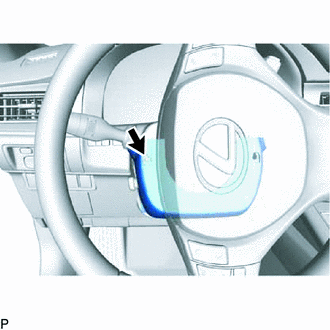
Turn the steering wheel assembly to the left and remove the screw.
-
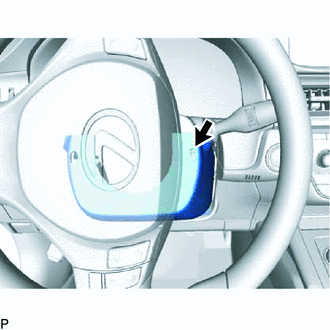
Turn the steering wheel assembly to the right and remove the screw.
-
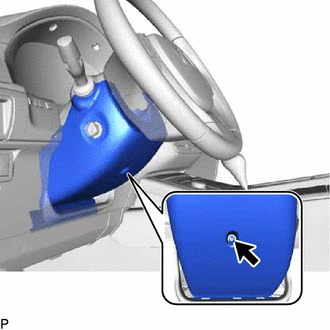
Remove the screw.
-
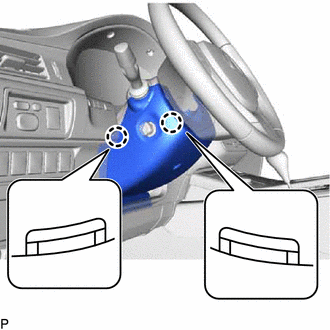
Push the right and left sides of the lower steering column cover to disengage the 2 claws and remove the lower steering column cover.
-
- Click here
REMOVE LOWER STEERING COLUMN COVER (for Manual Tilt and Manual Telescopic Steering Column)
-
Release the tilt and telescopic lever, and fully extend and lower the steering column assembly.
-
Lock the tilt and telescopic lever
-
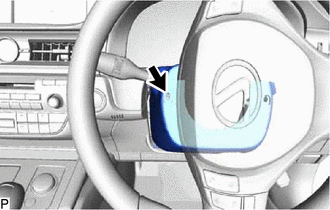
Turn the steering wheel assembly to the left and remove the screw.
-
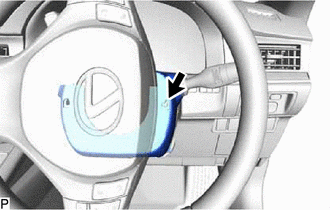
Turn the steering wheel assembly to the right and remove the screw.
-
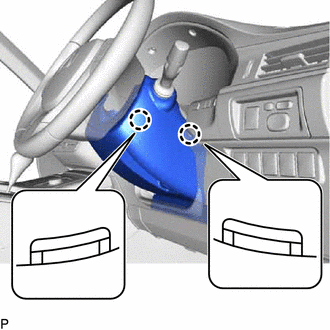
Push the right and left sides of the lower steering column cover to disengage the 2 claws.
-
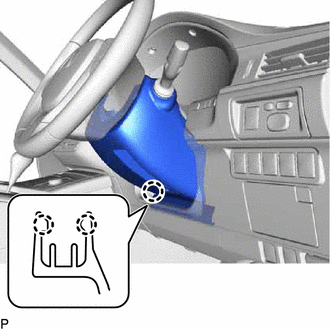
Insert your fingers into the opening of the tilt lever of the lower steering column cover to disengage the 2 claws.
Tip:Spread the claws to disengage them.
-
- Click here
REMOVE UPPER STEERING COLUMN COVER
-
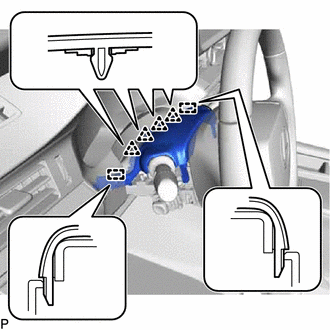
Disengage the 4 clips and 2 guides to separate the instrument cluster finish panel assembly from the upper steering column cover.
-
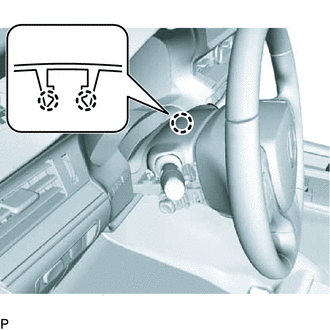
Disengage the 2 claws and remove the upper steering column cover.
-
- Click here
REMOVE TILT AND TELESCOPIC SWITCH (for RHD)
-
for Power Tilt and Power Telescopic Steering Column:
Tip:Use the same procedure as for LHD (Click here).
-
- Click here
REMOVE WINDSHIELD WIPER SWITCH ASSEMBLY
-
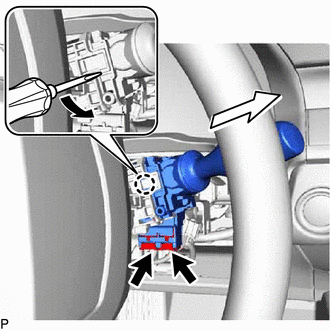
Disconnect each connector.
-
Using a screwdriver, disengage the claw and remove the windshield wiper switch assembly as shown in the illustration.
Note:If the claw is pulled with excessive force, it may break.
-