POWER WINDOW CONTROL SYSTEM Driver Side Power Window Auto Up / Down Function does not Operate with Power Window Master Switch
DESCRIPTION
If the manual up and down functions operate normally but the auto up and down functions do not, then fail-safe mode may be functioning.
If power window initialization Click here has not been performed, the auto up and down functions will not operate.
Tech Tips
If the pulse sensor built into the power window regulator motor assembly (for driver door) malfunctions, the power window control system enters fail-safe mode. The remote up and down and auto up and down functions cannot be operated during fail-safe mode. However, the power window can be closed by holding the multiplex network master switch assembly at the auto up position, and opened manually by pushing down the multiplex network master switch assembly.
WIRING DIAGRAM
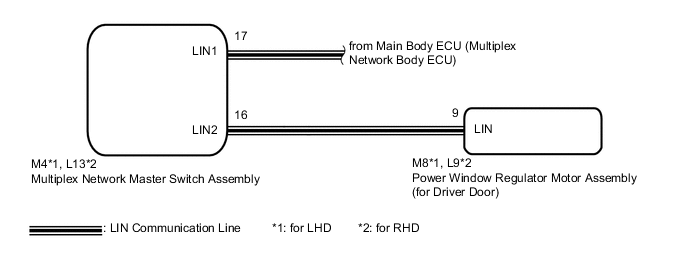
CAUTION / NOTICE / HINT
Note
-
The power window control system uses the LIN communication system. Inspect the communication function by following How to Proceed with Troubleshooting Click here. Troubleshoot the power window control system after confirming that the communication system is functioning properly.
-
If the power window regulator motor assembly (for driver door) has been replaced with a new one, initialize the power window control system Click here.
PROCEDURE
-
READ VALUE USING GTS (MASTER SWITCH)
-
Connect the GTS to the DLC3.
-
Turn the power switch on (IG).
-
Turn the GTS on.
-
Enter the following menus: Body Electrical / Master switch / Data List.
-
Read the Data List according to the display on the GTS.
Master Switch Tester Display Measurement Item/Range Normal Condition Diagnostic Note D Door P/W Auto SW Driver door power window auto switch signal / ON or OFF ON: Driver door power window auto switch being operated
OFF: Driver door power window auto switch not being operated
- OK On the GTS screen, ON or OFF is displayed accordingly.
NG 
REPLACE MULTIPLEX NETWORK MASTER SWITCH ASSEMBLY Click here
OK 
-
-
READ VALUE USING GTS (D-DOOR MOTOR)
-
Enter the following menus: Body Electrical / D-Door Motor / Data List.
-
Read the Data List according to the display on the GTS.
D-Door Motor Tester Display Measurement Item/Range Normal Condition Diagnostic Note D Door P/W Auto SW Driver door power window auto switch signal / ON or OFF ON: Driver door power window auto switch being operated
OFF: Driver door power window auto switch not being operated
- OK On the GTS screen, ON or OFF is displayed accordingly.
NG 
REPLACE MULTIPLEX NETWORK MASTER SWITCH ASSEMBLY Click here
OK
-
-
PERFORM INITIALIZATION (FOR DRIVER DOOR)
-
Initialize the power window regulator motor assembly (for driver door) Click here.
NEXT
-
-
CHECK POWER WINDOW CONTROL SYSTEM (AUTO UP/DOWN FUNCTION)
-
Check that the driver door power window moves when the auto up and down functions of the multiplex network master switch assembly are operated Click here.
OK Driver door auto up and down functions are normal.
OK
END (PROBLEM DUE TO INITIALIZATION FAILURE)
NG
REPLACE POWER WINDOW REGULATOR MOTOR ASSEMBLY (FOR DRIVER DOOR) Click here
-
-
REPLACE MULTIPLEX NETWORK MASTER SWITCH ASSEMBLY
-
Replace the multiplex network master switch assembly Click here.
NEXT
-
-
CHECK POWER WINDOW CONTROL SYSTEM (AUTO UP/DOWN FUNCTION)
-
Check that the driver door power window moves when the auto up and down functions of the multiplex network master switch assembly are operated Click here.
OK Driver door auto up and down functions are normal.
OK
END (MULTIPLEX NETWORK MASTER SWITCH ASSEMBLY WAS DEFECTIVE)
NG
REPLACE POWER WINDOW REGULATOR MOTOR ASSEMBLY (FOR DRIVER DOOR) Click here
-