FRONT CONSOLE BOX REASSEMBLY
PROCEDURE
-
INSTALL NO. 2 CONSOLE COMPARTMENT DOOR CUSHION
-
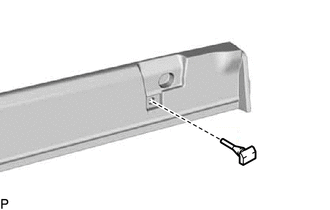
Install the No. 2 console compartment door cushion.
Tech Tips
Use the same procedure for the RH side and LH side.
-
-
INSTALL UPPER NO. 1 BOX PLATE
-
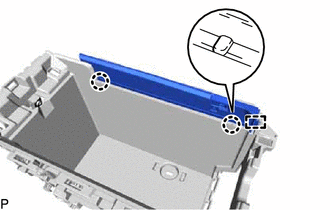
Engage the guide and 2 claws.
-
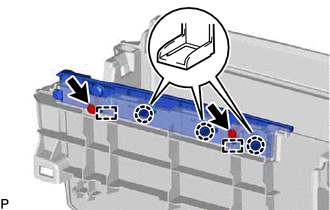
Engage the 3 claws and 2 guides.
-
Install the upper No. 1 box plate with the 2 screws.
-
-
INSTALL UPPER NO. 2 BOX PLATE
Tech Tips
Use the same procedure as for the upper No. 1 box plate.
-
INSTALL NO. 2 INSTRUMENT PANEL WIRE
-
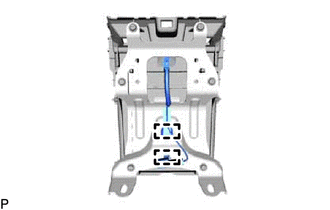
Engage the 2 clamps to install the No. 2 instrument panel wire.
-
-
INSTALL CONSOLE BOX ILLUMINATION LIGHT ASSEMBLY
-
INSTALL FRONT UPPER CONSOLE PANEL GARNISH
-
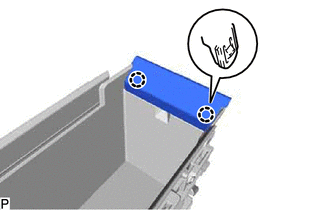
Engage the 2 claws to install the front upper console panel garnish.
-
Connect the connector.
-
-
INSTALL NO. 3 CONSOLE BOX DUCT
-
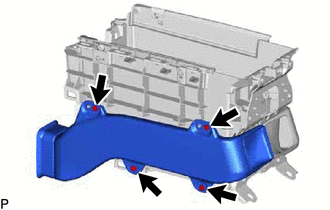
Install the No. 3 console box duct with the 4 screws.
-
-
INSTALL NO. 4 CONSOLE BOX DUCT
Tech Tips
Use the same procedure as for the No. 3 console box duct.
-
INSTALL NO. 1 BOX SIDE PANEL
-
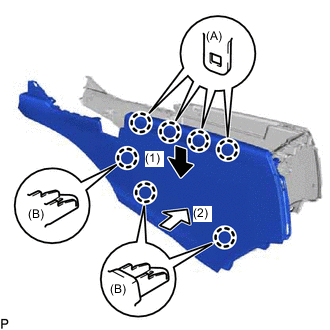
Engage the 4 claws (A) by moving the No. 1 box side panel in the direction indicated by the arrow (1) shown in the illustration.
-
Engage the 3 claws (B) by moving the No. 1 box side panel in the direction indicated by the arrow (2) shown in the illustration to install the No. 1 box side panel.
-
-
INSTALL NO. 2 BOX SIDE PANEL
Tech Tips
Use the same procedure as for the No. 1 box side panel.
-
INSTALL NO. 1 CONSOLE BOX RETAINER
-
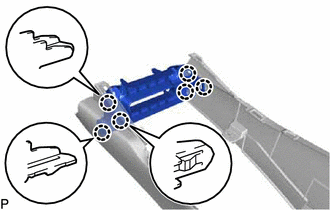
Engage the 6 claws to install the No. 1 console box retainer.
-
-
INSTALL NO. 2 CONSOLE BOX DUCT
-
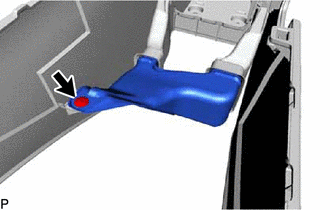
Install the No. 2 console box duct with the clip.
-
-
INSTALL NO. 1 CONSOLE COMPARTMENT DOOR CUSHION
-
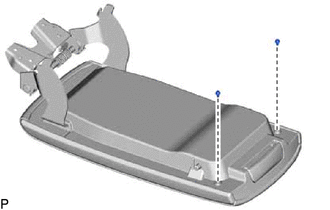
Install the 2 No. 1 console compartment door cushions.
-
-
INSTALL CONSOLE COMPARTMENT DOOR SUB-ASSEMBLY
-
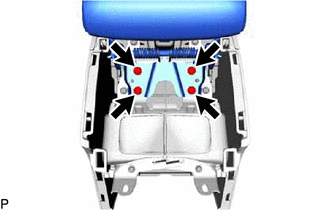
Install the console compartment door sub-assembly with the 4 screws.
-
-
INSTALL INSTRUMENT PANEL CUP HOLDER SUB-ASSEMBLY
-
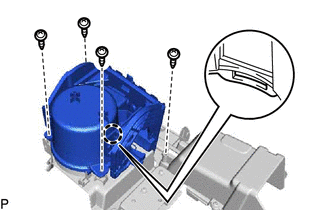
Engage the claw.
-
Install the instrument panel cup holder sub-assembly with the 4 screws.
-
-
INSTALL INSTRUMENT PANEL CUP HOLDER
-
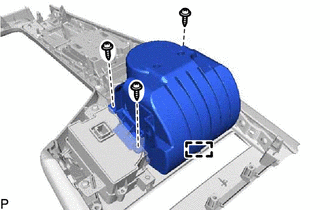
Engage the guide.
-
Install the instrument panel cup holder with the 3 screws.
-
-
INSTALL SWITCH BASE
-
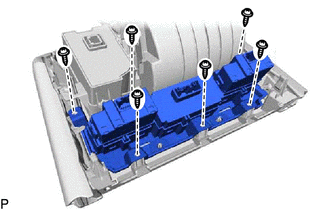
Install the switch base with the 6 screws.
-