MAIN BODY ECU INSTALLATION
PROCEDURE
-
INSTALL MAIN BODY ECU (MULTIPLEX NETWORK BODY ECU)
Note
-
Make sure that no foreign matter gets on the connecting surfaces.
-
Do not touch the main body ECU (multiplex network body ECU) connector.
-
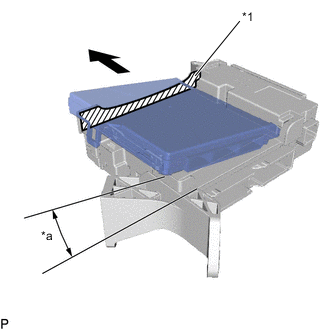
Text in Illustration *1 Housing Sidewall *a 20° Insert the main body ECU (multiplex network body ECU) up to the position where it contacts the housing sidewall of the guide as shown in the illustration.
Tech Tips
Make sure to keep the angle 20° or more as shown in the illustration.
-
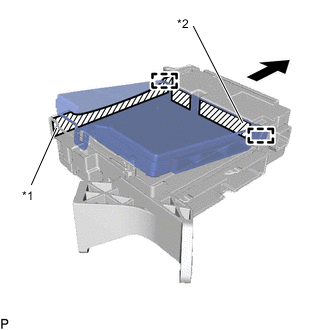
Text in Illustration *1 Housing Sidewall *2 Instrument Panel Junction Block Assembly Fuse Slide the guide of the main body ECU (multiplex network body ECU) along the housing sidewall so that it contacts the instrument panel junction block assembly fuses as shown in the illustration.
-
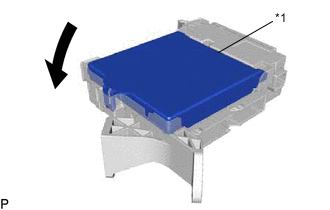
Text in Illustration *1 Side A Contact Portion While keeping the main body ECU (multiplex network body ECU) in contact with side A of the instrument panel junction block assembly (axis of rotation), rotate it downward as shown in the illustration.
-
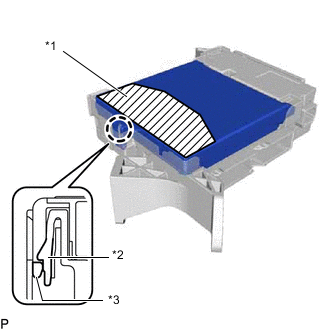
Text in Illustration *1 Push Area *2 Instrument Panel Junction Block Assembly *3 Main Body ECU (Multiplex Network Body ECU) Press the push area until the claw engages to install the main body ECU (multiplex network body ECU).
Note
-
Make sure to press only the push area.
-
Confirm the engagement of the main body ECU (multiplex network body ECU) and instrument panel junction block assembly by listening for the lock sound.
Tech Tips
If a lock sound cannot be heard, visually check the lock part engagement. The engagement can also be confirmed if the main body ECU (multiplex network body ECU) and instrument panel junction block assembly are flush.
-
-
-
INSTALL WIRING HARNESS CLAMP BRACKET
-
Engage the guide.
-
Install the wiring harness clamp bracket with the bolt.
- Torque:
- 8.0 N*m { 82 kgf*cm, 71 in.*lbf }
-
-
INSTALL INSTRUMENT PANEL JUNCTION BLOCK ASSEMBLY WITH MAIN BODY ECU
-
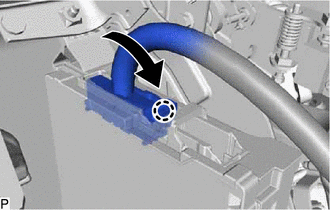
Engage the claw to connect the connector as shown in the illustration.
Note
Be sure to engage the connector securely.
-
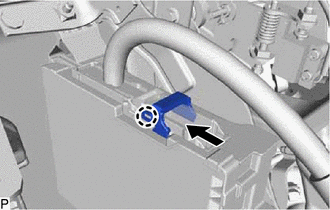
Engage the claw to lock the connector lock as shown in the illustration.
-
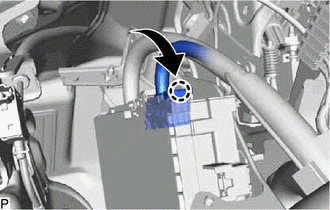
Engage the claw to connect the connector as shown in the illustration.
Note
Be sure to engage the connector securely.
-
Install the instrument panel junction block assembly with main body ECU with the bolt and 2 nuts.
- Torque:
- 8.0 N*m { 82 kgf*cm, 71 in.*lbf }
-
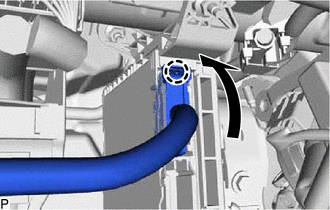
Engage the claw to connect the connector as shown in the illustration.
Note
Be sure to engage the connector securely.
-
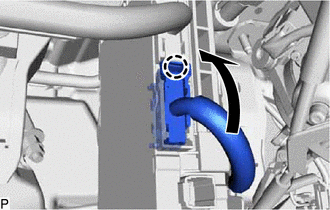
Engage the claw to connect the connector as shown in the illustration.
Note
Be sure to engage the connector securely.
-
Connect each connector.
-
-
INSTALL POWER MANAGEMENT CONTROL ECU
-
REGISTRATION
Note
If the main body ECU (multiplex network body ECU) is replaced, refer to Service Bulletin.