ULTRASONIC SENSOR(for Front Side) REMOVAL
PROCEDURE
-
REMOVE FRONT BUMPER ASSEMBLY
-
REMOVE NO. 1 ULTRASONIC SENSOR WITH CLIP
Tech Tips
Use the same procedure for all No. 1 ultrasonic sensor with clips.
-
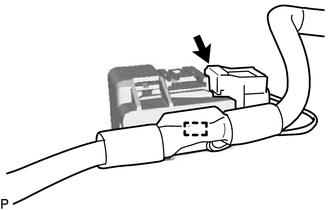
Disconnect the connector.
Tech Tips
The illustration is for the LH side. The orientation for the RH side is the opposite of the LH side.
-
Disengage the clamp.
-
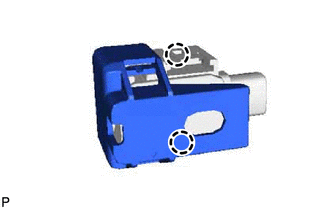
Disengage the 2 claws to remove the No. 1 ultrasonic sensor with clip.
Tech Tips
The illustration is for the LH side. The orientation for the RH side is the opposite of the LH side.
-
-
REMOVE NO. 2 ULTRASONIC SENSOR WITH CLIP
Tech Tips
Use the same procedure for all No. 2 ultrasonic sensor with clips.
-
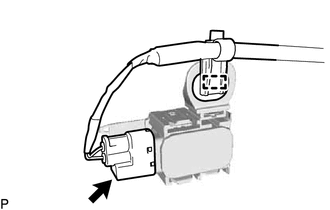
Disconnect the connector.
Tech Tips
The illustration is for the LH side. The orientation for the RH side is the opposite of the LH side.
-
Disengage the clamp.
-
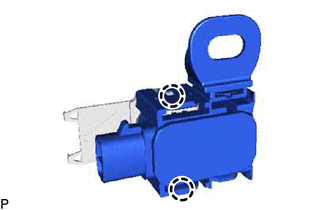
Disengage the 2 claws to remove the No. 2 ultrasonic sensor with clip.
Tech Tips
The illustration is for the LH side. The orientation for the RH side is the opposite of the LH side.
-
-
REMOVE NO. 1 ULTRASONIC SENSOR CLIP
Tech Tips
Use the same procedure for all No. 1 ultrasonic sensor clips.
-
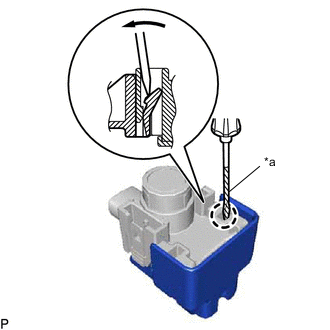
Text in Illustration *a Protective Tape Using a screwdriver with its tip wrapped with protective tape, disengage the claw to remove the No. 1 ultrasonic sensor clip.
Tech Tips
The illustration is for the LH side. The orientation for the RH side is the opposite of the LH side.
-
-
REMOVE NO. 2 ULTRASONIC SENSOR CLIP
Tech Tips
Use the same procedure for all No. 2 ultrasonic sensor clips.
-
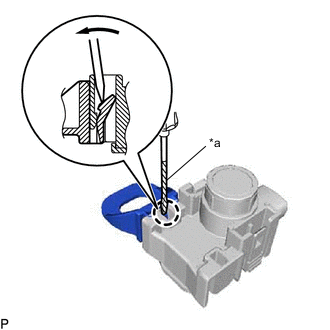
Text in Illustration *a Protective Tape Using a screwdriver with its tip wrapped with protective tape, disengage the claw to remove the No. 2 ultrasonic sensor clip.
Tech Tips
The illustration is for the LH side. The orientation for the RH side is the opposite of the LH side.
-
-
REMOVE NO. 1 ULTRASONIC SENSOR
-
REMOVE NO. 2 ULTRASONIC SENSOR
-
REMOVE NO. 2 ULTRASONIC SENSOR RETAINER
Tech Tips
-
Use the same procedure for all No. 2 ultrasonic sensor retainers.
-
Perform this step only when necessary.
-
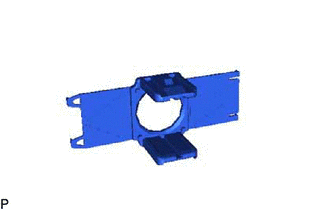
Remove the No. 2 ultrasonic sensor retainer.
Tech Tips
The illustration is for the LH side. The orientation for the RH side is the opposite of the LH side.
-
Remove any remaining double-sided tape from the front bumper assembly.
-