| DTC Code | DTC Name |
|---|---|
| Warning Notification Function Malfunction |
PROCEDURE
- Click here
CHECK PROBLEM SYMPTOM (WARNING NOTIFICATION FUNCTION)
-
Check the problem symptom.
-
Check the problem symptom of the warning notification function.
Result Result Proceed to The multi-display screen does not show a warning message even though a warning light turns on or the multi-information display indicates a warning. A The multi-display screen shows a warning message even though a warning light is not on and the multi-information display does not indicate a warning. B The multi-display screen shows a warning message different from the warning light or the multi-information display. The same warning notification is repeated. C Tip:
-
The warning notification function sends information to the G-BOOK center through communication.
-
Carefully confirm the conditions that caused the malfunction in order to determine if a temporary problem with the radio wave caused the malfunction.
-
-
-
- Click here
INSPECT WARNING LIGHT
-
Check if the indicated warning light or message is listed in the following table.
Tip:Only messages listed in the table are included in the G-BOOK warning notification function.
Warning Name Hybrid control system warning High motor inverter temperature warning Cruise warning High coolant temperature warning Engine warning Engine oil pressure warning Automatic headlight beam level control system warning Brake system warning VSC warning ABS warning ECB warning EPS warning Charging system warning Airbag warning PCS warning LEXUS parking assist-sensor system open circuit warning Smart entry and start system warning Automatic high beam warning Tire pressure warning Blind spot monitor system warning Lane departure alert system warning Washer fluid level warning Tire pressure low warning Result Result Proceed to Warning light or message is listed in the table. A Warning light or message is not listed in the table. B
- AClick here
- B
END
-
- Click here
CHECK FOR SERVICE FLAG
-
Check for service flags.
-
Enter diagnostic mode (Click here).
-
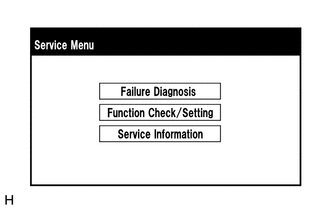
Select "Service Information" on the "Service Menu" screen.
-
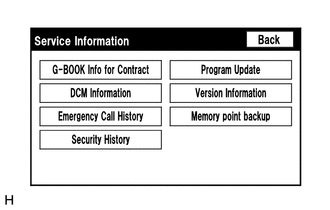
Select "G-BOOK Info for Contract" on the "Service Information" screen.
-
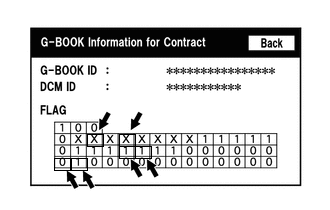
Check if the flag information shown in the illustration indicates "1".
Result Result Proceed to "1" is indicated A "1" is not indicated B
-
-
- Click here
CHECK CONNECTION (G-BOOK.com)
-
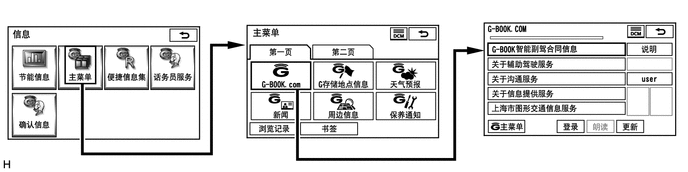
Perform the operations shown in the illustration and check that G-BOOK.com is displayed.
Tip:The screen illustrations provided are samples only and may be different from actual screens.
OK G-BOOK.com can be accessed.
- OKClick here
- NG
GO TO PROBLEM SYMPTOMS TABLE (Click here)
-
- Click here
CHECK METER WARNING LIGHT
-
Check if a warning light on the combination meter assembly comes on or a warning message on the multi-information display is displayed even when there is no problem.
OK There are no problems with warning lights or warning messages. Tip:The warning notification function of the G-BOOK system uses the warning notification signals sent and received by the meter and gauge system. Therefore, if the meter and gauge system is not operating normally, the warning notification function will not operate normally.
- OKClick here
- NG
GO TO METER / GAUGE SYSTEM (Click here)
-
- Click here
CHECK CAN COMMUNICATION SYSTEM
-
Connect the GTS to the DLC3.
-
Turn the power switch on (IG).
-
Turn the GTS on.
-
Enter the following menus: CAN Bus Check.
-
Check that all ECUs and sensors that use CAN communication are connected.
Result Result Proceed to There are no connection problems A There is a connection problem B
- AClick here
- B
GO TO CAN COMMUNICATION SYSTEM (Click here)
-
- Click here
CHECK DTC
-
Connect the GTS to the DLC3.
-
Turn the power switch on (IG).
-
Turn the GTS on.
-
Enter the following menus: Health Check.
-
Check for DTCs (Click here).
Result Result Proceed to No DTCs are output A DTC is output B DTCs cannot be checked
- AClick here
- B
INSPECT EACH ECU SYSTEM
-
- Click here
CHECK NAVIGATION SYSTEM
-
Check if the navigation system is operating and functioning normally.
OK The navigation system is normal.
- OKClick here
- NG
GO TO NAVIGATION SYSTEM (Click here)
-
- Click here
RENEW DATA
-
Renew the data.
-
Perform "Download necessary data" again (Click here).
Result Result Proceed to Data can be renewed A Data cannot be renewed B
-
- A
END
- B
CONTACT G-BOOK SUPPORT CENTER
-