| DTC Code | DTC Name |
|---|---|
| Switch Operation of Remote Touch not Accepted |
CAUTION / NOTICE / HINT
Depending on the parts that are replaced during vehicle inspection or maintenance, performing initialization, registration or calibration may be needed. Refer to Precautions for Navigation System (Click here).
PROCEDURE
- Click here
START DIAGNOSTIC MODE
-
Activate diagnostic mode and check if the "Service Menu" screen can be displayed (Click here).
OK Diagnostic mode can be activated.
- OKClick here
- NGClick here
-
- Click here
CHECK PANEL SWITCH (OPERATION CHECK)
-
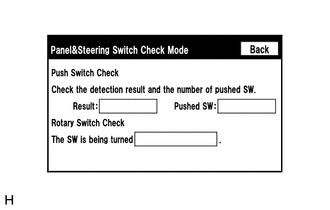
Enter the "Panel&Steering Switch Check Mode" screen. Refer to Check Panel & Steering Switch in Operation Check (Click here).
-
Operate the abnormal switch and check if the switch status is correctly displayed.
OK The switch status is correctly displayed as operated.
- OK
REPLACE MULTI-MEDIA MODULE RECEIVER ASSEMBLY (Click here)
- NGClick here
-
- Click here
REMOTE TOUCH SELF CHECK (SWITCH OPERATION CHECK)
-
Activate self check mode (Click here).
-
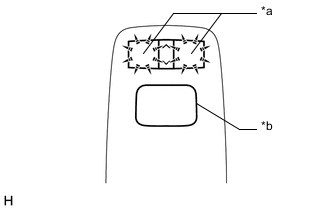
Check switch operation.
-
Move the remote touch switch knob to the lower left.
-
Check that the "MAP/VOICE"*1 or "HOME"*2 and "MENU" switches illuminate when each switch on the remote touch is pressed.
Result Result Proceed to Self check mode cannot be activated. A Some switches do not turn on the "MAP/VOICE"*1 or "HOME"*2 and "MENU" switch illumination when they are pressed. A All switches turn on the "MAP/VOICE"*1 or "HOME"*2 and "MENU" switch illumination when they are pressed. B Table 1. Text in Illustration *a Switch Illumination *b Switch Knob
-
*1: w/o Connected Services
-
*2: w/ Connected Services
-
-
- AClick here
- B
REPLACE MULTI-MEDIA MODULE RECEIVER ASSEMBLY (Click here)
-
- Click here
REPLACE REMOTE OPERATION SWITCH
-
Replace the remote operation switch (Click here).
-
Check that each switch operation on the remote touch is accepted normally.
OK Each switch operation is accepted normally.
- OK
END
- NG
REPLACE REMOTE OPERATION BOARD (Click here)
-