| DTC Code | DTC Name |
|---|---|
| USB Audio System Recognition/Play Error |
DESCRIPTION
When a USB device or "iPod" is connected to the USB jack of the No. 1 stereo jack adapter assembly, it must have playable files. The device must also communicate with and be recognized by the multi-media module receiver assembly. This diagnosis procedure is for when a device is not recognized, or files from the device cannot be played normally.
WIRING DIAGRAM
CAUTION / NOTICE / HINT
Depending on the parts that are replaced during vehicle inspection or maintenance, performing initialization, registration or calibration may be needed. Refer to Precautions for Navigation System (Click here).
-
When a large amount of data is in a USB device, it may take a while to begin play.
-
When using a USB device, files that are protected by copyright cannot be played.
-
When files are not played in the sorted order, perform the following procedure before inspection.
-
-
Add numbers in front of the file names.
-
Put the files in a folder and copy the folder data to the USB device.
-
PROCEDURE
- Click here
CHECK USB DEVICE OR "iPod"
-
Disconnect the USB device or "iPod" from the No. 1 stereo jack adapter assembly.
-
Check if playable files are present on the USB device or "iPod".
Tip:Refer to System Description for playable files (Click here).
-
Check if the USB device is a compatible format or "iPod" is a compatible version.
Tip:Refer to System Description for compatible formats and versions (Click here).
Result Result Proceed to No playable files exist, or incompatible device format or version A Playable files exist, and compatible device format or version B
- A
USB DEVICE FORMAT WAS INCOMPATIBLE, "iPod" VERSION WAS INCOMPATIBLE, OR NO PLAYABLE FILES PRESENT
- BClick here
-
- Click here
CHECK HARNESS AND CONNECTOR (MULTI-MEDIA MODULE RECEIVER ASSEMBLY - NO. 1 STEREO JACK ADAPTER ASSEMBLY)
-
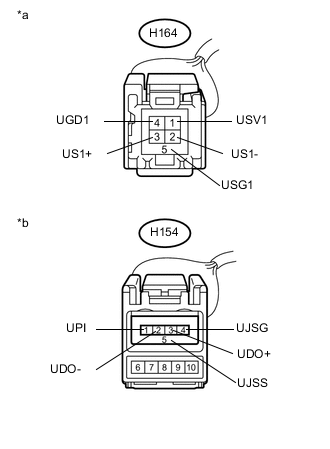
Disconnect the H164 multi-media module receiver assembly connector.
-
Disconnect the H154 No. 1 stereo jack adapter assembly connector.
-
Measure the resistance according to the value(s) in the table below.
Standard Resistance Tester Connection Condition Specified Condition H154-1 (UPI) - H164-1 (USV1) Always Below 1 Ω H154-2 (UDO-) - H164-2 (US1-) Always Below 1 Ω H154-3 (UDO+) - H164-3 (US1+) Always Below 1 Ω H154-4 (UJSG) - H164-4 (UGD1) Always Below 1 Ω H154-5 (UJSS) - H164-5 (USG1) Always Below 1 Ω H154-1 (UPI) - Body ground Always 10 kΩ or higher H154-2 (UDO-) - Body ground Always 10 kΩ or higher H154-3 (UDO+) - Body ground Always 10 kΩ or higher H154-4 (UJSG) - Body ground Always 10 kΩ or higher H154-5 (UJSS) - Body ground Always 10 kΩ or higher Table 2. Text in Illustration *a Front view of wire harness connector
(to Multi-media Module Receiver Assembly)
*b Front view of wire harness connector
(to No. 1 Stereo Jack Adapter Assembly)
- OKClick here
- NG
REPAIR OR REPLACE HARNESS OR CONNECTOR
-
- Click here
INSPECT MULTI-MEDIA MODULE RECEIVER ASSEMBLY (NO. 1 STEREO JACK ADAPTER ASSEMBLY POWER SOURCE)
-
Reconnect the H164 multi-media module receiver assembly connector.
-
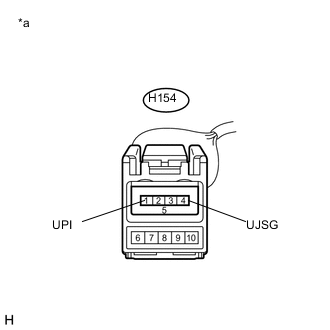
Measure the voltage according to the value(s) in the table below.
Standard Voltage Tester Connection Condition Specified Condition H154-1 (UPI) - H154-4 (UJSG) Power switch on (ACC) 5 V Table 3. Text in Illustration *a Front view of wire harness connector
(to No. 1 Stereo Jack Adapter Assembly)
- OKClick here
- NG
REPLACE MULTI-MEDIA MODULE RECEIVER ASSEMBLY (Click here)
-
- Click here
FORMAT USB DEVICE OR RESTORE "iPod" AND RECHECK
-
Delete all files in the USB device or "iPod" and format/restore it.
-
Save the data again and check if it can be played on the in-vehicle device.
Note:Formatting a USB device or restoring an "iPod" erases all music on the device. Ensure that backup music data is available before performing this operation.
OK Malfunction disappears.
- OK
END
- NGClick here
-
- Click here
REPLACE USB DEVICE OR "iPod"
-
Turn the power switch off.
Tip:When this malfunction occurs, it is necessary to turn off the power switch to make it possible for the vehicle to recognize a new device when it is connected.
-
Turn the power switch on (ACC).
-
Connect a known good USB device or "iPod" to the No. 1 stereo jack adapter assembly.
Tip:
-
If the malfunction occurred when a USB device was in use, use another USB device for the inspection. If the malfunction occurred when an "iPod" was in use, use another "iPod" for the inspection.
-
Refer to System Description for compatible formats and versions (Click here).
-
- NEXTClick here
-
- Click here
CHECK USB DEVICE OR "iPod"
-
Check if a USB device or "iPod" is recognized by the multi-media module receiver assembly, and if information such as track, artist and album names are displayed on the screen.
OK Malfunction disappears.
- OK
USB DEVICE OR "iPod" WAS INCOMPATIBLE OR DEFECTIVE
- NG
PROCEED TO NEXT SUSPECTED AREA SHOWN IN PROBLEM SYMPTOMS TABLE (Click here)
-