| DTC Code | DTC Name |
|---|---|
| Voice is not Recognized |
CAUTION / NOTICE / HINT
Depending on the parts that are replaced during vehicle inspection or maintenance, performing initialization, registration or calibration may be needed. Refer to Precautions for Navigation System (Click here).
PROCEDURE
- Click here
CHECK CONDITION
-
Check if the system voice recognition level is low when recognizing a particular voice.
Result Result Proceed to System voice recognition level is low with any voice. A System voice recognition level is low only for a particular voice. B Tip:System voice recognition level varies depending on voice and pronunciation. This is not a malfunction.
- AClick here
- B
END
-
- Click here
CHECK MICROPHONE AND VOICE RECOGNITION (OPERATION CHECK)
-
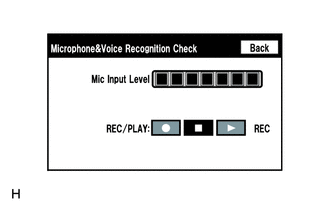
Enter the "Microphone&Voice Recognition Check" screen. Refer to Check Mic & Voice Recognition in Operation Check (Click here).
-
When voice is input into the microphone, check that the microphone input level meter changes according to the input voice.
-
Push the recording switch and perform voice recording.
Tip:
-
Select the recording switch with the blower motor of the air conditioning system stopped. If an outlet of the air conditioning system is facing the microphone, noise may be recorded.
-
Voice can be recorded for up to 5 seconds.
-
-
Check that the recording indicator remains on while recording and that the recorded voice is played normally without noise or distortion.
OK All check results are normal.
- OK
REPLACE MULTI-MEDIA MODULE RECEIVER ASSEMBLY (Click here)
- NG
PROCEED TO NEXT SUSPECTED AREA SHOWN IN PROBLEM SYMPTOMS TABLE (Click here)
-