| DTC Code | DTC Name |
|---|---|
| B15C0 | GPS Antenna Connection Malfunction(short) |
| B15C1 | GPS Antenna Connection Malfunction(break) |
DESCRIPTION
These DTCs are stored when a malfunction occurs in the navigation antenna assembly*1 or telephone antenna assembly*2.
| DTC No. | DTC Detection Condition | Trouble Area |
|---|---|---|
| B15C0 | Navigation antenna error |
|
| B15C1 | Error of the power source to the navigation antenna |
-
*1: w/o Blocking System
-
*2: w/ Blocking System
CAUTION / NOTICE / HINT
-
Depending on the parts that are replaced during vehicle inspection or maintenance, performing initialization, registration or calibration may be needed. Refer to Precaution for Navigation System (Click here).
-
Check that the navigation antenna assembly cable is properly installed and does not have any sharp bends, pinching or loose connections before performing the following inspection procedure (Click here).
PROCEDURE
- Click here
CHECK DTC
-
Clear the DTCs (Click here).
-
Recheck for DTCs and check that no DTCs are output.
OK No DTCs are output.
- OK
USE SIMULATION METHOD TO CHECK (Click here)
- NGClick here
-
- Click here
CONFIRM MODEL
-
Choose the model to be inspected.
Result Model Proceed to w/o Blocking System A w/ Blocking System B
-
- Click here
INSPECT NAVIGATION ANTENNA ASSEMBLY
-
Remove the navigation antenna assembly (Click here).
-
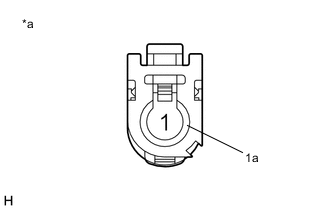
Measure the resistance according to the value(s) in the table below.
Standard Resistance Tester Connection Condition Specified Condition 1 - 1a Always 50 to 500 Ω Table 1. Text in Illustration *a Component without harness connected
(Navigation Antenna Assembly)
- OK
REPLACE MULTI-MEDIA MODULE RECEIVER ASSEMBLY (Click here)
- NG
REPLACE NAVIGATION ANTENNA ASSEMBLY (Click here)
-
- Click here
REPLACE ANTENNA CORD SUB-ASSEMBLY
-
Replace the antenna cord sub-assembly with a new or known good one (Click here).
-
Clear the DTCs (Click here).
-
Recheck for DTCs and check that no DTCs are output.
OK No DTCs are output.
- OK
END
- NGClick here
-
- Click here
REPLACE NO. 2 ANTENNA CORD SUB-ASSEMBLY
-
Replace the No. 2 antenna cord sub-assembly with a new or known good one (Click here).
-
Clear the DTCs (Click here).
-
Recheck for DTCs and check that no DTCs are output.
OK No DTCs are output.
- OK
END
- NGClick here
-
- Click here
REPLACE NO. 3 ANTENNA CORD SUB-ASSEMBLY
-
Replace the No. 3 antenna cord sub-assembly with a new or known good one (Click here).
-
Clear the DTCs (Click here).
-
Recheck for DTCs and check that no DTCs are output.
OK No DTCs are output.
- OK
END
- NGClick here
-
- Click here
REPLACE TELEPHONE ANTENNA ASSEMBLY
-
Replace the telephone antenna assembly with a new or known good one (Click here).
-
Clear the DTCs (Click here).
-
Recheck for DTCs and check that no DTCs are output.
OK No DTCs are output.
- OK
END
- NG
REPLACE MULTI-MEDIA MODULE RECEIVER ASSEMBLY (Click here)
-