RADIO ANTENNA CORD REMOVAL
Info Added 2017-08-02 
PROCEDURE
-
REMOVE INSTRUMENT PANEL SAFETY PAD ASSEMBLY
-
REMOVE NO. 1 SIDE DEFROSTER NOZZLE DUCT
-
REMOVE NO. 2 SIDE DEFROSTER NOZZLE DUCT
-
REMOVE AUTOMATIC LIGHT CONTROL SENSOR
-
REMOVE NO. 1 DEFROSTER NOZZLE GARNISH
-
REMOVE DEFROSTER NOZZLE ASSEMBLY
-
REMOVE NO. 3 HEATER TO REGISTER DUCT
-
REMOVE ANTENNA CORD SUB-ASSEMBLY (for LHD)
-
w/o Navigation System:
-
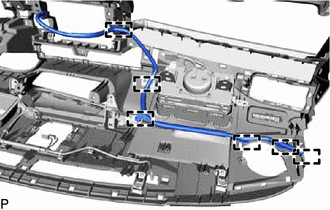
Disengage the 6 clamps and remove the antenna cord sub-assembly.
-
-
w/ Navigation System:
-
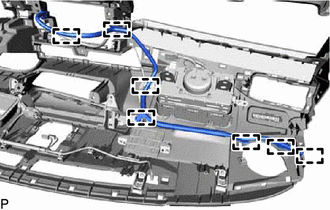
Disengage the 7 clamps and remove the antenna cord sub-assembly.
-
-
-
REMOVE ANTENNA CORD SUB-ASSEMBLY (for RHD)
-
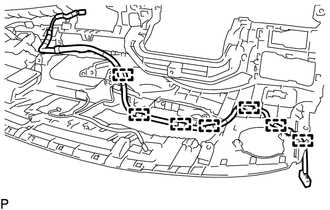
Disengage the 7 clamps and remove the antenna cord sub-assembly.
-
-
REMOVE ROOF HEADLINING ASSEMBLY
-
REMOVE NO. 2 ANTENNA CORD SUB-ASSEMBLY
-
Remove the adhesive tape from the roof headlining assembly.
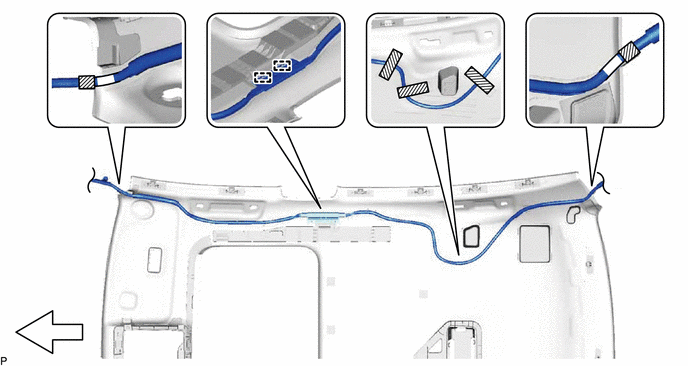
Text in Illustration 
Adhesive Tape - - 
Front - - -
Disengage the 2 guides and remove the No. 2 antenna cord sub-assembly from the roof headlining assembly.
-
-
REMOVE NO. 3 ANTENNA CORD SUB-ASSEMBLY (w/ Roof Antenna)
-
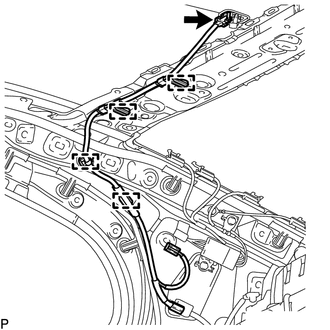
Disconnect the connector.
-
Disengage the 4 clamps to remove the No. 3 antenna cord sub-assembly.
-
-
REMOVE NO. 4 ANTENNA CORD SUB-ASSEMBLY (for RH Side with Digital Audio Broadcasting Antenna)
-
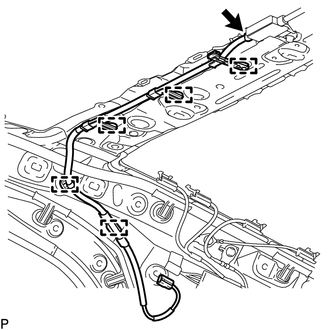
Disconnect the connector.
-
Disengage the 5 clamps to remove the No. 4 antenna cord sub-assembly.
-
-
REMOVE NO. 4 ANTENNA CORD SUB-ASSEMBLY (for LH Side with Digital Audio Broadcasting Antenna)
-
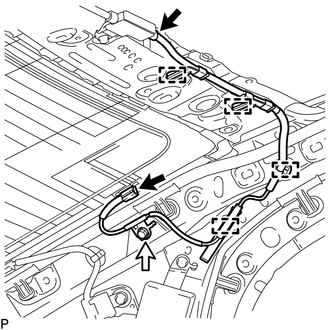
Disconnect the 2 connectors.
-
Remove the bolt.
-
Disengage the 4 clamps to remove the No. 4 antenna cord sub-assembly.
-