| DTC Code | DTC Name |
|---|---|
| CB-13 | USB Over Current Detection |
DESCRIPTION
| DTC No. | DTC Detection Condition | Trouble Area |
|---|---|---|
| CB-13 | "iPod" or USB device overcurrent malfunction |
|
PROCEDURE
- Click here
REPLACE USB DEVICE OR "iPod"
-
Disconnect the USB device or "iPod" from the No. 1 stereo jack adapter assembly.
-
Turn the power switch off.
Tip:When this DTC has been stored, it is necessary to turn off the power switch to make it possible for the vehicle to recognize a new device when it is connected.
-
Turn the power switch on (ACC).
-
Connect a known good USB device or "iPod" to the No. 1 stereo jack adapter assembly.
- NEXTClick here
-
- Click here
CLEAR DTC
-
Clear the DTCs (Click here).
- NEXTClick here
-
- Click here
RECHECK FOR DTC
-
Recheck for DTCs and check that no DTCs are output (Click here).
Tip:If DTCs are detected frequently, replace the radio receiver assembly.
OK No DTCs are output.
- OK
USB DEVICE OR "iPod" WAS DEFECTIVE
- NGClick here
-
- Click here
INSPECT RADIO RECEIVER ASSEMBLY
-
Disconnect the H154 No. 1 stereo jack adapter assembly connector.
-
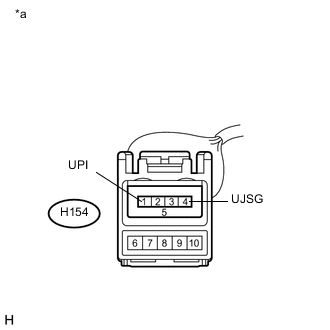
Measure the voltage according to the value(s) in the table below.
Standard Voltage Tester Connection Condition Specified Condition H154-1 (UPI) - H154-4 (UJSG) Power switch on (ACC) 5 V Table 2. Text in Illustration *a Front view of wire harness connector
(to No. 1 Stereo Jack Adapter Assembly)
- OK
REPLACE NO. 1 STEREO JACK ADAPTER ASSEMBLY (Click here)
- NGClick here
-
- Click here
CHECK HARNESS AND CONNECTOR (RADIO RECEIVER ASSEMBLY - NO. 1 STEREO JACK ADAPTER ASSEMBLY)
-
Disconnect the H155 radio receiver assembly connector.
-
Disconnect the H154 No. 1 stereo jack adapter assembly connector.
-
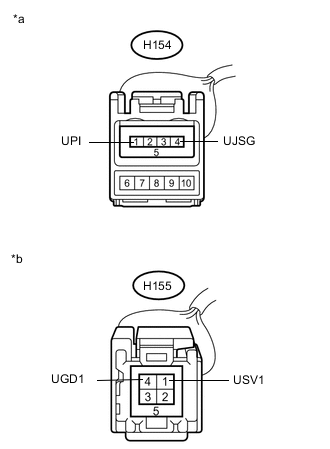
Measure the resistance according to the value(s) in the table below.
Standard Resistance Tester Connection Condition Specified Condition H154-1 (UPI) - H155-1 (USV1) Always Below 1 Ω H154-4 (UJSG) - H155-4 (UGD1) Always Below 1 Ω H154-1 (UPI) - Body ground Always 10 kΩ or higher H154-4 (UJSG) - Body ground Always 10 kΩ or higher Table 3. Text in Illustration *a Front view of wire harness connector
(to No. 1 Stereo Jack Adapter Assembly)
*b Front view of wire harness connector
(to Radio Receiver Assembly)
- OK
REPLACE RADIO RECEIVER ASSEMBLY (Click here)
- NG
REPAIR OR REPLACE HARNESS OR CONNECTOR
-