| DTC Code | DTC Name |
|---|---|
| B15B8 | Harddisk Malfunction |
DESCRIPTION
This DTC is stored when the hard disk drive, which is built into the multi-media module receiver assembly, has an initialization malfunction or read/write errors occur more than a specified number of times.
| DTC No. | DTC Detection Condition | Trouble Area |
|---|---|---|
| B15B8 | Hard Disk Drive (HDD) malfunction | Hard disk drive |
PROCEDURE
- Click here
CHECK HARD DISK DRIVE (OPERATION CHECK)
-
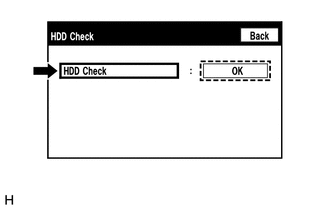
Enter the "HDD Check" screen. Refer to Check Hard Disk Drive in Operation Check (Click here).
-
Select "HDD Check" and check the result.
OK "OK" is displayed. Tip:After "HDD Check" is selected, it may take a while until the result is displayed.
- OKClick here
- NG
REPLACE HARD DISK DRIVE (Click here)
-
- Click here
CHECK DTC
-
Clear the DTCs (Click here).
-
Recheck for DTCs and check that no DTCs are output.
OK No DTCs are output. Tip:The hard disk drive may be malfunctioning even if DTC B15B8 is not output.
- OK
USE SIMULATION METHOD TO CHECK (Click here)
- NG
REPLACE HARD DISK DRIVE (Click here)
-