| DTC Code | DTC Name |
|---|---|
| Pointer does not Reach Screen Edge |
PROCEDURE
- Click here
CHECK FOR FOREIGN MATTER
-
Check if there is any foreign matter around the remote touch switch knob that interferes with knob operation.
OK There is no foreign matter around the remote touch switch knob that interferes with its operation. Result Proceed to OK NG
- OKClick here
- NG
REMOVE FOREIGN MATTER (CHECK SWITCH KNOB OPERATION AFTER REMOVING MATTER)
-
- Click here
CHECK REMOTE TOUCH SWITCH (OPERATION CHECK)
-
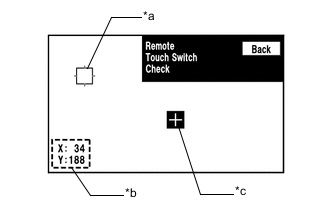
*a Pointer *b Coordinate *c "+" Mark Enter the "Remote Touch Switch Check" screen. Refer to Check Remote Touch Switch in Operation Check.
-
Move the remote touch switch knob and press the switch knob at any blank space on the screen to display the "+" mark.
Tip:
-
The "+" mark will be displayed at the point where the switch knob was pressed.
-
Even if the pointer is moved, the "+" mark will remain at the position where the pointer was when the switch knob was pressed.
-
-
Move the pointer to any position using the remote touch switch knob. When the location of the pointer is changed by moving the switch knob, check that the coordinate value "X" changes between 0 and 255 and coordinate value "Y" changes between 1 and 255.
Result Result Proceed to Remote touch switch check cannot be performed due to a remote touch switch knob malfunction. A The coordinate value "X" does not change between 0 and 255 and coordinate value "Y" does not change between 1 and 255 according to the location of the pointer. The coordinate value "X" changes between 0 and 255 and coordinate value "Y" changes between 1 and 255 according to the location of the pointer. B
- AClick here
- B
REPLACE RADIO RECEIVER ASSEMBLYClick here
-
- Click here
REMOTE TOUCH SELF CHECK (REMOTE TOUCH SWITCH KNOB POSITION RECOGNITION CHECK)
-
Activate self check mode.
-
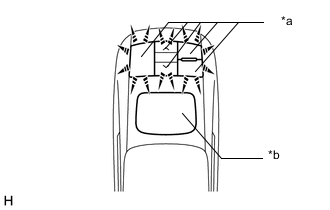
*a Switch Illumination *b Switch Knob Check remote touch switch knob position recognition.
-
Move the remote touch switch knob from the lower left to the upper right to check that the brightness of the switch illumination changes.
Result Result Proceed to Brightness of the switch illumination changes according to remote touch switch knob operation. A Brightness of the switch illumination does not change according to remote touch switch knob operation. B Switch illumination remains on. Tip:
-
If the brightness changes according to remote touch switch knob operation, the knob position is being recognized normally.
-
When the switch illumination blinks, the remote touch has stored a DTC.
-
-
- A
USE SIMULATION METHOD TO CHECKClick here
- BClick here
-
- Click here
REPLACE REMOTE OPERATION BOARD
-
Replace the remote operation board with a new or known good one.
-
Check that the pointer moves to the edge of the screen.
OK The pointer moves to the edge of the screen. Result Proceed to OK NG
- OK
END
- NG
REPLACE RADIO RECEIVER ASSEMBLYClick here
-