ELECTRONICALLY CONTROLLED BRAKE SYSTEM Slip Indicator Light Remains ON
DESCRIPTION
The skid control ECU (brake booster with master cylinder assembly) is connected to the combination meter assembly via CAN communication.
If the skid control ECU (brake booster with master cylinder assembly) stores a DTC, the slip indicator light comes on in the combination meter assembly.
The slip indicator light blinks during ABS, VSC, TRC and/or hill-start assist control operation.
When the system fails, the slip indicator light comes on to warn the driver Click here.
WIRING DIAGRAM
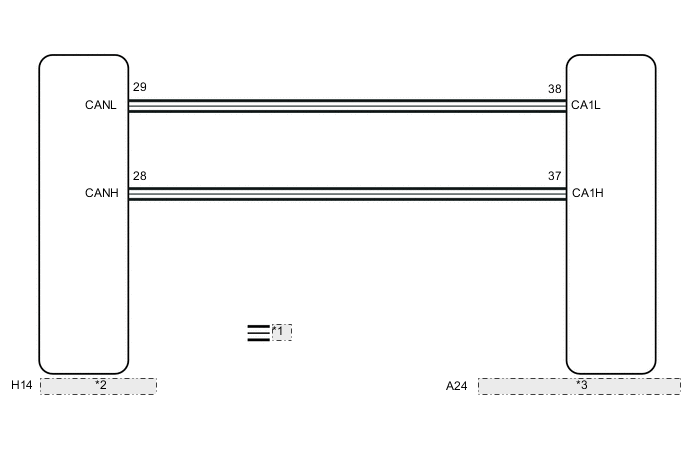
| *1 | CAN Communication Line |
| *2 | Combination Meter Assembly |
| *3 | Skid Control ECU (Brake Booster with Master Cylinder Assembly) |
CAUTION / NOTICE / HINT
Note
When replacing the skid control ECU (brake booster with master cylinder assembly), perform initialization and calibration of the linear solenoid valve Click here.
PROCEDURE
-
CHECK CAN COMMUNICATION SYSTEM
-
Check if CAN communication system DTCs are output Click here.
Result Result Proceed to DTCs are not output. A DTCs are output. B
B 
INSPECT CAN COMMUNICATION SYSTEM Click here
A 
-
-
CHECK IF BRAKE BOOSTER WITH MASTER CYLINDER ASSEMBLY CONNECTOR IS SECURELY CONNECTED
-
Check if the skid control ECU (brake booster with master cylinder assembly) connector is securely connected.
OK The connector is securely connected.
NG
CONNECT CONNECTOR TO BRAKE BOOSTER WITH MASTER CYLINDER ASSEMBLY CORRECTLY
OK
-
-
CHECK AUXILIARY BATTERY
-
Check the auxiliary battery voltage.
Standard Voltage Tester Connection Condition Specified Condition Auxiliary battery Power switch on (IG) 11 to 14 V Auxiliary battery Power switch on (READY) 11 to 15.5 V
NG
CHARGE OR REPLACE AUXILIARY BATTERY
OK
-
-
INSPECT COMBINATION METER ASSEMBLY
-
Perform the Active Test of the combination meter assembly (meter CPU) using the GTS Click here.
-
Check the combination meter assembly.
OK The slip indicator light turns on or off in accordance with GTS operation. Tech Tips
If troubleshooting has been carried out according to Problem Symptoms Table, refer back to the table and proceed to the next step before replacing the part Click here.
OK
REPLACE BRAKE BOOSTER WITH MASTER CYLINDER ASSEMBLY Click here
NG
REPLACE COMBINATION METER ASSEMBLY Click here
-