HYBRID BATTERY SYSTEM, Diagnostic DTC:P0AC0-123
| DTC Code | DTC Name |
|---|---|
| P0AC0-123 | Hybrid Battery Pack Current Sensor Circuit Range / Performance |
DESCRIPTION
Refer to the Description for DTC P0ABF-123 Click here.
| DTC No. | INF Code | DTC Detection Condition | Trouble Area |
|---|---|---|---|
| P0AC0 | 123 | When the battery current sensor is abnormal (1 or 2 trip detection) |
|
PROCEDURE
-
CHECK DTC OUTPUT (HYBRID CONTROL)
-
Connect the GTS to the DLC3.
-
Turn the power switch on (IG).
-
Enter the following menus: Powertrain / Hybrid Control / Trouble Codes.
-
Check for and record any HV system DTCs, INF codes and freeze frame data Click here.
-
Read the output DTCs.
Result Result Proceed to Only DTC P0AC0-123 is output or DTC P0AC0-123 and DTCs other than those in the following table are output. A DTC P0AC0-123 and any of the DTCs in the following table are output at the same time. B Relevant DTC P0A95-123 High Voltage Fuse P0ABF-123 Hybrid Battery Pack Current Sensor Circuit P0AC1-123 Hybrid Battery Pack Current Sensor Circuit Low P0AC2-123 Hybrid Battery Pack Current Sensor Circuit High P0AFC-123 Hybrid Battery Pack Sensor Module P0B3D-123, P0B42-123, P0B47-123, P0B4C-123, P0B51-123, P0B56-123, P0B5B-123, P0B60-123, P0B65-123, P0B6A-123, P0B6F-123, P0B74-123, P0B79-123, P0B7E-123, P0B83-123, P0B88-123, P0B8D- 123 , P0B92- 123 Hybrid Battery Voltage Sensor "A - R" Circuit Low -
Turn the power switch off.
-
Disconnect the GTS from the DLC3.
B 
GO TO DTC CHART (HYBRID BATTERY SYSTEM) Click here
A 
-
-
READ VALUE USING GTS
-
Connect the GTS to the DLC3.
-
Turn the power switch on (IG).
Note
Do not turn the power switch on (READY).
-
Enter the following menus: Powertrain / Hybrid Control / Data List / Battery block Vol -V01 to V17.
Note
Select "Battery block Vol -V01 to V17" only. (Do not select any other Data List items.)
-
Check the voltage of each "Battery block Vol" of "Battery block Vol -V01 to V17" in the Data List with the power switch on (IG).
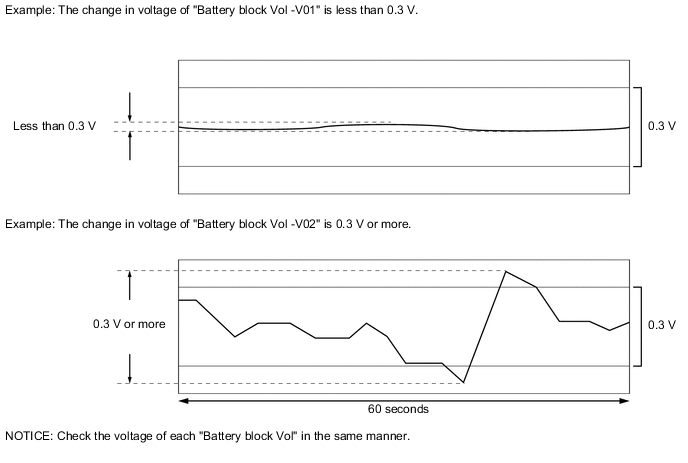
Specified Condition Any "Battery block Vol" changes by 0.3 V or more within 60 seconds after the power switch is turned on (IG). (The difference between the maximum and minimum voltage is 0.3 V or more.) Result Result Proceed to The change in voltage of any "Battery block Vol" is 0.3 V or more. A Other than above. B -
Turn the power switch off.
-
Disconnect the GTS from the DLC3.
A
REPLACE BATTERY SMART UNIT Click here
B
REPLACE HV BATTERY JUNCTION BLOCK ASSEMBLY Click here
-