PRE-COLLISION SYSTEM, Diagnostic DTC:C1A4A
| DTC Code | DTC Name |
|---|---|
| C1A4A | Skid Control Buzzer Circuit |
DESCRIPTION
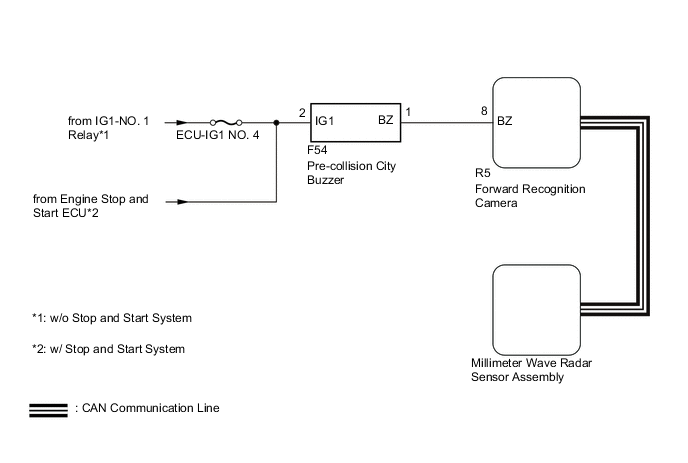
The millimeter wave radar sensor assembly is connected to the forward recognition camera via CAN communication.
The millimeter wave radar sensor assembly operates the pre-collision alarm by sending a buzzer request signal to the pre-collision city buzzer.
If the millimeter wave radar sensor assembly detects a malfunction in the pre-collision city buzzer circuit, it stores DTC C1A4A.
| DTC No. | Detection Item | DTC Detection Condition | Trouble Area |
|---|---|---|---|
| C1A4A | Skid Control Buzzer Circuit | When the ignition switch to ON and the pre-collision alarm is operating, either of the following conditions is met:
|
|
| Vehicle Condition | |||
|---|---|---|---|
| Pattern 1 | Pattern 2 | ||
| Diagnosis Condition | When the ignition switch to ON and the pre-collision alarm is operating. | ○ | ○ |
| Malfunction Status | A buzzer request signal is sent to the pre-collision city buzzer but the buzzer does not sound. | ○ | - |
| A buzzer request signal is not sent to the pre-collision city buzzer but the buzzer sound. | - | ○ | |
| Detection Time | 0.3 seconds | 0.3 seconds | |
| Number of Trips | 1 trip | 1 trip | |
Tech Tips
DTC will be output when conditions for either of the patterns in the table above are met.
WIRING DIAGRAM
CAUTION / NOTICE / HINT
Note
-
Inspect the fuses for circuits related to this system before performing the following procedure.
-
When replacing the millimeter wave radar sensor assembly, always replace it with a new one.
-
When the millimeter wave radar sensor assembly is replaced with a new one, adjustment of the radar sensor beam axis must be performed.
-
If the forward recognition camera has been replaced with a new one, be sure to perform Forward Recognition Axis Adjustment.
-
When a malfunction occurs in the communication line to the forward recognition camera, U023A and/or U1002 is output. If a DTC related to the CAN communication line is output, first troubleshoot the CAN communication line.
PROCEDURE
-
CHECK FOR DTCs (PRE-COLLISION SYSTEM)
-
Clear the DTCs.
Body Electrical > Pre-Collision 2 > Clear DTCs -
Perform the Active Test according to the display on the GTS.
Note
Perform the Active Test for 1 second or more.
Tech Tips
Performing the Active Test for 1 second or more causes DTC C1A4A to be stored if the DTC detection conditions are met.
Body Electrical > Pre-Collision 2 > Active TestTester Display Measurement Item Control Range Diagnostic Note PCS Collision Alarm Buzzer Pre-collision city buzzer ON / OFF Test possible with ignition switch to ON
Vehicle condition: Vehicle stopped
Body Electrical > Pre-Collision 2 > Active TestTester Display PCS Collision Alarm Buzzer -
Check for DTCs.
Body Electrical > Pre-Collision 2 > Trouble CodesResult Result Proceed to DTC C1A4A is not output A DTC C1A4A is output B
A 
USE SIMULATION METHOD TO CHECK Click here
B 
-
-
CHECK TERMINAL VOLTAGE
-
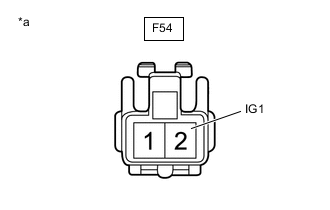
*a Front view of wire harness connector
(to Pre-collision City Buzzer)
Disconnect the pre-collision city buzzer connector.
-
Measure the voltage according to the value(s) in the table below.
Standard Voltage Tester Connection Switch Condition Specified Condition F54-2 (IG1) - Body ground Ignition switch ON 11 to 14 V Ignition switch off Below 1 V -
Connect the F54 pre-collision city buzzer connector.
Result Proceed to OK NG
NG
REPAIR OR REPLACE HARNESS OR CONNECTOR (PRE-COLLISION CITY BUZZER - BATTERY)
OK
-
-
CHECK HARNESS AND CONNECTOR (PRE-COLLISION CITY BUZZER - FORWARD RECOGNITION CAMERA)
-
Disconnect the F54 pre-collision city buzzer connector.
-
Disconnect the R5 forward recognition camera connector.
-
Measure the resistance according to the value(s) in the table below.
Standard Resistance Tester Connection Condition Specified Condition F54-1 (BZ) - R5-8 (BZ) Always Below 1 Ω F54-1 (BZ) or R5-8 (BZ) - Body ground Always 10 kΩ or higher -
Connect the R5 forward recognition camera connector.
-
Connect the F54 pre-collision city buzzer connector.
Result Proceed to OK NG
OK 
GO TO STEP 6 Click here
NG
-
-
REPAIR OR REPLACE HARNESS OR CONNECTOR (PRE-COLLISION CITY BUZZER - FORWARD RECOGNITION CAMERA)
-
Repair or replace the harness or connector.
Result Proceed to NEXT
NEXT
-
-
CHECK FOR DTCs (PRE-COLLISION SYSTEM)
-
Clear the DTCs.
Body Electrical > Pre-Collision 2 > Clear DTCs -
Perform the Active Test according to the display on the GTS.
Note
Perform the Active Test for 1 second or more.
Tech Tips
Performing the Active Test for 1 second or more causes DTC C1A4A to be stored if the DTC detection conditions are met.
Body Electrical > Pre-Collision 2 > Active TestTester Display Measurement Item Control Range Diagnostic Note PCS Collision Alarm Buzzer Pre-collision city buzzer ON / OFF Test possible with ignition switch to ON
Vehicle condition: Vehicle stopped
Body Electrical > Pre-Collision 2 > Active TestTester Display PCS Collision Alarm Buzzer -
Check for DTCs.
Body Electrical > Pre-Collision 2 > Trouble CodesResult Result Proceed to DTC C1A4A is not output A DTC C1A4A is output B
A
END
B
-
-
INSPECT PRE-COLLISION CITY BUZZER (CONFIRM BUZZER OPERATION)
-
Turn the ignition switch to ON.
-
Check if the pre-collision city buzzer is sounding.
Result Result Proceed to The pre-collision city buzzer does not sound when the ignition switch to ON A The pre-collision city buzzer sounds continuously when the ignition switch to ON B
B
GO TO STEP 8 Click here
A
-
-
INSPECT PRE-COLLISION CITY BUZZER (UNIT INSPECTION)
-
Remove the pre-collision city buzzer.
for LHD: Click here
for RHD: Click here
-
Inspect the pre-collision city buzzer.
for LHD: Click here
for RHD: Click here
Result Result Proceed to Pre-collision city buzzer is abnormal A Pre-collision city buzzer is normal B
B
GO TO STEP 9 Click here
A
-
-
REPLACE PRE-COLLISION CITY BUZZER
-
Replace the pre-collision city buzzer.
for LHD: Click here
for RHD: Click here
Result Proceed to NEXT
NEXT
-
-
CHECK FOR DTCs (PRE-COLLISION SYSTEM)
-
Clear the DTCs.
Body Electrical > Pre-Collision 2 > Clear DTCs -
Perform the Active Test according to the display on the GTS.
Note
Perform the Active Test for 1 second or more.
Tech Tips
Performing the Active Test for 1 second or more causes DTC C1A4A to be stored if the DTC detection conditions are met.
Body Electrical > Pre-Collision 2 > Active TestTester Display Measurement Item Control Range Diagnostic Note PCS Collision Alarm Buzzer Pre-collision city buzzer ON / OFF Test possible with ignition switch to ON
Vehicle condition: Vehicle stopped
Body Electrical > Pre-Collision 2 > Active TestTester Display PCS Collision Alarm Buzzer -
Check for DTCs.
Body Electrical > Pre-Collision 2 > Trouble CodesResult Result Proceed to DTC C1A4A is not output A DTC C1A4A is output B
A
END
B
-
-
REPLACE FORWARD RECOGNITION CAMERA
-
Replace the forward recognition camera.
-
Perform Forward Recognition Axis Adjustment.
Result Proceed to NEXT
NEXT
-
-
CHECK FOR DTCs (PRE-COLLISION SYSTEM)
-
Clear the DTCs.
Body Electrical > Pre-Collision 2 > Clear DTCs -
Perform the Active Test according to the display on the GTS.
Note
Perform the Active Test for 1 second or more.
Tech Tips
Performing the Active Test for 1 second or more causes DTC C1A4A to be stored if the DTC detection conditions are met.
Body Electrical > Pre-Collision 2 > Active TestTester Display Measurement Item Control Range Diagnostic Note PCS Collision Alarm Buzzer Pre-collision city buzzer ON / OFF Test possible with ignition switch to ON
Vehicle condition: Vehicle stopped
Body Electrical > Pre-Collision 2 > Active TestTester Display PCS Collision Alarm Buzzer -
Check for DTCs.
Body Electrical > Pre-Collision 2 > Trouble CodesResult Result Proceed to DTC C1A4A is not output A DTC C1A4A is output B
A
END (FORWARD RECOGNITION CAMERA WAS DEFECTIVE)
B
-
-
REPLACE MILLIMETER WAVE RADAR SENSOR ASSEMBLY
-
Replace the millimeter wave radar sensor assembly.
-
Adjust the millimeter wave radar sensor assembly.
Result Proceed to NEXT
NEXT
-
-
CLEAR DTC (PRE-COLLISION SYSTEM)
-
Clear the DTCs.
Body Electrical > Pre-Collision 2 > Clear DTCsResult Proceed to NEXT
NEXT
END (MILLIMETER WAVE RADAR SENSOR ASSEMBLY WAS DEFECTIVE)
-