DYNAMIC TORQUE CONTROL AWD SYSTEM DIAGNOSIS SYSTEM

-
DESCRIPTION
Dynamic torque control AWD system data can be read through the Data Link Connector 3 (DLC3) of the vehicle. When the system seems to be malfunctioning, use the GTS to check for malfunctions and perform repairs. Therefore when there seems to be a problem with the dynamic torque control AWD system, use the GTS or SST to check and troubleshoot it.
-
CHECK DATA LINK CONNECTOR 3 (DLC3)
-
Check the DLC3.
-
-
FUNCTION OF AWD WARNING LIGHT
-
The AWD warning message displayed on the multi-information display warns the driver of abnormal or poor condition of the dynamic torque control AWD system.
-
If the 4WD ECU assembly detects a malfunction, the check master warning light comes on and the multi-information display displays warning messages in accordance with the trouble area to warn the driver.
Tech Tips
Check that the master warning light comes on for approximately 4 seconds.
-
-
CHECK WARNING LIGHT AND INDICATOR LIGHT
-
Check AWD warning.
-
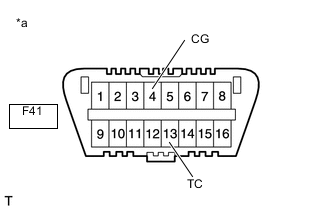
*a Front view of DLC3 Using SST, connect terminals 13 (TC) and 4 (CG) of the DLC3 (to enter diagnostic mode).
- SST
- 09843-18040
-
Turn the ignition switch to ON.
-
"DIAG AWD" is displayed on the multi-information display, and the 4WD ECU assembly checks the system for malfunctions.
-
If the dynamic torque control AWD system is normal, or "DIAG AWD FF"is displayed on the multi-information display.
-
If the dynamic torque control AWD system is not normal, "DIAG AWD XX (DTC)" is displayed on the multi-information display.
-
Although the test mode is not set for the dynamic torque control AWD system, the message is displayed on the multi-information display when the test mode is activated for checking the VSC, etc.
Tech Tips
-
Test mode DTCs will not be stored because the test mode is not set.
-
If the systems above are not displayed on the multi-information display, there may be a malfunction in "TC and CG Terminal Circuit".
-
If the AWD warning check result is not normal, proceed to troubleshooting for the AWD warning light circuit.
-
-
Trouble Area See procedure AWD warning light (Remains on) AWD warning light (Does not come on) AWD lock indicator light (Does not come on) -