ECM REMOVAL
CAUTION / NOTICE / HINT
The necessary procedures (adjustment, calibration, initialization, or registration) that must be performed after parts are removed, installed, or replaced during the ECM removal/installation are shown below.
| Replacement Part or Procedure | Necessary Procedure | Effect/Inoperative when not Performed | Link |
|---|---|---|---|
| Disconnect cable from negative battery terminal | Memorize steering angle neutral point | Lane departure alert system (w/ Steering Control) | |
| Simple intelligent parking assist system*1 | |||
| Toyota parking assist-sensor system (w/ Simple Intelligent Parking Assist System)*1 | |||
| Pre-collision syatem | |||
| Initialize back door lock | Power door lock control system | ||
| Drive the vehicle until stop and start control is permitted (approximately 5 to 60 minutes)*2 | Stop and start system | ||
| Replacement of ECM | Perform Vehicle Identification Number (VIN) or frame number registration |
|
|
| HEAVY KNOCK HISTORY |
|
||
| ECU Communication ID Registration (Immobiliser system) | Engine start function | See Service Bulletin for the registration method. | |
| Perform code registration (Immobiliser system) |
|
See Service Bulletin for the registration method. (w/ Entry and Start System) | |
| Engine starting | See Service Bulletin for the registration method. (w/o Entry and Start System) | ||
|
Deterioration of fuel efficiency | for K313 Click here for K313F Click here |
Click here Click here
*2: w/ Stop and start system
PROCEDURE
-
PRECAUTION
Note
-
After turning the ignition switch off, waiting time may be required before disconnecting the cable from the negative (-) battery terminal. Therefore, make sure to read the disconnecting the cable from the negative (-) battery terminal notices before proceeding with work.
-
If the ECM has been struck or dropped, replace it.
-
Perform the Vehicle Identification Number (VIN) registration when replacing the ECM.
-
When replacing the ECM, use the GTS to save "Heavy Knock History" and then upload it to the new ECM.
-
-
DISCONNECT CABLE FROM NEGATIVE BATTERY TERMINAL
Note
When disconnecting the cable, some systems need to be initialized after the cable is reconnected.
-
REMOVE RADIATOR COVER
-
REMOVE NO. 1 AIR CLEANER INLET
-
REMOVE AIR CLEANER CAP SUB-ASSEMBLY
-
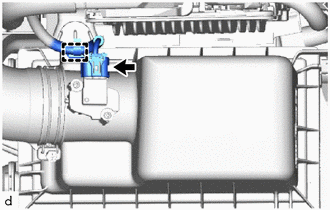
Disconnect the mass air flow meter connector.
-
Disengage the clamp from the air cleaner cap sub-assembly.
-
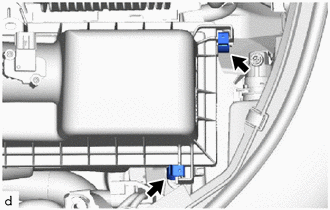
Disengage the 2 air cleaner cap sub-assembly clamps.
-
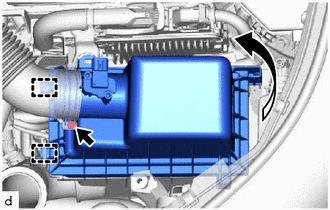
Disengage the 2 guides to separate the air cleaner cap sub-assembly from the air cleaner case sub-assembly.
-
Loosen the hose clamp and remove the air cleaner cap sub-assembly from the air cleaner hose.
-
-
REMOVE AIR CLEANER CASE SUB-ASSEMBLY
-
REMOVE ECM
Tech Tips
When replacing the ECM, use the GTS to save "Heavy Knock History" and then upload it to the new ECM.
-
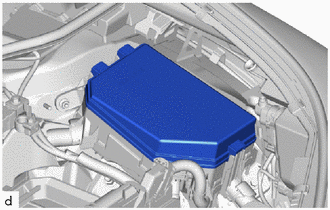
Remove the No. 1 relay block cover from the No. 1 engine room relay block.
-
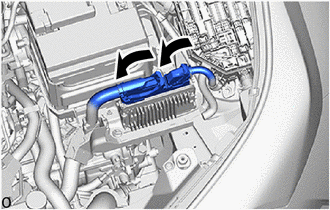
Raise the 2 levers while pushing the locks on the levers, and disconnect the 2 ECM connectors.
Note
After disconnecting the ECM connectors, make sure that dirt, water or other foreign matter does not contact the connecting parts of the ECM connectors.
-
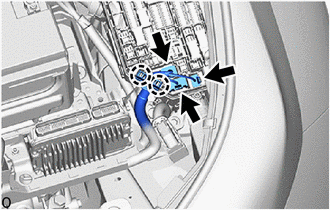
Disconnect the 3 connectors from the No. 1 engine room relay block.
-
Disengage the 2 claws to separate the engine wire from the No. 1 engine room relay block.
-
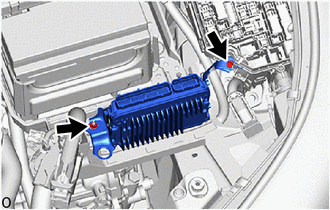
Remove the bolt, nut and ECM.
Note
If the ECM has been struck or dropped, replace it.
-
-
REMOVE NO. 1 ECM BRACKET
-
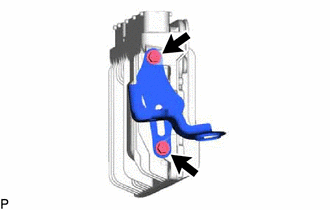
Remove the 2 screws and No. 1 ECM bracket from the ECM.
-
-
REMOVE NO. 2 ECM BRACKET
-
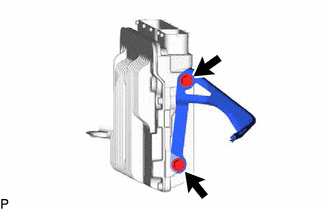
Remove the 2 screws and No. 2 ECM bracket from the ECM.
-