VEHICLE PROXIMITY NOTIFICATION SYSTEM There is No Sound Made
DESCRIPTION
The hybrid vehicle control ECU controls the vehicle approaching speaker assembly based on received signals.
WIRING DIAGRAM
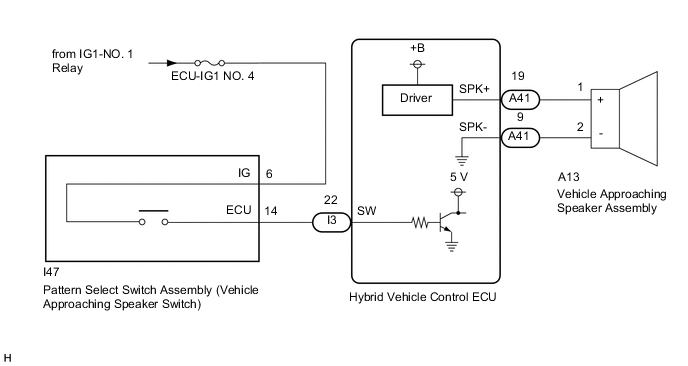
CAUTION / NOTICE / HINT
Note
-
Inspect the fuses for circuits related to this system before performing the following procedure.
-
Before replacing the hybrid vehicle control ECU, refer to Service Bulletin.
PROCEDURE
-
CHECK DTC OUTPUT
-
Connect the GTS to the DLC3.
-
Turn the power switch on (IG).
-
Turn the GTS on.
-
Enter the following menus: Powertrain / Hybrid Control / Trouble Codes.
Powertrain > Hybrid Control > Trouble Codes -
Check for DTCs.
Result Result Proceed to Hybrid control system DTCs are not output A Hybrid control system DTCs are output B
B 
GO TO HYBRID CONTROL SYSTEM Click here
A 
-
-
READ VALUE USING GTS (Operation Cancel SW)
-
Connect the GTS to the DLC3.
-
Turn the power switch on (IG).
-
Turn the GTS on.
-
Enter the following menus: Body Electrical / Vehicle Proximity Notification System / Data List.
-
Read the Data List according to the display on the GTS.
Body Electrical > Vehicle Proximity Notification System > Data ListTester Display Measurement Item Range Normal Condition Diagnostic Note Operation Cancel SW Pattern select switch assembly (vehicle approaching speaker switch) signal OFF or ON OFF: Pattern select switch assembly (vehicle approaching speaker switch) is not pressed
ON: Pattern select switch assembly (vehicle approaching speaker switch) is pressed
-
Body Electrical > Vehicle Proximity Notification System > Data ListTester Display Operation Cancel SW Result Result Proceed to The GTS display changes according to the operation of the vehicle approaching speaker switch A The GTS display does not change according to the operation of the vehicle approaching speaker switch B
B 
INSPECT PATTERN SELECT SWITCH ASSEMBLY (VEHICLE APPROACHING SPEAKER SWITCH) Click here
A
-
-
PERFORM ACTIVE TEST USING GTS (Proximity Sound (Vehicle Stationary))
-
Connect the GTS to the DLC3.
-
Turn the power switch on (IG).
-
Turn the GTS on.
-
Enter the following menus: Body Electrical / Vehicle Proximity Notification System / Active Test.
-
Perform the Active Test according to the display on the GTS.
Body Electrical > Vehicle Proximity Notification System > Active TestTester Display Measurement Item Control Range Diagnostic Note Proximity Sound (Vehicle Stationary) Proximity sound (Vehicle stationary) OFF or ON Produces warning sound when vehicle is stopped
Body Electrical > Vehicle Proximity Notification System > Active TestTester Display Proximity Sound (Vehicle Stationary) Result Result Proceed to The warning sound is produced A The warning sound is not produced B
A
REPLACE HYBRID VEHICLE CONTROL ECU Click here
B
-
-
INSPECT VEHICLE APPROACHING SPEAKER ASSEMBLY
-
Remove the vehicle approaching speaker assembly.
-
Inspect the vehicle approaching speaker assembly.
Result Proceed to OK NG
NG
REPLACE VEHICLE APPROACHING SPEAKER ASSEMBLY Click here
OK
-
-
CHECK HARNESS AND CONNECTOR (HYBRID VEHICLE CONTROL ECU - VEHICLE APPROACHING SPEAKER ASSEMBLY)
-
Disconnect the A41 hybrid vehicle control ECU connector.
-
Measure the resistance according to the value(s) in the table below.
Standard Resistance Tester Connection Condition Specified Condition A41-19 (SPK+) - A13-1 (+) Always Below 1 Ω A41-9 (SPK-) - A13-2 (-) Always Below 1 Ω A41-19 (SPK+) or A13-1 (+) - Body ground Always 10 kΩ or higher A41-9 (SPK-) or A13-2 (-) - Body ground Always 10 kΩ or higher Result Proceed to OK NG
OK
REPLACE HYBRID VEHICLE CONTROL ECU Click here
NG
REPAIR OR REPLACE HARNESS OR CONNECTOR
-
-
INSPECT PATTERN SELECT SWITCH ASSEMBLY (VEHICLE APPROACHING SPEAKER SWITCH)
-
Remove the pattern select switch assembly (vehicle approaching speaker switch).
-
Inspect the pattern select switch assembly (vehicle approaching speaker switch).
Result Proceed to OK NG
NG
REPLACE PATTERN SELECT SWITCH ASSEMBLY (VEHICLE APPROACHING SPEAKER SWITCH) Click here
OK
-
-
CHECK HARNESS AND CONNECTOR (PATTERN SELECT SWITCH ASSEMBLY (VEHICLE APPROACHING SPEAKER SWITCH) - IG POWER SOURCE)
-
Measure the voltage according to the value(s) in the table below.
Standard Voltage Tester Connection Condition Specified Condition I47-6 (IG) - Body ground Power switch on (IG) 11 to 14 V Power switch off Below 1 V Result Proceed to OK NG
NG
REPAIR OR REPLACE HARNESS OR CONNECTOR
OK
-
-
CHECK HARNESS AND CONNECTOR (PATTERN SELECT SWITCH ASSEMBLY (VEHICLE APPROACHING SPEAKER SWITCH) - HYBRID VEHICLE CONTROL ECU)
-
Disconnect the I3 hybrid vehicle control ECU connector.
-
Measure the resistance according to the value(s) in the table below.
Standard Resistance Tester Connection Condition Specified Condition I47-14 (ECU) - I3-22 (SW) Always Below 1 Ω I47-14 (ECU) or I3-22 (SW) - Body ground Always 10 kΩ or higher Result Proceed to OK NG
OK
REPLACE HYBRID VEHICLE CONTROL ECU Click here
NG
REPAIR OR REPLACE HARNESS OR CONNECTOR
-