BACK DOOR REASSEMBLY
PROCEDURE
-
INSTALL BACK DOOR NO. 2 WIRE
-
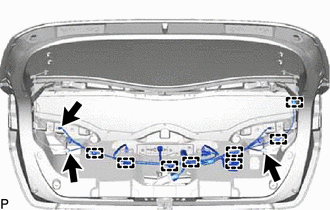
Engage the 8 clamps.
-
Connect the 3 connectors to install the back door No. 2 wire.
-
-
INSTALL BACK DOOR NO. 1 WIRE
-
When reusing the back door No. 1 wire:
Tech Tips
Use the same procedure for both No. 4 wiring harness protectors.
-
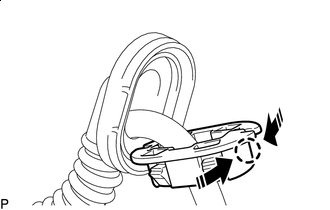

Install in this Direction Engage the claw as shown in the illustration to temporarily install a new No. 4 wiring harness protector.
-
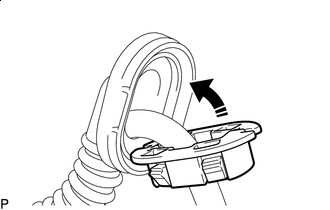
Install in this Direction Install the No. 4 wiring harness protector to the grommet as shown in the illustration.
-
-
Secure the rope to the back door No. 1 wire with vinyl tape as shown in the illustration.
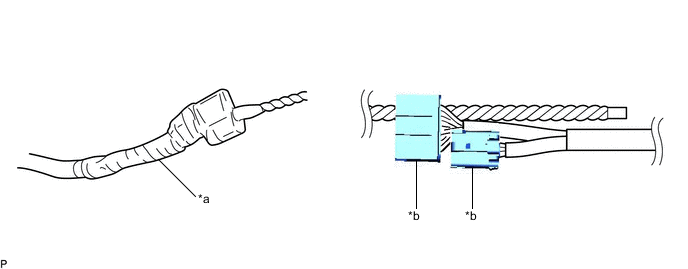
*a Vinyl tape *b Connector Note
Make sure that the rope is secured with vinyl tape to prevent the rope from separating from the back door No. 1 wire when installing it.
-
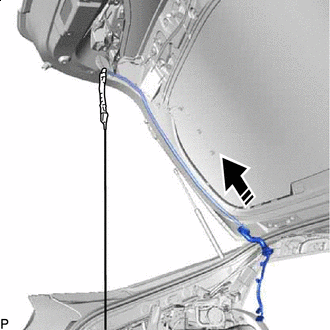
Install in this Direction Pass the back door No. 1 wire through the inside of the back door panel sub-assembly as shown in the illustration.
Note
This step should not be performed with the back door panel sub-assembly removed from the vehicle.
Tech Tips
The back door No. 1 wire is likely to be caught on the parts of the back door panel sub-assembly. If the back door No. 1 wire is caught, gradually install it by moving it back and forth, or by turning it.
-
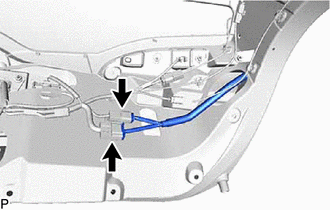
Connect the 2 connectors.
-
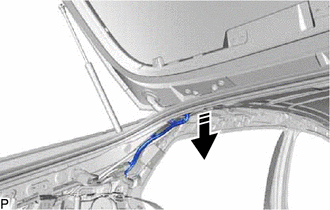
Pass the back door No. 1 wire as shown in the illustration.
-
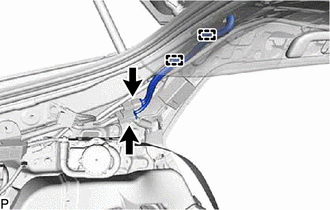
Engage the 2 clamps.
-
Connect the 2 connectors to install the back door No. 1 wire.
-
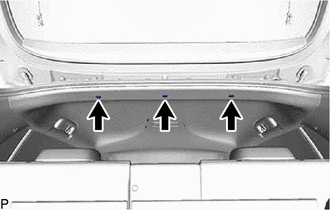
Install the 3 clips.
-
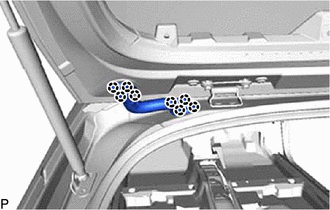
Engage the 8 claws to connect the 2 grommets.
-
-
INSTALL ROOF SIDE INNER GARNISH ASSEMBLY LH
-
INSTALL DECK TRIM SIDE PANEL ASSEMBLY LH
-
INSTALL TONNEAU COVER HOOK A (w/ Toyota Safety Sense)
-
INSTALL NO. 1 TONNEAU COVER HOLDER CAP (w/ Toyota Safety Sense)
-
INSTALL NO. 2 ROPE HOOK (w/o Toyota Safety Sense)
-
INSTALL ROPE HOOK (w/o Toyota Safety Sense)
-
INSTALL REAR SEAT SIDE GARNISH LH
-
INSTALL REAR SEATBACK HINGE SUB-ASSEMBLY LH
-
INSTALL REAR UNDER SIDE COVER LH
-
INSTALL REAR DOOR OPENING TRIM WEATHERSTRIP LH
-
INSTALL REAR DOOR SCUFF PLATE LH
-
INSTALL REAR SEAT CUSHION LOCK HOOK
-
INSTALL REAR SEAT CUSHION ASSEMBLY LH
-
INSTALL REAR SEATBACK ASSEMBLY LH
-
INSTALL REAR SEAT HEADREST ASSEMBLY
-
INSTALL REAR DECK TRIM COVER
-
INSTALL DECK TRIM SERVICE HOLE COVER
-
INSTALL DECK FLOOR BOX RH
-
INSTALL DECK FLOOR BOX LH
-
INSTALL REAR NO. 1 FLOOR BOARD
-
INSTALL REAR NO. 3 FLOOR BOARD
-
INSTALL REAR NO. 4 FLOOR BOARD
-
INSTALL REAR NO. 2 FLOOR BOARD
-
INSTALL TONNEAU COVER ASSEMBLY
-
INSTALL BACK DOOR STAY BOLT
-
INSTALL BACK DOOR STAY ASSEMBLY LH
-
INSTALL BACK DOOR STAY ASSEMBLY RH
Tech Tips
Use the same procedure as for the LH side.
-
INSTALL BACK DOOR PANEL CUSHION
-
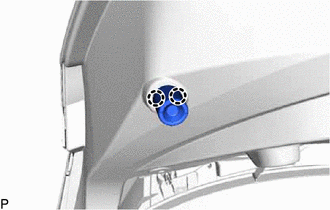
Engage the 2 claws to install a new back door panel cushion.
Tech Tips
Use the same procedure for the RH side and LH side.
-
-
INSTALL REAR TELEVISION CAMERA ASSEMBLY
-
INSTALL LICENSE PLATE LIGHT ASSEMBLY
-
INSTALL BACK DOOR FINISH PANEL COVER
-
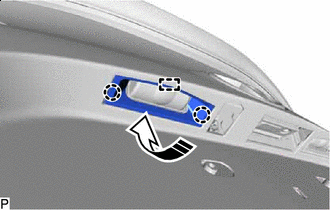
Install in this Direction Engage the guide and 2 claws to install the back door finish panel cover as shown in the illustration.
Tech Tips
Use the same procedure for the RH side and LH side.
-
-
INSTALL BACK DOOR NO. 1 FINISH PANEL PROTECTOR
-
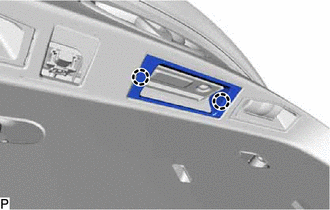
Engage the 2 claws to install the back door No. 1 finish panel protector.
-
-
INSTALL BACK DOOR OPENER SWITCH ASSEMBLY
-
INSTALL REAR LIGHT ASSEMBLY LH
-
INSTALL REAR LIGHT ASSEMBLY RH
Tech Tips
Use the same procedure as for the LH side.
-
INSTALL CENTER STOP LIGHT SET
-
INSTALL BACK DOOR OUTSIDE GARNISH ASSEMBLY
-
INSTALL BACK DOOR LOWER STOPPER
-
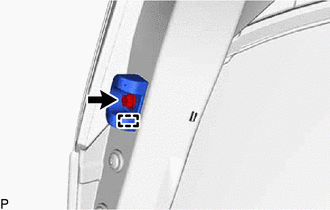
Engage the guide and install the back door lower stopper with the bolt.
Tech Tips
Use the same procedure for the RH side and LH side.
-
-
INSTALL BACK DOOR LOCK ASSEMBLY
-
INSTALL BACK DOOR TRIM BOARD
-
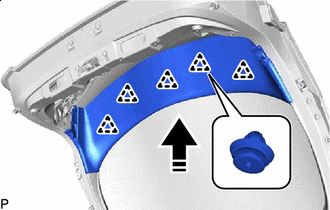
Install in this Direction Engage the 5 clips to install the back door trim board as shown in the illustration.
-
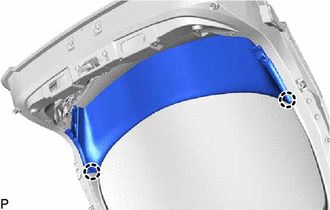
Engage the 2 claws.
-
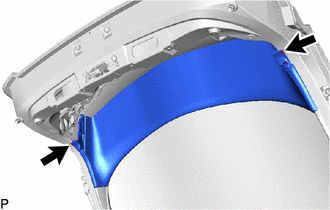
Install the 2 clips.
-
-
INSTALL BACK DOOR LOCK COVER
-
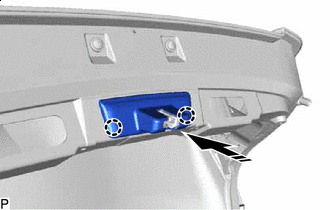
Install in this Direction Engage the 2 claws to install the back door lock cover as shown in the illustration.
-
-
INSTALL BACK DOOR TRIM BOARD ASSEMBLY
-
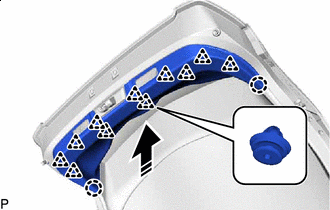
Install in this Direction Engage the 11 clips and 2 claws to install the back door trim board assembly as shown in the illustration.
-
-
INSTALL DOOR PULL HANDLE
-
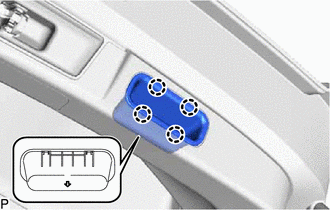
Engage the 4 claws to install the door pull handle as shown in the illustration.
Tech Tips
-
With the back door fully open, install the door pull handle so that the arrow on the backside of door pull handle points down.
-
Use the same procedure for the RH side and LH side.
-
-
-
INSTALL BACK DOOR UPPER TRIM PANEL ASSEMBLY
-
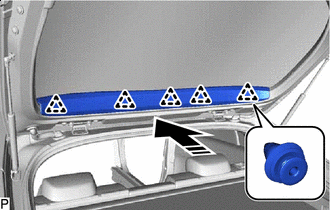
Install in this Direction Engage the 5 clips to install the back door upper trim panel assembly as shown in the illustration.
-
-
PERFORM CALIBRATION