CHARGE LID OPENER SYSTEM Charging Lid Lock Function does not Operate
DESCRIPTION
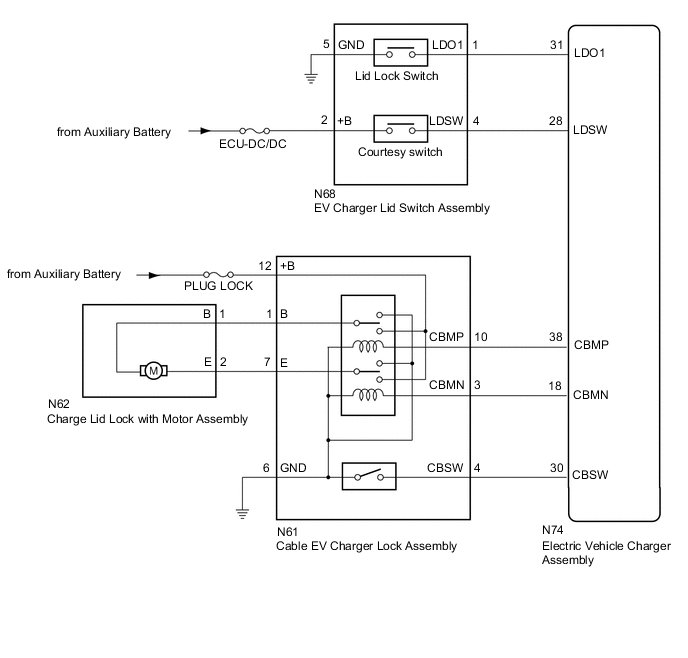
If the lock function of the charging port lid lock does not operate, the EV charger lid switch assembly, cable EV charger lock assembly, AC charger inlet cable, charge lid lock with motor assembly or the signal circuit between electric vehicle charger assembly and certification ECU (smart key ECU assembly) may be malfunctioning or the vehicle may be being affected by wave interference.
WIRING DIAGRAM
CAUTION / NOTICE / HINT
CAUTION:
-
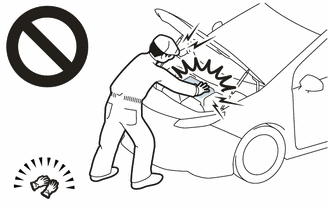
Before the following operations are conducted, take precautions to prevent electric shock by turning the power switch off, wearing insulated gloves, and removing the service plug grip from HV battery.
-
Inspecting the high-voltage system
-
Disconnecting the low voltage connector of the inverter with converter assembly
-
Disconnecting the low voltage connector of the HV battery
-
Disconnecting the low voltage connector of the electric vehicle charger assembly.
-
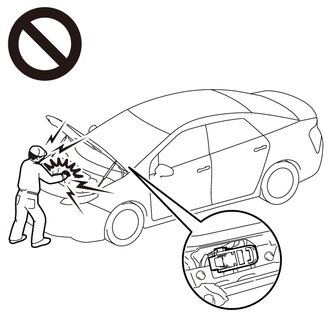
To prevent electric shock, make sure to remove the service plug grip to cut off the high voltage circuit before servicing the vehicle.
-
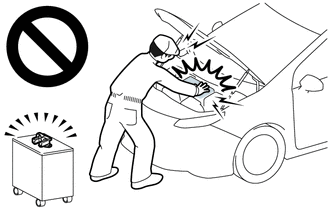
After removing the service plug grip from the HV battery, put it in your pocket to prevent other technicians from accidentally reconnecting it while you are working on the high-voltage system.
-
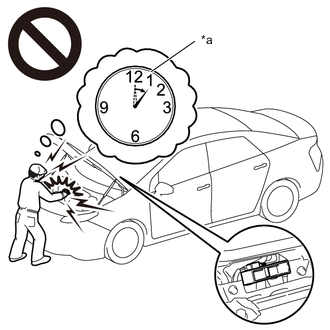
*a Without waiting for 10 minutes After removing the service plug grip, wait for at least 10 minutes before touching any of the high-voltage connectors or terminals. After waiting for 10 minutes, check the voltage at the terminals in the inspection point in the inverter with converter assembly. The voltage should be 0 V before beginning work.
Tech Tips
Waiting for at least 10 minutes is required to discharge the high-voltage capacitor inside the inverter with converter assembly and the electric vehicle charger assembly.
Note
-
After turning the power switch off, waiting time may be required before disconnecting the cable from the negative (-) auxiliary battery terminal. Therefore, make sure to read the disconnecting the cable from the negative (-) auxiliary battery terminal notices before proceeding with work.
-
The charge lid opener system uses the entry and start system (for entry function).
If the entry and start system (for entry function) is malfunctioning, the charging port lid may not be able to be locked/unlocked.
In this case, make sure to inspect the entry and start system (for entry function) first.
-
Check that there are no electrical key transmitter sub-assemblies in the vehicle.
-
Inspect the fuses for circuits related to this system before performing the following procedure.
-
To protect the charging port lid lock motor, if the charging port lid lock/unlock is operated repeatedly, operation of the lock will be prohibited. Wait for 3 minutes or more to allow the motor to cool and then resume the inspection.
-
To protect the charging port lid lock motor, if the charging port lid lock/unlock is operated repeatedly in quick succession, operation of the lock will be prohibited for a certain amount of time. Wait for 3 seconds or more after operation was prohibited and then resume the inspection.
-
If the charging port lid lock pin is dirty or frozen, or if foreign matter is caught between the charging port lid lock pin and charging port lid, the charging port lid lock pin may not be able to be locked/unlocked. Clean the charging port lid lock pin before performing the inspection.
-
The charging port lid lock may not operate if the charging port lid lock emergency release lever or charging connector lock emergency release lever has been operated.
Open the charging port lid (extend the push lifter of the EV charger lid switch assembly (charging lid courtesy switch)) and then close the charging port lid (push in the push lifter of the EV charger lid switch assembly (charging lid courtesy switch)) to return the charging port lid lock operation to normal.
PROCEDURE
-
CHECK DTC OUTPUT (HEALTH CHECK)
-
Connect the GTS to the DLC3.
-
Turn the power switch on (IG).
-
Turn the GTS on.
-
Enter the following menus: Health Check.
-
Check DTCs.
Result Result Proceed to No DTCs are output. A DTCs are output. B
B 
GO TO DTC CHART
A 
-
-
CHECK POWER DOOR LOCK CONTROL SYSTEM
-
Check that all doors can be locked and unlocked by the multiplex network master switch assembly.
OK All doors can be locked and unlocked by the multiplex network master switch assembly. Result Proceed to OK NG
NG
GO TO POWER DOOR LOCK CONTROL SYSTEM Click here
OK
-
-
CHECK ELECTRIC VEHICLE CHARGER ASSEMBLY (CHARGING PORT LID CLOSED AND CHARGING PORT LID LOCK LOCKED)
CAUTION:
Be sure to wear insulated gloves.
-
Disconnect the cable to the negative (-) auxiliary battery terminal.
-
Removing the service plug grip.
Note
After removing the service plug grip, do not turn the power switch on (READY), unless instructed by the repair manual because this may cause a malfunction.
-
Connect the cable to the negative (-) auxiliary battery terminal.
-
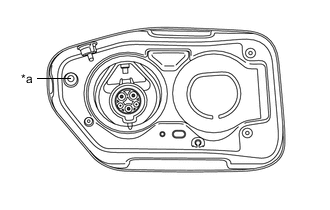
*a Push Lifter Close the charging port lid (push in the push lifter).
-
All doors are locked.
-
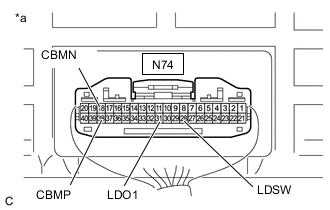
*a Component with harness connected
(Electric Vehicle Charger Assembly)
Measure the voltage according to the value(s) in the table below.
Note
Make sure that the charging port lid is closed (the push lifter is pushed in) when measuring the voltage.
Standard Voltage Tester Connection Condition Specified Condition N74-38 (CBMP) - Body ground Power switch on (IG) 0 to 1.5 V N74-18 (CBMN) - Body ground Power switch on (IG) 0 to 1.5 V N74-28 (LDSW) - Body ground Power switch on (IG) 0 to 1.5 V N74-31 (LDO1) - Body ground Power switch on (IG) 11 to 14 V -
Connect the GTS to the DLC3.
-
Turn the GTS on.
-
Enter the following menus: Powertrain / Plug-in Control / Data List / Charging Lid Switch Status, Charging Lid Lock Pin Request Status, Charging Connector Lock Pin Status, Charging Connector Lock Motor Unlock Direction Revolution Request Current, Charging Connector Lock Motor Lock Direction Revolution Request Current.
Tech Tips
-
The state of each terminal can be checked on the Data List.
-
As the values in the Data List and the measured values might vary due to slight differences in factors such as the environment, vehicle age, etc., make sure to only use the results as a reference.
Powertrain > Plug-in Control > Data ListTester Display Measurement Item Normal Condition Charging Lid Switch Status Charging lid switch status OFF: Charging port lid close (push lifter of EV charger lid switch assembly (charging lid courtesy switch) pushed in) Charging Lid Lock Pin Request Status Charging port lid lock unlock request signal Lock: Charging port lid locked (charging port lid lock pin extended) Charging Connector Lock Pin Status Charging connector lock pin status Lock: Charging connector lock pin extended Charging Connector Lock Motor Unlock Direction Revolution Request Current Output of current to operate charging connector lock motor or charging port lid lock motor in reverse OFF: Charging connector lock motor or charging port lid lock motor not operated Charging Connector Lock Motor Lock Direction Revolution Request Current Output of current to operate charging connector lock motor or charging port lid lock motor forward OFF: Charging connector lock motor or charging port lid lock motor not operated
Powertrain > Plug-in Control > Data ListTester Display Charging Lid Switch Status Charging Lid Lock Pin Request Status Charging Connector Lock Pin Status Charging Connector Lock Motor Unlock Direction Revolution Request Current Charging Connector Lock Motor Lock Direction Revolution Request Current Result Result Proceed to OK A NG (CBMP terminal) B NG (CBMN terminal) C NG (LDSW terminal) D NG (LDO1 terminal) E -
B 
GO TO STEP 12 Click here
C
GO TO STEP 15 Click here
D
GO TO STEP 18 Click here
E
GO TO STEP 21 Click here
A
-
-
CHECK ELECTRIC VEHICLE CHARGER ASSEMBLY (CHARGING PORT LID CLOSED AND CHARGING PORT LID LOCK UNLOCKED)
CAUTION:
Be sure to wear insulated gloves.
-
All doors are unlocked.
-
*a Push Lifter While carrying the electrical key transmitter sub-assembly, close the charging port lid then fully push it in by hand (fully push in the push lifter).
-
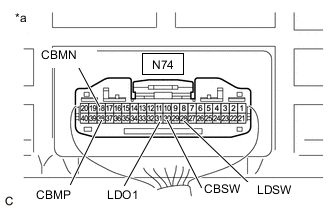
*a Component with harness connected
(Electric Vehicle Charger Assembly)
Measure the voltage according to the value(s) in the table below.
Note
Make sure that the push lifter is fully pushed in when measuring the voltage.
Standard Voltage Tester Connection Condition Specified Condition N74-30 (CBSW) - Body ground Power switch on (IG) 4.5 to 5.5 V N74-38 (CBMP) - Body ground Power switch on (IG) 0 to 1.5 V N74-18 (CBMN) - Body ground Power switch on (IG) 0 to 1.5 V N74-28 (LDSW) - Body ground Power switch on (IG) 0 to 1.5 V N74-31 (LDO1) - Body ground Power switch on (IG) 0 to 1.5 V -
Enter the following menus: Powertrain / Plug-in Control / Data List / Charging Lid Switch Status, Charging Lid Lock Pin Request Status, Charging Connector Lock Pin Status, Charging Connector Lock Motor Unlock Direction Revolution Request Current, Charging Connector Lock Motor Lock Direction Revolution Request Current.
Tech Tips
-
The state of each terminal can be checked on the Data List.
-
As the values in the Data List and the measured values might vary due to slight differences in factors such as the environment, vehicle age, etc., make sure to only use the results as a reference.
Powertrain > Plug-in Control > Data ListTester Display Measurement Item Normal Condition Charging Lid Switch Status Charging lid switch status OFF: Charging port lid close (push lifter of EV charger lid switch assembly (charging lid courtesy switch) pushed in) Charging Lid Lock Pin Request Status Charging port lid lock unlock request signal Unlock: Charging port lid unlocked (charging port lid lock pin not extended) Charging Connector Lock Pin Status Charging connector lock pin status Unlock: Charging connector lock pin not extended Charging Connector Lock Motor Unlock Direction Revolution Request Current Output of current to operate charging connector lock motor or charging port lid lock motor in reverse OFF: Charging connector lock motor or charging port lid lock motor not operated Charging Connector Lock Motor Lock Direction Revolution Request Current Output of current to operate charging connector lock motor or charging port lid lock motor forward OFF: Charging connector lock motor or charging port lid lock motor not operated
Powertrain > Plug-in Control > Data ListTester Display Charging Lid Switch Status Charging Lid Lock Pin Request Status Charging Connector Lock Pin Status Charging Connector Lock Motor Unlock Direction Revolution Request Current Charging Connector Lock Motor Lock Direction Revolution Request Current Result Result Proceed to OK A NG (CBSW terminal) B NG (CBMP terminal) C NG (CBMN terminal) D NG (LDSW terminal) E NG (LDO1 terminal) F -
B
GO TO STEP 9 Click here
C
GO TO STEP 12 Click here
D
GO TO STEP 15 Click here
E
GO TO STEP 18 Click here
F
GO TO STEP 21 Click here
A
-
-
CHECK ELECTRIC VEHICLE CHARGER ASSEMBLY (CHARGING PORT LID OPEN AND CHARGING PORT LID LOCK UNLOCKED)
CAUTION:
Be sure to wear insulated gloves.
-
*a Push Lifter Open the charging port lid (extend the push lifter).
-
*a Component with harness connected
(Electric Vehicle Charger Assembly)
Measure the voltage according to the value(s) in the table below.
Note
Make sure that the charging port lid is open (the push lifter is extended) when measuring the voltage.
Standard Voltage Tester Connection Condition Specified Condition N74-30 (CBSW) - Body ground Power switch on (IG) 4.5 to 5.5 V N74-38 (CBMP) - Body ground Power switch on (IG) 0 to 1.5 V N74-18 (CBMN) - Body ground Power switch on (IG) 0 to 1.5 V N74-28 (LDSW) - Body ground Power switch on (IG) 11 to 14 V N74-31 (LDO1) - Body ground Power switch on (IG) 11 to 14 V -
Enter the following menus: Powertrain / Plug-in Control / Data List / Charging Lid Switch Status, Charging Lid Lock Pin Request Status, Charging Connector Lock Pin Status, Charging Connector Lock Motor Unlock Direction Revolution Request Current, Charging Connector Lock Motor Lock Direction Revolution Request Current.
Tech Tips
-
The state of each terminal can be checked on the Data List.
-
As the values in the Data List and the measured values might vary due to slight differences in factors such as the environment, vehicle age, etc., make sure to only use the results as a reference.
Powertrain > Plug-in Control > Data ListTester Display Measurement Item Normal Condition Charging Lid Switch Status Charging lid switch status ON: Charging port lid open (push lifter of EV charger lid switch assembly (charging lid courtesy switch) extended) Charging Lid Lock Pin Request Status Charging port lid lock unlock request signal Unlock: Charging port lid unlocked (charging port lid lock pin not extended) Charging Connector Lock Pin Status Charging connector lock pin status Unlock: Charging connector lock pin not extended Charging Connector Lock Motor Unlock Direction Revolution Request Current Output of current to operate charging connector lock motor or charging port lid lock motor in reverse OFF: Charging connector lock motor or charging port lid lock motor not operated Charging Connector Lock Motor Lock Direction Revolution Request Current Output of current to operate charging connector lock motor or charging port lid lock motor forward OFF: Charging connector lock motor or charging port lid lock motor not operated
Powertrain > Plug-in Control > Data ListTester Display Charging Lid Switch Status Charging Lid Lock Pin Request Status Charging Connector Lock Pin Status Charging Connector Lock Motor Unlock Direction Revolution Request Current Charging Connector Lock Motor Lock Direction Revolution Request Current Result Result Proceed to OK A NG (CBSW terminal) B NG (CBMP terminal) C NG (CBMN terminal) D NG (LDSW terminal) E NG (LDO1 terminal) F -
B
CHECK ELECTRIC VEHICLE CHARGER ASSEMBLY (CBSW TERMINAL VOLTAGE) Click here
C
CHECK ELECTRIC VEHICLE CHARGER ASSEMBLY (CBMP TERMINAL VOLTAGE) Click here
D
CHECK ELECTRIC VEHICLE CHARGER ASSEMBLY (CBMN TERMINAL VOLTAGE) Click here
E
CHECK ELECTRIC VEHICLE CHARGER ASSEMBLY (LDSW TERMINAL VOLTAGE) Click here
F
CHECK ELECTRIC VEHICLE CHARGER ASSEMBLY (LDO1 TERMINAL VOLTAGE) Click here
A
-
-
INSPECT CABLE EV CHARGER LOCK ASSEMBLY (CBSW TERMINAL)
-
Remove the cable EV charger lock assembly.
-
Inspect the cable EV charger lock assembly.
Result Proceed to OK NG
NG
REPLACE CABLE EV CHARGER LOCK ASSEMBLY Click here
OK
-
-
INSPECT CHARGE LID LOCK WITH MOTOR ASSEMBLY
-
Remove the charge lid lock with motor assembly.
-
Inspect the charge lid lock with motor assembly.
Result Proceed to OK NG
NG
REPLACE CHARGE LID LOCK WITH MOTOR ASSEMBLY Click here
OK
-
-
CAUSE ANALYSIS (ENVIRONMENT/USER RELATED CAUSE)
-
Perform cause analysis in the order of "Environment" and "User" categories as specified in the following tables.
Environment Possible Cause Action to be Taken Charging port lid lock motor temperature high Explain to the customer that, due to the temperature of the charging port lid lock motor becoming high, to protect the charging port lid lock motor, charging port lid lock operation was prohibited.
(Wait 3 minutes or more after lock/unlock operation is prohibited, then resume inspection.)
Charging port lid lock motor cannot operate due to foreign matter, ice, etc. Explain to the customer that the charging port lid cannot be locked/unlocked if foreign matter, ice, etc. are stuck on the lock pin or charging port lid. User Possible Cause Action to be Taken Charging port lid lock was unlocked using charging port lid lock emergency release lever Explain to the customer that the charging port lid lock may not operate if the charging port lid lock emergency release lever has been operated.
Open the charging port lid (extend the push lifter of the EV charger lid switch assembly (charging lid courtesy switch)) and then close the charging port lid (push in the push lifter of the EV charger lid switch assembly (charging lid courtesy switch)) to return the charging port lid lock operation to normal.
Charging connector lock was unlocked using charging connector lock emergency release lever Explain to the customer that the charging connector lock may not operate if the charging connector lock emergency release lever has been operated. In this case, disconnect the charging connector and push in the push lifter of the EV charger lid switch assembly (charging lid courtesy switch)).*1
The charging connector lock may not operate if the charging connector lock emergency release lever has been operated. In this case, disconnect and then connect the charging connector to operate the charging connector lock.*2
Charging port lid lock/unlock was operated repeatedly Explain to the customer that, to protect the charging port lid lock motor, if the charging port lid lock/unlock was operated repeatedly, operation may be temporarily prohibited. Charging port lid lock operation was attempted after auxiliary battery was replaced or cable disconnected and reconnected to negative (-) auxiliary battery terminal Explain to the customer that charging port lid lock operation may be prohibited after the auxiliary battery has been replaced or the cable has been disconnected and reconnected to the negative (-) auxiliary battery terminal.
(Operate the charging port lid lock again to return the operation to normal.)
-
*1: for Electric Vehicle Charger Cable Assembly (Type A)
-
*2: for Electric Vehicle Charger Cable Assembly (Type B)
-
-
Take appropriate action in accordance with the result of the cause analysis.
Result Proceed to NEXT
NEXT
END
-
-
CHECK ELECTRIC VEHICLE CHARGER ASSEMBLY (CBSW TERMINAL VOLTAGE)
CAUTION:
Be sure to wear insulated gloves.
-
Disconnect the N74 electric vehicle charger assembly connector.
-
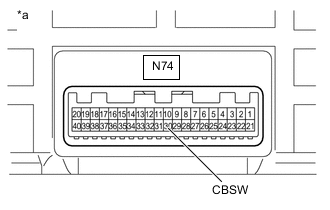
*a Component without harness connected
(Electric Vehicle Charger Assembly)
Measure the voltage according to the value(s) in the table below.
Standard Voltage Tester Connection Condition Specified Condition N74-30 (CBSW) - Body ground Power switch off 4.5 to 5.5 V Result Proceed to OK NG
NG
REPLACE ELECTRIC VEHICLE CHARGER ASSEMBLY Click here
OK
-
-
INSPECT CABLE EV CHARGER LOCK ASSEMBLY (CBSW TERMINAL)
-
Remove the cable EV charger lock assembly.
-
Inspect the cable EV charger lock assembly.
Result Proceed to OK NG
NG
REPLACE CABLE EV CHARGER LOCK ASSEMBLY Click here
OK
-
-
CHECK HARNESS AND CONNECTOR (ELECTRIC VEHICLE CHARGER ASSEMBLY - CABLE EV CHARGER LOCK ASSEMBLY (CBSW))
CAUTION:
Be sure to wear insulated gloves.
-
Measure the resistance according to the value(s) in the table below.
Standard Resistance Tester Connection Condition Specified Condition N74-30 (CBSW) - N61-4 (CBSW) Power switch off Below 1 Ω N74-30 (CBSW) or N61-4 (CBSW) - Body ground Power switch off 10 kΩ or higher Result Proceed to OK NG
OK
GO TO STEP 8 Click here
NG
REPAIR OR REPLACE HARNESS OR CONNECTOR
-
-
CHECK ELECTRIC VEHICLE CHARGER ASSEMBLY (CBMP TERMINAL VOLTAGE)
CAUTION:
Be sure to wear insulated gloves.
-
Disconnect the N74 electric vehicle charger assembly connector.
-
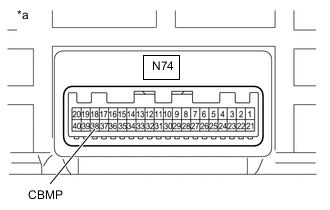
*a Component without harness connected
(Electric Vehicle Charger Assembly)
Measure the voltage according to the value(s) in the table below.
Standard Voltage Tester Connection Condition Specified Condition N74-38 (CBMP) - Body ground Power switch off 0 to 1.5 V Result Proceed to OK NG
NG
REPLACE ELECTRIC VEHICLE CHARGER ASSEMBLY Click here
OK
-
-
INSPECT CABLE EV CHARGER LOCK ASSEMBLY (CBMP TERMINAL)
-
Remove the cable EV charger lock assembly.
-
Inspect the cable EV charger lock assembly.
Result Proceed to OK NG
NG
REPLACE CABLE EV CHARGER LOCK ASSEMBLY Click here
OK
-
-
CHECK HARNESS AND CONNECTOR (ELECTRIC VEHICLE CHARGER ASSEMBLY - CABLE EV CHARGER LOCK ASSEMBLY (CBMP))
CAUTION:
Be sure to wear insulated gloves.
-
Measure the resistance according to the value(s) in the table below.
Standard Resistance Tester Connection Condition Specified Condition N74-38 (CBMP) - N61-10 (CBMP) Power switch off Below 1 Ω N74-38 (CBMP) or N61-10 (CBMP) - Body ground Power switch off 10 kΩ or higher Result Proceed to OK NG
OK
GO TO STEP 8 Click here
NG
REPAIR OR REPLACE HARNESS OR CONNECTOR
-
-
CHECK ELECTRIC VEHICLE CHARGER ASSEMBLY (CBMN TERMINAL VOLTAGE)
CAUTION:
Be sure to wear insulated gloves.
-
Disconnect the N74 electric vehicle charger assembly connector.
-
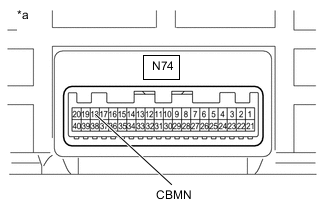
*a Component without harness connected
(Electric Vehicle Charger Assembly)
Measure the voltage according to the value(s) in the table below.
Standard Voltage Tester Connection Condition Specified Condition N74-18 (CBMN) - Body ground Power switch off 0 to 1.5 V Result Proceed to OK NG
NG
REPLACE ELECTRIC VEHICLE CHARGER ASSEMBLY Click here
OK
-
-
INSPECT CABLE EV CHARGER LOCK ASSEMBLY (CBMN TERMINAL)
-
Remove the cable EV charger lock assembly.
-
Inspect the cable EV charger lock assembly.
Result Proceed to OK NG
NG
REPLACE CABLE EV CHARGER LOCK ASSEMBLY Click here
OK
-
-
CHECK HARNESS AND CONNECTOR (ELECTRIC VEHICLE CHARGER ASSEMBLY - CABLE EV CHARGER LOCK ASSEMBLY (CBMN))
CAUTION:
Be sure to wear insulated gloves.
-
Measure the resistance according to the value(s) in the table below.
Standard Resistance Tester Connection Condition Specified Condition N74-18 (CBMN) - N61-3 (CBMN) Power switch off Below 1 Ω N74-18 (CBMN) or N61-3 (CBMN) - Body ground Power switch off 10 kΩ or higher Result Proceed to OK NG
OK
GO TO STEP 8 Click here
NG
REPAIR OR REPLACE HARNESS OR CONNECTOR
-
-
CHECK ELECTRIC VEHICLE CHARGER ASSEMBLY (LDSW TERMINAL VOLTAGE)
CAUTION:
Be sure to wear insulated gloves.
-
Disconnect the N74 electric vehicle charger assembly connector.
-
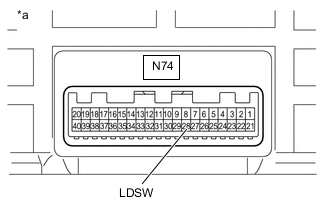
*a Component without harness connected
(Electric Vehicle Charger Assembly)
Measure the voltage according to the value(s) in the table below.
Standard Voltage Tester Connection Condition Specified Condition N74-28 (LDSW) - Body ground Power switch off 0 to 1.5 V Result Proceed to OK NG
NG
REPLACE ELECTRIC VEHICLE CHARGER ASSEMBLY Click here
OK
-
-
INSPECT EV CHARGER LID SWITCH ASSEMBLY (LDSW TERMINAL)
-
Remove the EV charger lid switch assembly.
-
Inspect the EV charger lid switch assembly.
Result Proceed to OK NG
NG
REPLACE EV CHARGER LID SWITCH ASSEMBLY Click here
OK
-
-
CHECK HARNESS AND CONNECTOR (ELECTRIC VEHICLE CHARGER ASSEMBLY - EV CHARGER LID SWITCH ASSEMBLY (LDSW))
CAUTION:
Be sure to wear insulated gloves.
-
Measure the resistance according to the value(s) in the table below.
Standard Resistance Tester Connection Condition Specified Condition N74-28 (LDSW) - N68-4 (LDSW) Power switch off Below 1 Ω N74-28 (LDSW) or N68-4 (LDSW) - Body ground Power switch off 10 kΩ or higher Result Proceed to OK NG
OK
GO TO STEP 8 Click here
NG
REPAIR OR REPLACE HARNESS OR CONNECTOR
-
-
CHECK ELECTRIC VEHICLE CHARGER ASSEMBLY (LDO1 TERMINAL VOLTAGE)
CAUTION:
Be sure to wear insulated gloves.
-
Disconnect the N74 electric vehicle charger assembly connector.
-
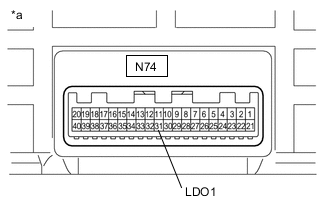
*a Component without harness connected
(Electric Vehicle Charger Assembly)
Measure the voltage according to the value(s) in the table below.
Standard Voltage Tester Connection Condition Specified Condition N74-31 (LDO1) - Body ground Power switch off 11 to 14 V Result Proceed to OK NG
NG
REPLACE ELECTRIC VEHICLE CHARGER ASSEMBLY Click here
OK
-
-
INSPECT EV CHARGER LID SWITCH ASSEMBLY (LDO1 TERMINAL)
-
Remove the EV charger lid switch assembly.
-
Inspect the cable EV charger lid switch assembly.
Result Proceed to OK NG
NG
REPLACE EV CHARGER LID SWITCH ASSEMBLY Click here
OK
-
-
CHECK HARNESS AND CONNECTOR (ELECTRIC VEHICLE CHARGER ASSEMBLY - EV CHARGER LID SWITCH ASSEMBLY (LDO1))
CAUTION:
Be sure to wear insulated gloves.
-
Measure the resistance according to the value(s) in the table below.
Standard Resistance Tester Connection Condition Specified Condition N74-31 (LDO1) - N68-1 (LDO1) Power switch off Below 1 Ω N74-31 (LDO1) or N68-1 (LDO1) - Body ground Power switch off 10 kΩ or higher Result Proceed to OK NG
OK
GO TO STEP 8 Click here
NG
REPAIR OR REPLACE HARNESS OR CONNECTOR
-