UPPER INSTRUMENT PANEL REMOVAL
PROCEDURE
-
PRECAUTION
-
DISCONNECT FRONT DOOR OPENING TRIM WEATHERSTRIP LH
-
Disconnect the front door opening trim weatherstrip LH.
-
-
REMOVE FRONT PILLAR GARNISH LH
-
REMOVE NO. 1 INSTRUMENT PANEL SPEAKER PANEL SUB-ASSEMBLY
-
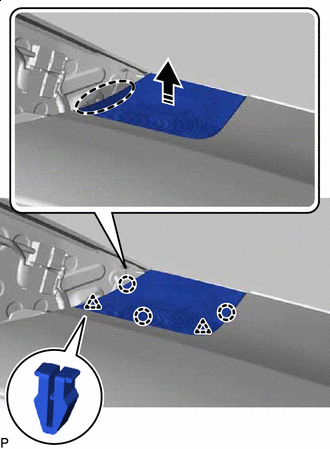

Place Hand Here 
Remove in this Direction Disengage the 2 clips and 3 claws as shown in the illustration.
-
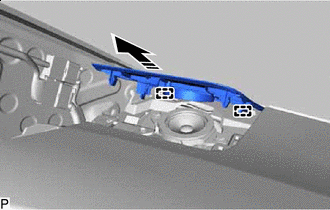
Remove in this Direction Disengage the 2 guides to remove the No. 1 instrument panel speaker panel sub-assembly as shown in the illustration.
-
-
REMOVE FRONT NO. 2 SPEAKER ASSEMBLY (for LH Side)
-
DISCONNECT FRONT DOOR OPENING TRIM WEATHERSTRIP RH
-
Disconnect the front door opening trim weatherstrip RH.
-
-
REMOVE FRONT PILLAR GARNISH RH
Tech Tips
Use the same procedure as for the LH side.
-
REMOVE NO. 2 INSTRUMENT PANEL SPEAKER PANEL SUB-ASSEMBLY
-
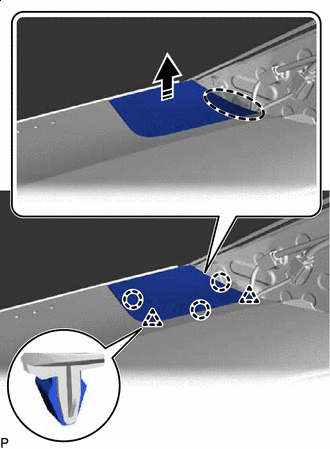
Place Hand Here Remove in this Direction Disengage the 2 clips and 3 claws as shown in the illustration.
-
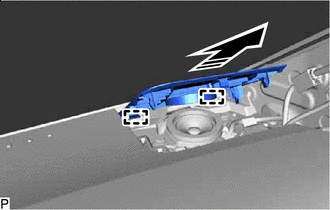
Remove in this Direction Disengage the 2 guides to remove the No. 2 instrument panel speaker panel sub-assembly as shown in the illustration.
-
-
REMOVE FRONT NO. 2 SPEAKER ASSEMBLY (for RH Side)
Tech Tips
Use the same procedure as for the LH side.
-
REMOVE INSTRUMENT CLUSTER FINISH PANEL END (w/ Headup Display)
-
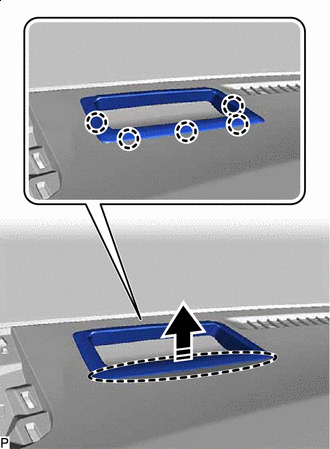
Place Hand Here Remove in this Direction Disengage the 5 claws as shown in the illustration.
-
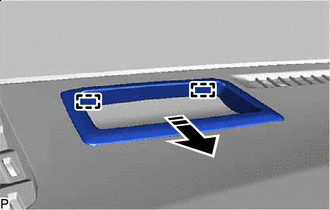
Remove in this Direction Disengage the 2 guides to remove the instrument cluster finish panel end as shown in the illustration.
-
-
REMOVE INSTRUMENT CLUSTER FINISH PANEL ASSEMBLY
-
REMOVE UPPER INSTRUMENT PANEL ASSEMBLY
-
Disconnect each connector.
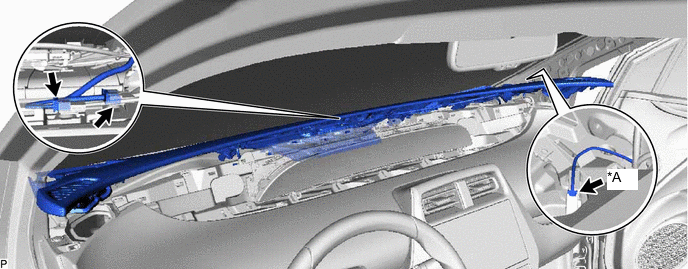
*A w/ Navigation Antenna - - -
Remove the upper instrument panel assembly as shown in the illustration.
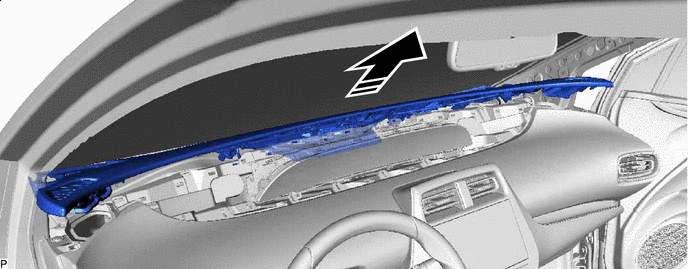
Remove in this Direction - - Note
-
Do not damage the upper instrument panel assembly.
-
Do not allow the wire harnesses to interfere with the surrounding parts.
-
-