CURTAIN SHIELD AIRBAG ASSEMBLY INSTALLATION

CAUTION / NOTICE / HINT
Tech Tips
-
Use the same procedure for the RH side and LH side.
-
The following procedure is for the LH side.
PROCEDURE
-
INSTALL CURTAIN SHIELD AIRBAG ASSEMBLY
Note
When installing a curtain shield airbag assembly, have assistants hold it to prevent it from bending.
-
Check that the power switch is off.
-
Check that the cable is disconnected from the negative (-) auxiliary battery terminal.
CAUTION:
Wait at least 90 seconds after disconnecting the cable from the negative (-) auxiliary battery terminal to disable the SRS system.
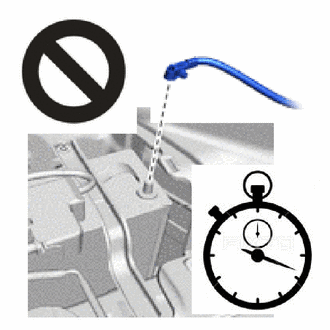
-
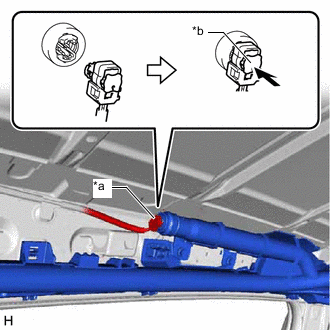
*a Airbag Connector *b Airbag Connector Lock Connect the airbag connector.
Note
When connecting any airbag connector, take care not to damage the airbag wire harness.
-
Push in the airbag connector lock to install the airbag connector.
-
Insert the 3 hooks to temporarily install the curtain shield airbag assembly.
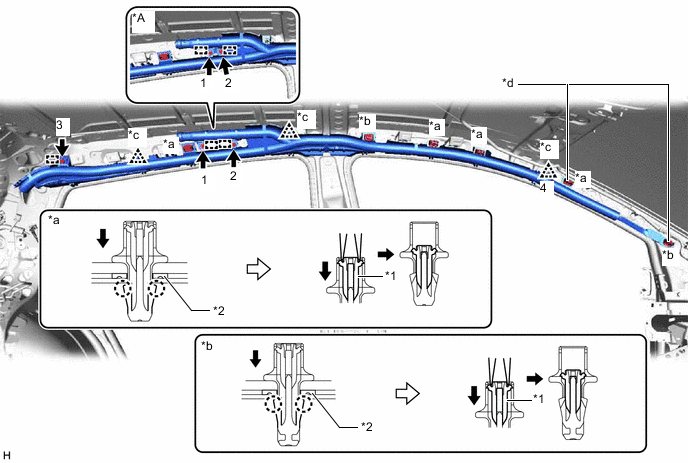
*A w/o Occupant Classification System - - *1 Pin *2 Spacer *a Clip (A) *b Clip (B) *c Clip (C) *d Spacer Location -
Install 3 new bolts and engage the clip (C) in the order shown in the illustration.
- Torque:
- 9.8 N*m { 100 kgf*cm, 87 in.*lbf }
Note
Do not twist the curtain shield airbag assembly when installing it.
-
Install the curtain shield airbag assembly with 2 new spacers, 4 new clips (A) with pins and 2 new clips (B) with pins, and engage the 2 clips (C).
Note
Do not twist the curtain shield airbag assembly when installing it.
Tech Tips
Engage the 2 claws to install each new clip (A) and (B).
-
Using needle nose pliers, push the 6 pins into the 4 clips (A) and 2 clips (B).
Note
-
Do not damage the pins.
-
Make sure that the pins of the clips (A) and (B) are pushed in firmly.
-
-
-
INSTALL ROOF HEADLINING ASSEMBLY
-
CONNECT CABLE TO NEGATIVE AUXILIARY BATTERY TERMINAL
Note
When disconnecting the cable, some systems need to be initialized after the cable is reconnected.
-
PERFORM DIAGNOSTIC SYSTEM CHECK
-
INSPECT SRS WARNING LIGHT