LIGHTING SYSTEM Power Switch Illumination Circuit
DESCRIPTION
The illuminated entry system controls the power switch illumination.
WIRING DIAGRAM
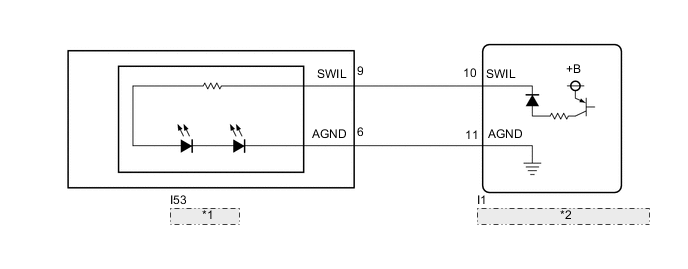
| *1 | Power Switch |
| *2 | Certification ECU (Smart Key ECU Assembly) |
CAUTION / NOTICE / HINT
Note
Before replacing the certification ECU (smart key ECU assembly), refer to Service Bulletin.
PROCEDURE
-
PERFORM ACTIVE TEST USING GTS
-
Connect the GTS to the DLC3.
-
Turn the power switch on (IG).
-
Turn the GTS on.
-
Enter the following menus: Body Electrical / Entry&Start / Active Test.
-
Perform the Active Test according to the display on the GTS.
Body Electrical > Entry&Start > Active TestTester Display Measurement Item Control Range Diagnostic Note Power/Engine SW Light Power switch illumination OFF or ON -
Body Electrical > Entry&Start > Active TestTester Display Power/Engine SW Light OK Power switch illumination comes on. Result Proceed to OK NG
OK 
PROCEED TO NEXT SUSPECTED AREA SHOWN IN PROBLEM SYMPTOMS TABLE Click here
NG 
-
-
INSPECT POWER SWITCH
-
Remove the power switch.
-
Inspect the power switch.
Result Proceed to OK NG
NG
REPLACE POWER SWITCH Click here
OK
-
-
CHECK HARNESS AND CONNECTOR (POWER SWITCH - CERTIFICATION ECU (SMART KEY ECU ASSEMBLY))
-
Disconnect the I1 certification ECU (smart key ECU assembly) connector.
-
Measure the resistance according to the value(s) in the table below.
Standard Resistance Tester Connection Condition Specified Condition I53-9 (SWIL) - I1-10 (SWIL) Always Below 1 Ω I53-6 (AGND) - I1-11 (AGND) Always Below 1 Ω I53-9 (SWIL) or I1-10 (SWIL) - Body ground Always 10 kΩ or higher I53-6 (AGND) or I1-11 (AGND) - Body ground Always 10 kΩ or higher Result Proceed to OK NG
OK
REPLACE CERTIFICATION ECU (SMART KEY ECU ASSEMBLY)
NG
REPAIR OR REPLACE HARNESS OR CONNECTOR
-