NETWORK GATEWAY ECU REMOVAL
CAUTION / NOTICE / HINT
The necessary procedures (adjustment, calibration, initialization, or registration) that must be performed after parts are removed and installed, or replaced during central gateway ECU (network gateway ECU) removal/installation are shown below.
| Replaced Part or Performed Procedure | Necessary Procedure | Effect/Inoperative Function when Necessary Procedure not Performed | Link |
|---|---|---|---|
| Auxiliary battery terminal is disconnected/reconnected | Memorize steering angle neutral point | Lane departure alert system (w/ Steering Control) | |
| Intelligent clearance sonar system*1 | |||
| Simple intelligent parking assist system*1 | |||
| Pre-crash safety system | |||
| Adaptive high beam system | |||
| Parking assist monitor system | |||
| Initialize back door lock | Power door lock control system | ||
| Replacement of hybrid vehicle control ECU | Perform code registration (Immobiliser system) |
|
See Service Bulletin for the registration method. |
*1: When performing learning using the GTS.
PROCEDURE
-
REMOVE ECU INTEGRATION BOX RH (for LHD)
-
REMOVE ECU INTEGRATION BOX LH (for RHD)
-
REMOVE CENTRAL GATEWAY ECU (NETWORK GATEWAY ECU) (for LHD)
-
Disengage the 2 claws and remove the central gateway ECU (network gateway ECU).
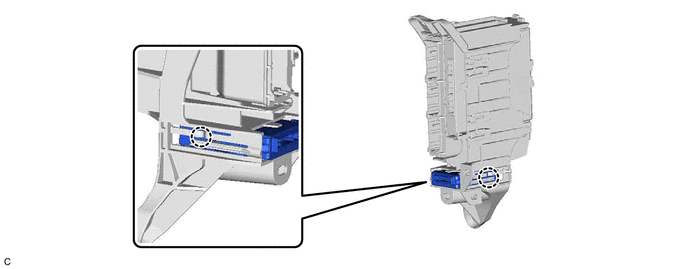
Note
-
If the ECU integration box is deformed or damaged, replace it.
-
Do not bend the 2 claws more than necessary.
-
-
-
REMOVE CENTRAL GATEWAY ECU (NETWORK GATEWAY ECU) (for RHD)
-
Disengage the 2 claws and remove the central gateway ECU (network gateway ECU).
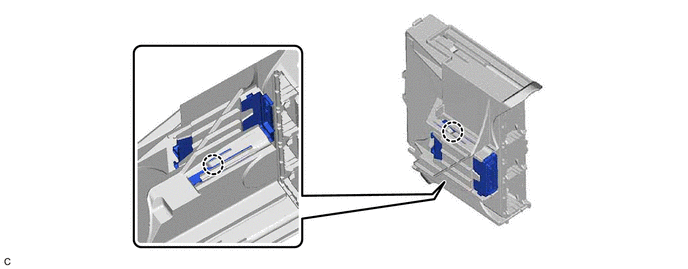
Note
-
If the ECU integration box is deformed or damaged, replace it.
-
Do not bend the 2 claws more than necessary.
-
-