LIN COMMUNICATION SYSTEM TERMINALS OF ECU
-
CHECK INSTRUMENT PANEL JUNCTION BLOCK ASSEMBLY AND MAIN BODY ECU (MULTIPLEX NETWORK BODY ECU)
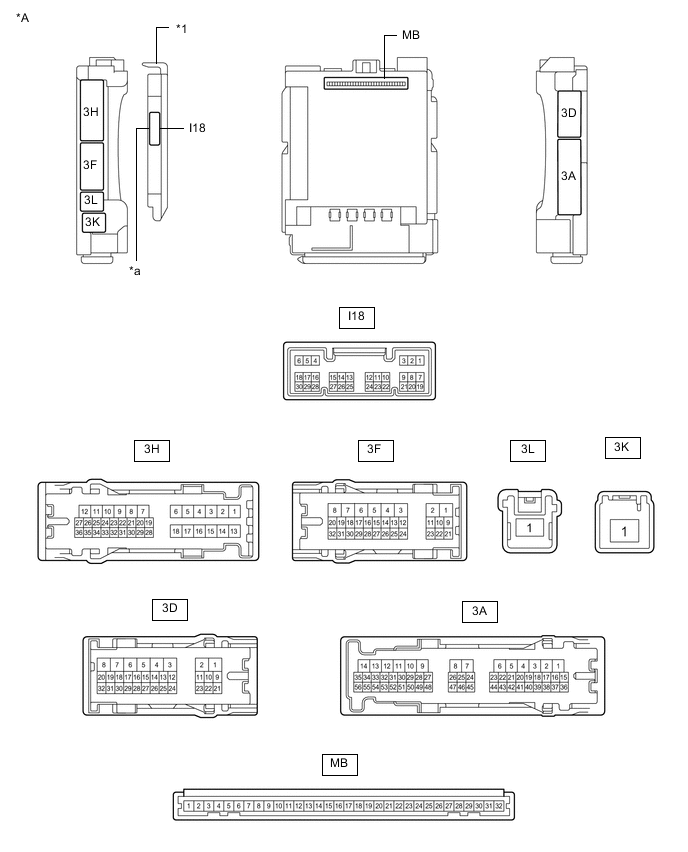
*A Main Body ECU (Multiplex Network Body ECU) with 1 Connector - - *1 Main Body ECU (Multiplex Network Body ECU) - - *a 1 Connector - - 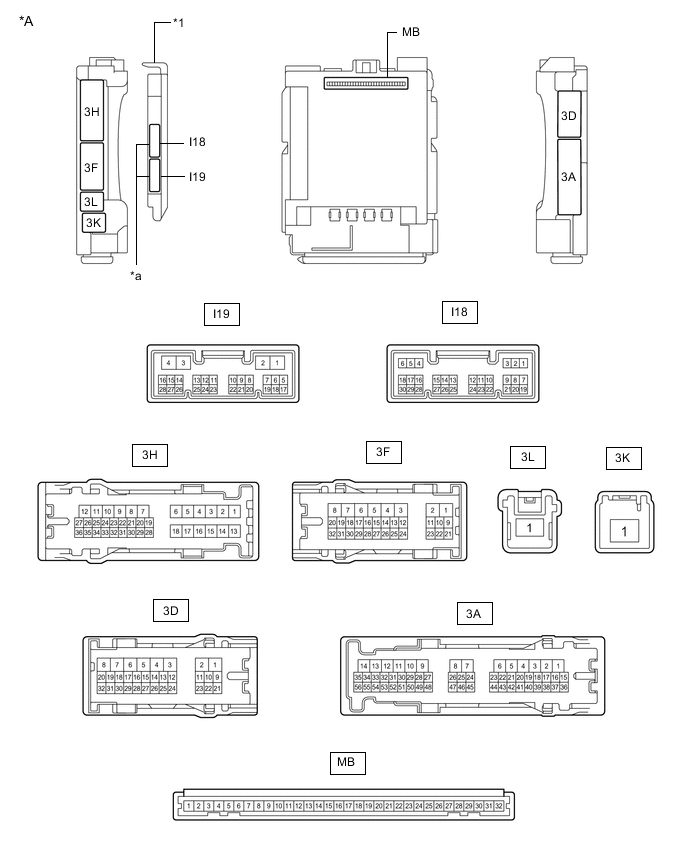
*A Main Body ECU (Multiplex Network Body ECU) with 2 Connectors - - *1 Main Body ECU (Multiplex Network Body ECU) - - *a 2 Connectors - -
-
Disconnect the MB main body ECU (multiplex network body ECU) connector.
-
Measure the voltage and resistance according to the value(s) in the table below.
Tech Tips
Measure the values on the wire harness side with the connectors disconnected.
Terminal No. (Symbol) Wiring Color Terminal Description Condition Specified Condition MB-11 (GND1) - Body ground - Ground Always Below 1 Ω MB-31 (BECU) - Body ground - Auxiliary battery power supply Power switch off 11 to 14 V MB-30 (ACC) - Body ground - ACC power supply Power switch on (ACC) 11 to 14 V Power switch off Below 1 V MB-32 (IG) - Body ground - IG power supply Power switch on (IG) 11 to 14 V Power switch off Below 1 V -
Reconnect the MB main body ECU (multiplex network body ECU) connector.
-
Check for pulses according to the value(s) in the table below.
Terminal No. (Symbol) Wiring Color Terminal Description Condition Specified Condition 3H-25 - Body ground G - Body ground LIN communication line Power switch on (IG) Pulse generation 3D-17 - Body ground GR - Body ground*1
W - Body ground*2
LIN communication line Power switch on (IG) Pulse generation
-
*1: for LHD
-
*2: for RHD
-
-
-
CHECK POWER WINDOW REGULATOR MOTOR ASSEMBLY (for Driver Door)

*A for LHD *B for RHD
-
for LHD
-
Disconnect the K2 power window regulator motor assembly (for driver door) connector.
-
Measure the voltage and resistance according to the value(s) in the table below.
Tech Tips
Measure the values on the wire harness side with the connector disconnected.
Terminal No. (Symbol) Wiring Color Terminal Description Condition Specified Condition K2-2 (B) - Body ground B - Body ground Auxiliary battery power supply Power switch off 11 to 14 V K2-1 (GND) - Body ground W - Body ground Ground Always Below 1 Ω -
Reconnect the K2 power window regulator motor assembly (for driver door) connector.
-
Check for pulses according to the value(s) in the table below.
Terminal No. (Symbol) Wiring Color Terminal Description Condition Specified Condition K2-9 (LIN) - Body ground SB - Body ground LIN communication line Power switch on (IG) Pulse generation
-
-
for RHD
-
Disconnect the J2 power window regulator motor assembly (for driver door) connector.
-
Measure the voltage and resistance according to the value(s) in the table below.
Tech Tips
Measure the values on the wire harness side with the connector disconnected.
Terminal No. (Symbol) Wiring Color Terminal Description Condition Specified Condition J2-2 (B) - Body ground B - Body ground Auxiliary battery power supply Power switch off 11 to 14 V J2-1 (GND) - Body ground W - Body ground Ground Always Below 1 Ω -
Reconnect the J2 power window regulator motor assembly (for driver door) connector.
-
Check for pulses according to the value(s) in the table below.
Terminal No. (Symbol) Wiring Color Terminal Description Condition Specified Condition J2-9 (LIN) - Body ground SB - Body ground LIN communication line Power switch on (IG) Pulse generation
-
-
-
CHECK POWER WINDOW REGULATOR MOTOR ASSEMBLY (for Front Passenger Door)

*A for LHD *B for RHD
-
for LHD
-
Disconnect the J2 power window regulator motor assembly (for front passenger door) connector.
-
Measure the voltage and resistance according to the value(s) in the table below.
Tech Tips
Measure the values on the wire harness side with the connector disconnected.
Terminal No. (Symbol) Wiring Color Terminal Description Condition Specified Condition J2-2 (B) - Body ground B - Body ground Auxiliary battery power supply Power switch off 11 to 14 V J2-1 (GND) - Body ground W - Body ground Ground Always Below 1 Ω -
Reconnect the J2 power window regulator motor assembly (for front passenger door) connector.
-
Check for pulses according to the value(s) in the table below.
Terminal No. (Symbol) Wiring Color Terminal Description Condition Specified Condition J2-9 (LIN) - Body ground SB - Body ground LIN communication line Power switch on (IG) Pulse generation
-
-
for RHD
-
Disconnect the K2 power window regulator motor assembly (for front passenger door) connector.
-
Measure the voltage and resistance according to the value(s) in the table below.
Tech Tips
Measure the values on the wire harness side with the connector disconnected.
Terminal No. (Symbol) Wiring Color Terminal Description Condition Specified Condition K2-2 (B) - Body ground B - Body ground Auxiliary battery power supply Power switch off 11 to 14 V K2-1 (GND) - Body ground W - Body ground Ground Always Below 1 Ω -
Reconnect the K2 power window regulator motor assembly (for front passenger door) connector.
-
Check for pulses according to the value(s) in the table below.
Terminal No. (Symbol) Wiring Color Terminal Description Condition Specified Condition K2-9 (LIN) - Body ground SB - Body ground LIN communication line Power switch on (IG) Pulse generation
-
-
-
CHECK POWER WINDOW REGULATOR MOTOR ASSEMBLY (for Rear RH Door)

-
Disconnect the L2 power window regulator motor assembly (for rear RH door) connector.
-
Measure the voltage and resistance according to the value(s) in the table below.
Tech Tips
Measure the values on the wire harness side with the connector disconnected.
Terminal No. (Symbol) Wiring Color Terminal Description Condition Specified Condition L2-2 (B) - Body ground B - Body ground Auxiliary battery power supply Power switch off 11 to 14 V L2-1 (GND) - Body ground W - Body ground Ground Always Below 1 Ω -
Reconnect the L2 power window regulator motor assembly (for rear RH door) connector.
-
Check for pulses according to the value(s) in the table below.
Terminal No. (Symbol) Wiring Color Terminal Description Condition Specified Condition L2-9 (LIN) - Body ground SB - Body ground LIN communication line Power switch on (IG) Pulse generation
-
-
CHECK POWER WINDOW REGULATOR MOTOR ASSEMBLY (for Rear LH Door)

-
Disconnect the M2 power window regulator motor assembly (for rear LH door) connector.
-
Measure the voltage and resistance according to the value(s) in the table below.
Tech Tips
Measure the values on the wire harness side with the connector disconnected.
Terminal No. (Symbol) Wiring Color Terminal Description Condition Specified Condition M2-2 (B) - Body ground B - Body ground Auxiliary battery power supply Power switch off 11 to 14 V M2-1 (GND) - Body ground W - Body ground Ground Always Below 1 Ω -
Reconnect the M2 power window regulator motor assembly (for rear LH door) connector.
-
Check for pulses according to the value(s) in the table below.
Terminal No. (Symbol) Wiring Color Terminal Description Condition Specified Condition M2-9 (LIN) - Body ground SB - Body ground LIN communication line Power switch on (IG) Pulse generation
-
-
CHECK MULTIPLEX NETWORK MASTER SWITCH ASSEMBLY

*A for LHD *B for RHD
-
for LHD
-
Disconnect the K7 multiplex network master switch assembly connector.
-
Measure the voltage and resistance according to the value(s) in the table below.
Tech Tips
Measure the values on the wire harness side with the connector disconnected.
Terminal No. (Symbol) Wiring Color Terminal Description Condition Specified Condition K7-11 (B) - Body ground B - Body ground Auxiliary battery power supply Power switch off 11 to 14 V K7-12 (GND) - Body ground W - Body ground Ground Always Below 1 Ω -
Reconnect the K7 multiplex network master switch assembly connector.
-
Check for pulses according to the value(s) in the table below.
Terminal No. (Symbol) Wiring Color Terminal Description Condition Specified Condition K7-17 (LIN1) - Body ground SB - Body ground LIN communication line Power switch on (IG) Pulse generation K7-16 (LIN2) - Body ground SB - Body ground LIN communication line Power switch on (IG) Pulse generation
-
-
for RHD
-
Disconnect the J7 multiplex network master switch assembly connector.
-
Measure the voltage and resistance according to the value(s) in the table below.
Tech Tips
Measure the values on the wire harness side with the connector disconnected.
Terminal No. (Symbol) Wiring Color Terminal Description Condition Specified Condition J7-11 (B) - Body ground B - Body ground Auxiliary battery power supply Power switch off 11 to 14 V J7-12 (GND) - Body ground W - Body ground Ground Always Below 1 Ω -
Reconnect the J7 multiplex network master switch assembly connector.
-
Check for pulses according to the value(s) in the table below.
Terminal No. (Symbol) Wiring Color Terminal Description Condition Specified Condition J7-17 (LIN1) - Body ground SB - Body ground LIN communication line Power switch on (IG) Pulse generation J7-16 (LIN2) - Body ground SB - Body ground LIN communication line Power switch on (IG) Pulse generation
-
-
-
CHECK CERTIFICATION ECU (SMART KEY ECU ASSEMBLY)
-
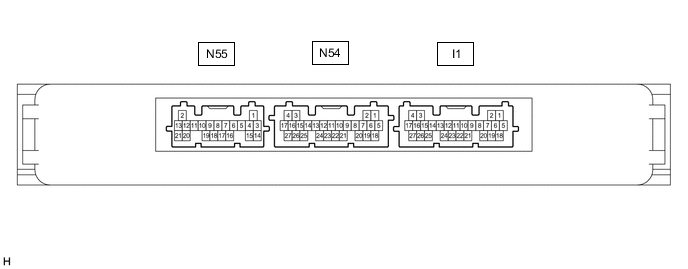
Disconnect the I1 certification ECU (smart key ECU assembly) connector.
-
Measure the voltage and resistance according to the value(s) in the table below.
Tech Tips
Measure the values on the wire harness side with the connector disconnected.
Terminal No. (Symbol) Wiring Color Terminal Description Condition Specified Condition I1-18 (E) - Body ground W-B - Body ground Ground Always Below 1 Ω I1-4 (+B) - Body ground GR - Body ground +B power supply Power switch off 11 to 14 V -
Reconnect the I1 certification ECU (smart key ECU assembly) connector.
-
Check for pulses according to the value(s) in the table below.
Terminal No. (Symbol) Wiring Color Terminal Description Condition Specified Condition I1-13 (LIN) - Body ground B - Body ground*1
L - Body ground*2
LIN communication line Power switch on (IG) Pulse generation
-
*1: for LHD
-
*2: for RHD
-
-
-
CHECK HYBRID VEHICLE CONTROL ECU
-
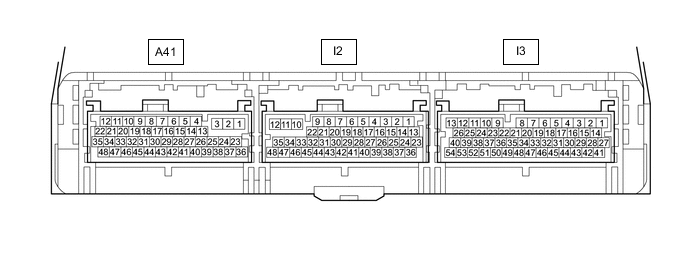
Disconnect the I2 and I3 hybrid vehicle control ECU connectors.
-
Measure the resistance and voltage according to the value(s) in the table below.
Terminal No. (Symbol) Wiring Color Terminal Description Condition Specified Condition I3-3 (E1) - Body ground W-B - Body ground Ground Always Below 1 Ω I2-34 (E12) - Body ground W-B - Body ground Ground Always Below 1 Ω I3-27 (BATT) - Body ground GR - Body ground Auxiliary battery power supply Power switch off 11 to 14 V -
Reconnect the I2 and I3 hybrid vehicle control ECU connectors.
-
Check for pulses according to the value(s) in the table below.
Terminal No. (Symbol) Wiring Color Terminal Description Condition Specified Condition I3-31 (LIN) - Body ground L - Body ground*1
BE - Body ground*2
LIN communication line Power switch on (IG) Pulse generation
-
*1: for LHD
-
*2: for RHD
-
-
-
CHECK ID CODE BOX (IMMOBILISER CODE ECU)

-
Disconnect the I20 ID code box (immobiliser code ECU) connector.
-
Measure the voltage and resistance according to the value(s) in the table below.
Tech Tips
Measure the values on the wire harness side with the connector disconnected.
Terminal No. (Symbol) Wiring Color Terminal Description Condition Specified Condition I20-5 (GND) - Body ground W - Body ground Ground Always Below 1 Ω I20-1 (+B) - Body ground GR - Body ground*1
W - Body ground*2
+B power supply Power switch off 11 to 14 V
-
*1: for LHD
-
*2: for RHD
-
-
Reconnect the I20 ID code box (immobiliser code ECU) connector.
-
Check for pulses according to the value(s) in the table below.
Terminal No. (Symbol) Wiring Color Terminal Description Condition Specified Condition I20-2 (LIN1) - Body ground SB - Body ground*1
W - Body ground*2
LIN communication line Power switch on (IG) Pulse generation
-
*1: for LHD
-
*2: for RHD
-
-
-
CHECK DOUBLE LOCK DOOR CONTROL RELAY ASSEMBLY (w/ Double Locking System)

-
Disconnect the I16 double lock door control relay assembly connector.
-
Measure the voltage and resistance according to the value(s) in the table below.
Tech Tips
Measure the values on the wire harness side with the connector disconnected.
Terminal No. (Symbol) Wiring Color Terminal Description Condition Specified Condition I16-12 (+B) - Body ground R - Body ground Auxiliary battery power supply Power switch off 11 to 14 V I16-11 (CPUB) - Body ground P - Body ground Auxiliary battery power supply Power switch off 11 to 14 V I16-7 (GND) - Body ground LA - Body ground Ground Always Below 1 Ω -
Reconnect the I16 double lock door control relay assembly connector.
-
Check for pulses according to the value(s) in the table below.
Terminal No. (Symbol) Wiring Color Terminal Description Condition Specified Condition I16-9 (LIN) - Body ground GR - Body ground LIN communication line Double lock unset Pulse generation
-