ELECTRONICALLY CONTROLLED BRAKE SYSTEM VSC OFF Switch Circuit
DESCRIPTION
The skid control ECU (brake booster with master cylinder assembly) is connected to the combination meter assembly via CAN communication.
Pressing the VSC OFF switch turns off TRC operation, and pressing and holding this switch turns off TRC and VSC operation. If TRC and VSC operations are turned off, the "Traction Control Turned Off" will be displayed on the multi-information display and the VSC OFF indicator light will come on.
WIRING DIAGRAM
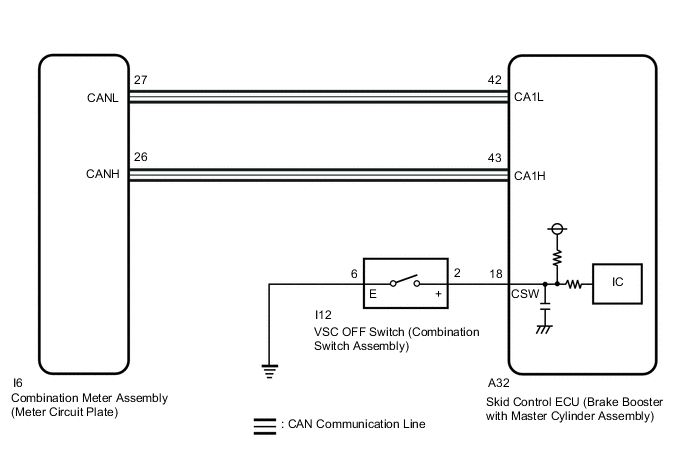
CAUTION / NOTICE / HINT
Note
After replacing the skid control ECU (brake booster with master cylinder assembly), perform linear solenoid valve offset learning, ABS holding solenoid valve learning, yaw rate and acceleration sensor zero point calibration and system information memorization after performing "Reset Memory".
PROCEDURE
-
CHECK CAN COMMUNICATION SYSTEM
-
Check if CAN communication system DTCs are output.
Result Result Proceed to DTCs are not output. A DTCs are output. B
B 
INSPECT CAN COMMUNICATION SYSTEM Click here
A 
-
-
CHECK IF BRAKE BOOSTER WITH MASTER CYLINDER ASSEMBLY CONNECTOR IS SECURELY CONNECTED
-
Check if the skid control ECU (brake booster with master cylinder assembly) connector is securely connected.
OK The connector is securely connected. Result Proceed to OK NG
NG
CONNECT CONNECTOR TO BRAKE BOOSTER WITH MASTER CYLINDER ASSEMBLY CORRECTLY
OK
-
-
READ VALUE USING GTS (TRC/VSC OFF MODE)
-
Select the Data List on the GTS.
Chassis > ABS/VSC/TRC > Data ListTester Display Measurement Item Range Normal Condition Diagnostic Note TRC/VSC Off Mode TRC/VSC off mode Normal, TRC OFF, VSC Expert Mode or VSC OFF Normal: Normal mode
TRC OFF: TRC off mode
VSC Expert Mode: VSC expert mode
VSC OFF: VSC off mode
-
Chassis > ABS/VSC/TRC > Data ListTester Display TRC/VSC Off Mode -
Check the indicator light and mode condition on the GTS changes according to VSC OFF switch operation.
Standard Switch Operation Mode Condition Display Multi-information Display (Traction Control Turned Off) VSC OFF Indicator Light Not pressed Normal Not displayed Does not come on Pressing the VSC OFF switch (combination switch assembly) TRC OFF Displayed Does not come on Pressing and holding the VSC OFF switch (combination switch assembly) VSC OFF Displayed Comes on Result Result Proceed to Indicator light and mode condition display do not change. A Mode condition display is normal, but indicator light does not change. B Indicator light and mode condition display are normal. C
B
INSPECT METER / GAUGE SYSTEM Click here
C
USE SIMULATION METHOD TO CHECK Click here
A
-
-
PERFORM ACTIVE TEST USING GTS (MULTI-INFORMATION DISPLAY (TRACTION CONTROL TURNED OFF) AND VSC OFF INDICATOR LIGHT)
-
Select the Active Test on the GTS.
Chassis > ABS/VSC/TRC > Active TestTester Display Measurement Item Control Range Diagnostic Note TRC(TRAC) OFF Indicator Light Multi-information display (Traction Control Turned Off) Display ON/OFF Observe combination meter assembly VSC OFF Indicator Light VSC OFF indicator light Indicator light ON/OFF Observe combination meter assembly
Chassis > ABS/VSC/TRC > Active TestTester Display TRC(TRAC) OFF Indicator Light
Chassis > ABS/VSC/TRC > Active TestTester Display VSC OFF Indicator Light -
Check the multi-information display (Traction Control Turned Off) and VSC OFF indicator light on the combination meter assembly turn on or off in accordance with GTS operation.
OK The multi-information display (Traction Control Turned Off) and VSC OFF indicator light turn on or off in accordance with GTS operation. Result Proceed to OK NG
NG 
INSPECT COMBINATION METER ASSEMBLY Click here
OK
-
-
INSPECT COMBINATION SWITCH ASSEMBLY
-
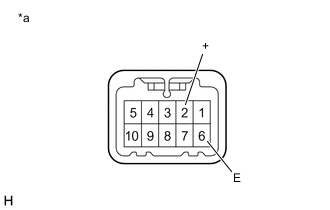
*a Component without harness connected
(VSC OFF Switch (Combination Switch Assembly))
Turn the power switch off.
-
Make sure that there is no looseness at the locking part and the connecting part of the connector.
OK The connector is securely connected. -
Disconnect the I12 VSC OFF switch (combination switch assembly) connector.
-
Check both the connector case and the terminals for deformation and corrosion.
OK No deformation or corrosion. -
Measure the resistance according to the value(s) in the table below.
Standard Resistance Tester Connection Condition Specified Condition 2 (+) - 6 (E) Switch pushed Below 1 Ω 2 (+) - 6 (E) Switch not pushed 10 kΩ or higher Result Proceed to OK NG
NG
REPLACE COMBINATION SWITCH ASSEMBLY Click here
OK
-
-
CHECK HARNESS AND CONNECTOR (BRAKE BOOSTER WITH MASTER CYLINDER ASSEMBLY - COMBINATION SWITCH ASSEMBLY)
-
Make sure that there is no looseness at the locking part and the connecting part of the connector.
OK The connector is securely connected. -
Disconnect the A32 skid control ECU (brake booster with master cylinder assembly) connector.
-
Check both the connector case and the terminals for deformation and corrosion.
OK No deformation or corrosion. -
Measure the resistance according to the value(s) in the table below.
Standard Resistance Tester Connection Condition Specified Condition A32-18 (CSW) - I12-2 (+) Always Below 1 Ω A32-18 (CSW) or I12-2 (+) - Body ground Always 10 kΩ or higher I12-6 (E) - Body ground Always Below 1 Ω Result Proceed to OK NG
OK
REPLACE BRAKE BOOSTER WITH MASTER CYLINDER ASSEMBLY for LHD: Click here
REPLACE BRAKE BOOSTER WITH MASTER CYLINDER ASSEMBLY for RHD: Click hereNG
REPAIR OR REPLACE HARNESS OR CONNECTOR
-
-
INSPECT COMBINATION METER ASSEMBLY
-
Perform the Active Test of the combination meter assembly (meter CPU) using the GTS.
Body Electrical > Combination Meter > Active TestTester Display Meter Display 1
Body Electrical > Combination Meter > Active TestTester Display Indicat. VSC OFF -
Check the combination meter assembly.
OK The multi-information display and VSC OFF indicator light turn on or off in accordance with GTS operation. Result Proceed to OK NG
OK
REPLACE BRAKE BOOSTER WITH MASTER CYLINDER ASSEMBLY for LHD: Click here
REPLACE BRAKE BOOSTER WITH MASTER CYLINDER ASSEMBLY for RHD: Click hereNG
INSPECT METER / GAUGE SYSTEM Click here
-