SFI SYSTEM(w/ Canister Pump Module), Diagnostic DTC:P04417E, P04417F, P04419C
| DTC Code | DTC Name |
|---|---|
| P04417E | Evaporative Emission System Incorrect Purge Flow Actuator Stuck On |
| P04417F | Evaporative Emission System Incorrect Purge Flow Actuator Stuck Off |
| P04419C | Evaporative Emission System Incorrect Purge Flow Low/Insufficient Flow |
DTC SUMMARY
| DTC No. | Detection Item | DTC Detection Condition | Trouble Area | MIL | Memory | Note |
|---|---|---|---|---|---|---|
| P04417E | Evaporative Emission System Incorrect Purge Flow Actuator Stuck On | The stabilized EVAP system pressure is higher than [second reference pressure x 0.2] and the purge VSV is judged as stuck on. |
|
Comes on | DTC stored | SAE Code: P0441 |
| P04417F | Evaporative Emission System Incorrect Purge Flow Actuator Stuck Off | When the purge VSV is opened, the EVAP system pressure does not return to near atmospheric pressure and the purge VSV is judged as stuck off. |
|
Comes on | DTC stored | SAE Code: P0441 |
| P04419C | Evaporative Emission System Incorrect Purge Flow Low/Insufficient Flow | The following conditions are met successively while the engine is running:
|
|
Comes on | DTC stored | SAE Code: P0441 |
| DTC No. | Monitoring Item | Detection Timing | Detection Logic | SAE Code |
|---|---|---|---|---|
| P04417E | Purge VSV (Vacuum Switching Valve) stuck on (open) | While power switch off | 2 trip | P0441 |
| P04417F | Purge VSV stuck off (closed) | While power switch off | ||
| P04419C | Purge flow | While engine running |
MONITOR DESCRIPTION
The 2 monitors, Key-off and Purge Flow, are used to detect malfunctions relating to DTCs P04417E, P04417F and P04419C. The key-off monitor is initiated by the ECM internal timer, known as the soak timer, 5 hours* after the power switch is turned off. The purge flow monitor runs while the engine is running.
Tech Tips
*: If the engine coolant temperature is not less than 35°C (95°F) 5 hours after the power switch is turned off, the monitor check starts 2 hours later. If it is still not less than 35°C (95°F) 7 hours after the power switch is turned off, the monitor check starts 2.5 hours later.
-
KEY-OFF MONITOR
-
Purge VSV stuck open
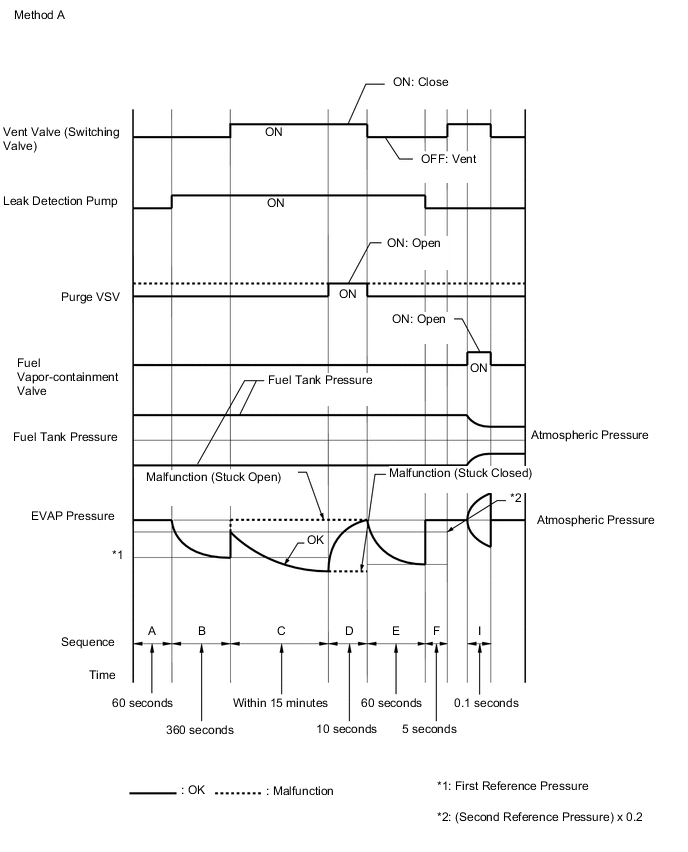
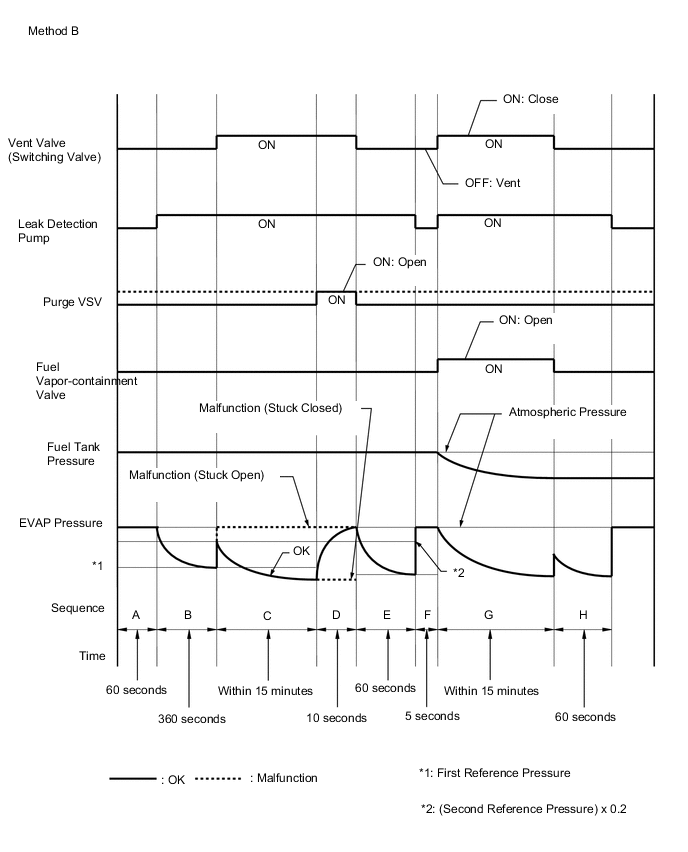
In operation C, the leak detection pump creates negative pressure (vacuum) in the EVAP system. The EVAP system pressure is then measured by the ECM using the canister pressure sensor. If the stabilized system pressure is higher than [second reference pressure x 0.2], the ECM interprets this as the purge VSV (Vacuum Switching Valve) being stuck open. The ECM illuminates the MIL and stores the DTC (2 trip detection logic).
-
Purge VSV stuck closed
During sequence D, the canister pressure sensor measures the EVAP system pressure. The pressure measurement for purge VSV monitor is begun when the purge VSV is turned on (open) after the EVAP leak check. When the measured pressure indicates an increase of 0.3 kPa (0.04 psi) or higher, the purge VSV is functioning normally. If the pressure does not increase, the ECM interprets this as the purge VSV being stuck closed. The ECM illuminates the MIL and stores the DTC (2 trip detection logic).
-
PURGE FLOW MONITOR
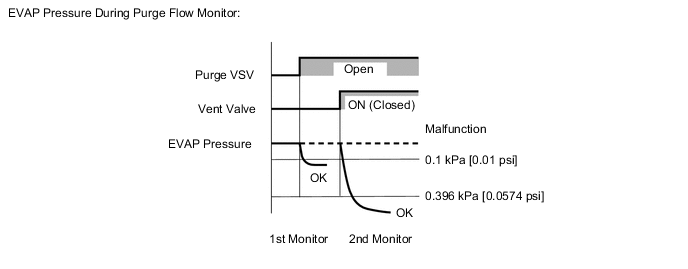
The purge flow monitor consists of 2 monitors. The 1st monitor is conducted every time and the 2nd monitor is activated if necessary.
-
The 1st monitor
While the engine is running and the purge VSV is on (open), the ECM monitors the purge flow by measuring the EVAP pressure change. If negative pressure is not created, the ECM begins the 2nd monitor.
-
The 2nd monitor
The vent valve is turned on (closed) and the EVAP pressure is then measured. If the variation in the pressure is less than 0.396 kPa (0.0574 psi), the ECM interprets this as the Purge VSV being stuck closed. The ECM illuminates the MIL and stores DTC P04419C (2 trip detection logic).
Atmospheric pressure check:
In order to ensure reliable malfunction detection, the variation in atmospheric pressure, before and after performing the purge flow monitor, is measured by the ECM.
MONITOR STRATEGY
| Required Sensors/Components | Purge VSV Canister pump module |
| Frequency of Operation | Once per driving cycle |
CONFIRMATION DRIVING PATTERN
- P04417E and P04417F
Note
-
The Evaporative System Check (Automatic Mode) consists of 9 steps performed automatically by the GTS. It takes a maximum of approximately 40 minutes.
-
Do not perform the Evaporative System Check when the fuel tank is more than 90% full because the cut-off valve may be closed, making the fuel tank leak check unavailable.
-
Do not start the engine during this operation.
-
When the temperature of the fuel is 35°C (95°F) or higher, a large amount of vapor will from and any check result will be inaccurate. When performing the Evaporative System Check, keep the fuel temperature less than 35°C (95°F).
-
Connect the GTS to the DLC3.
-
Turn the power switch on (IG).
-
Turn the GTS on.
-
Clear the DTCs (even if no DTCs are stored, perform the clear DTC procedure).
-
Turn the power switch off and wait for at least 30 seconds.
-
Turn the power switch on (IG).
-
Turn the GTS on.
-
Enter the following menus: Powertrain / Engine / Utility / Evaporative System Check / Automatic Mode.
-
After the Evaporative System Check is completed, check for All Readiness by entering the following menus: Powertrain / Engine / Utility / All Readiness.
-
Input the DTC: P04417E or P04417F.
-
Check the DTC judgment result.
GTS Display Description NORMAL
-
DTC judgment completed
-
System normal
ABNORMAL
-
DTC judgment completed
-
System abnormal
INCOMPLETE
-
DTC judgment not completed
-
Perform driving pattern after confirming DTC enabling conditions
N/A
-
Unable to perform DTC judgment
-
Number of DTCs which do not fulfill DTC preconditions has reached ECU memory limit
Tech Tips
-
If the judgment result is NORMAL, the system is normal.
-
If the judgment result is ABNORMAL, the system is malfunctioning.
-
-
- P04419C
-
Connect the GTS to the DLC3.
-
Turn the power switch on (IG).
-
Turn the GTS on.
-
Clear the DTCs (even if no DTCs are stored, perform the clear DTC procedure).
-
Turn the power switch off and wait for at least 30 seconds.
-
Turn the power switch on (IG).
-
Turn the GTS on.
-
Put the engine in Inspection Mode (Maintenance Mode).
-
Start the engine and wait 15 minutes or more.
-
Enter the following menus: Powertrain / Engine / Trouble Codes.
-
Read the pending DTCs.
Tech Tips
-
If a pending DTC is output, the system is malfunctioning.
-
If a pending DTC is not output, perform the following procedure.
-
-
Enter the following menus: Powertrain / Engine / Utility / All Readiness.
-
Input the DTC: P04419C.
-
Check the DTC judgment result.
GTS Display Description NORMAL
-
DTC judgment completed
-
System normal
ABNORMAL
-
DTC judgment completed
-
System abnormal
INCOMPLETE
-
DTC judgment not completed
-
Perform driving pattern after confirming DTC enabling conditions
N/A
-
Unable to perform DTC judgment
-
Number of DTCs which do not fulfill DTC preconditions has reached ECU memory limit
Tech Tips
-
If the judgment result is NORMAL, the system is normal.
-
If the judgment result is ABNORMAL, the system is malfunctioning.
-
-
PROCEDURE
-
CHECK ANY OTHER DTCS OUTPUT (IN ADDITION TO DTC P04417E, P04417F AND/OR P04419C)
-
Connect the GTS to the DLC3.
-
Turn the power switch on (IG).
-
Turn the GTS on.
-
Enter the following menus: Powertrain / Engine / Trouble Codes.
-
Read the DTCs.
Powertrain > Engine > Trouble CodesResult Result Proceed to DTC P04417E, P04417F or P04419C is output A DTC P04417E, P04417F or P04419C and other DTCs are output B Tech Tips
If any DTCs other than DTC P04417E, P04417F or P04419C are output, troubleshoot those DTCs first.
A 
GO TO EVAP SYSTEM Click here
B
GO TO DTC CHART Click here
-