SPEED LIMITER SYSTEM OPERATION CHECK
-
CHECK SPEED LIMITER INDICATOR AND MULTI-INFORMATION DISPLAY
-
Turn the power switch on (IG).
-
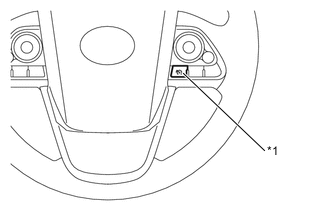
*1 Speed Limiter Switch Check that the speed limiter indicator turns on when the speed limiter is turned on using the speed limiter switch and that the speed limiter indicator turns off when the speed limiter is turned off using the speed limiter switch.
-
Check that the status of the speed limiter operation appears on the main display or multi-information display.
Condition Main Display Multi-information Display Master Warning Light Warning Buzzer Speed Limiter Switch On Adjustable speed limiter indicator illuminates - Does not illuminate Does not sound Mode Set Effecting Control
-
Adjustable speed limiter indicator illuminates
-
Set vehicle limit speed is displayed
- Does not illuminate Does not sound Interrupt Control
-
Adjustable speed limiter indicator illuminates
-
Set vehicle limit speed is displayed as "--"
- Does not illuminate Does not sound Set Speed Exceeded
-
Adjustable speed limiter indicator illuminates
-
Set vehicle limit speed is highlighted
- Does not illuminate Sounds* System Malfunction Adjustable speed limiter indicator does not illuminate "Check Speed Limiter System" is displayed Illuminates Sounds *: The warning buzzer does not sound under the following conditions:
-
The override control is operating
-
The vehicle speed becomes higher than the set speed while coasting
-
The vehicle speed is higher than the set speed when the speed limiter system is resumed
-
-