PLUG-IN CHARGE CONTROL SYSTEM AC Line Insulation Malfunction
DESCRIPTION
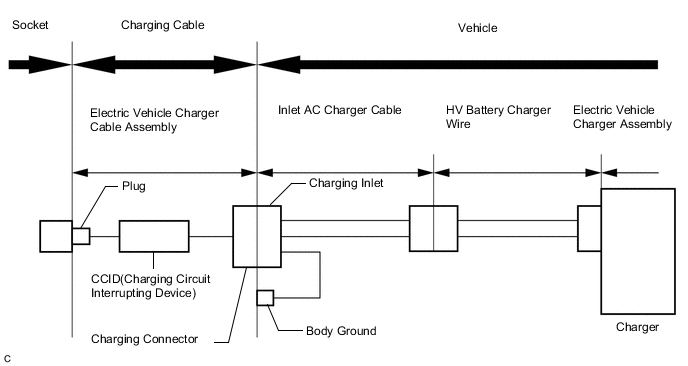
The CCID (Charging Circuit Interrupting Device) built into the electric vehicle charger cable assembly detects insulation malfunctions in the AC line between the CCID and electric vehicle charger assembly.
CAUTION / NOTICE / HINT
CAUTION:
-
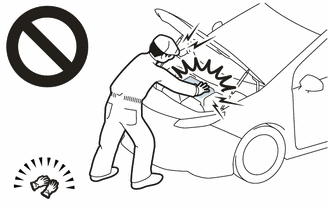
Before the following operations are conducted, take precautions to prevent electric shock by turning the power switch off, wearing insulated gloves, and removing the service plug grip from HV battery.
-
Inspecting the high-voltage system
-
Disconnecting the low voltage connector of the inverter with converter assembly
-
Disconnecting the low voltage connector of the HV battery
-
Disconnecting the low voltage connector of the electric vehicle charger assembly
-
Disconnecting the low voltage connector of the solar energy control unit
-
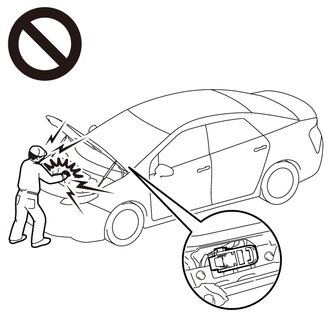
To prevent electric shock, make sure to remove the service plug grip to cut off the high voltage circuit before servicing the vehicle.
-
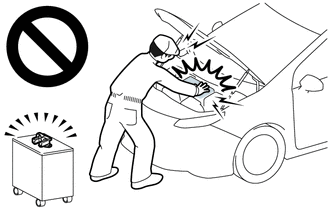
After removing the service plug grip from the HV battery, put it in your pocket to prevent other technicians from accidentally reconnecting it while you are working on the high-voltage system.
-

*a Without waiting for 10 minutes After removing the service plug grip, wait for at least 10 minutes before touching any of the high-voltage connectors or terminals. After waiting for 10 minutes, check the voltage at the terminals in the inspection point in the inverter with converter assembly. The voltage should be 0 V before beginning work.
Tech Tips
Waiting for at least 10 minutes is required to discharge the high-voltage capacitor inside the inverter with converter assembly and the electric vehicle charger assembly.
Note
After turning the power switch off, waiting time may be required before disconnecting the cable from the negative (-) auxiliary battery terminal. Therefore, make sure to read the disconnecting the cable from the negative (-) auxiliary battery terminal notices before proceeding with work.
PROCEDURE
-
SIMULATION TEST
CAUTION:
Be sure to wear insulated gloves.
-
Perform plug-in charging using the electric vehicle charger cable assembly that the customer used.
-
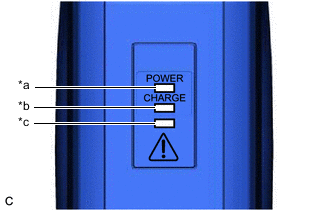
*a Power Indicator *b Charge Status Indicator *c Error Warning Indicator Check the condition of the power and error warning indicators on the electric vehicle charger cable assembly.
Tech Tips
For details on the status of the power and error warning indicators, refer to Charge Cable On-vehicle Inspection.
Result Power Indicator Error Warning Indicator Plug-in Charge Status Proceed to Illuminated Flashes (3 times) Not charging A Illuminated Off Charging B Other - C
B 
COMPLETED (EXPLAIN TO CUSTOMER THAT OPERATION IS NORMAL)
C
GO TO ELECTRIC VEHICLE CHARGER CABLE ASSEMBLY INSPECTION Click here
A 
-
-
CHECK ELECTRIC VEHICLE CHARGER CABLE ASSEMBLY (USING A KNOWN GOOD ELECTRIC VEHICLE CHARGER CABLE ASSEMBLY)
CAUTION:
Be sure to wear insulated gloves.
-
Perform plug-in charging using a known good electric vehicle charger cable assembly.
-
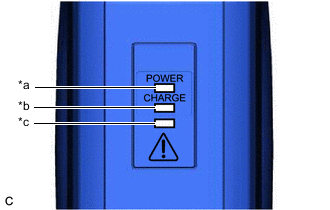
*a Power Indicator *b Charge Status Indicator *c Error Warning Indicator Check the condition of the power and error warning indicators on the electric vehicle charger cable assembly.
Result Power Indicator Error Warning Indicator Plug-in Charge Status Proceed to Illuminated Flashes (3 times) Not charging A Illuminated Off Charging B
B
REPLACE ELECTRIC VEHICLE CHARGER CABLE ASSEMBLY
A
-
-
CHECK HV BATTERY CHARGER WIRE (ELECTRIC VEHICLE CHARGER ASSEMBLY - CHARGING INLET)
CAUTION:
Be sure to wear insulated gloves.
-
Check that the service plug grip is not installed.
Note
After removing the service plug grip, do not turn the power switch on (READY), unless instructed by the repair manual because this may cause a malfunction.
-
Check that the electric vehicle charger cable assembly is not connected.
-
Remove the rear under side cover RH.
-
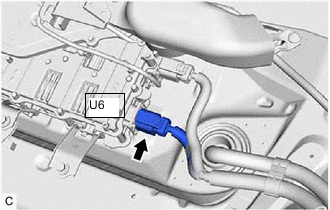
Disconnect the U6 electric vehicle charger assembly connector.
-
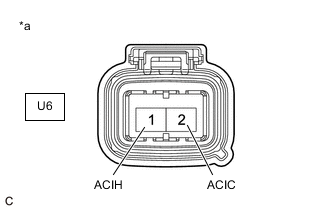
*a HV Battery Charger Wire
(Electric Vehicle Charger Assembly Side)
Using a megohmmeter set to 500 V, measure the resistance according to the value(s) in the table below.
Note
Be sure to set the megohmmeter to 500 V when performing this test. Using a setting higher than 500 V can result in damage to the component being inspected.
Standard Resistance Tester Connection Condition Specified Condition U6-1 (ACIH) - Body ground Power switch off 10 MΩ or higher U6-2 (ACIC) - Body ground Power switch off 10 MΩ or higher -
Reconnect the U6 electric vehicle charger assembly connector.
-
Install the rear under side cover RH.
Result Proceed to OK NG
OK
REPLACE ELECTRIC VEHICLE CHARGER ASSEMBLY Click here
NG
-
-
CHECK INLET AC CHARGER CABLE (CHARGING INLET - HV BATTERY CHARGER WIRE CONNECTOR)
CAUTION:
Be sure to wear insulated gloves.
-
Check that the service plug grip is not installed.
Note
After removing the service plug grip, do not turn the power switch on (READY), unless instructed by the repair manual because this may cause a malfunction.
-
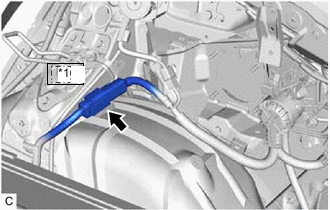
*1 Uh1 Disconnect the Uh1 inlet AC charger cable connector.
-
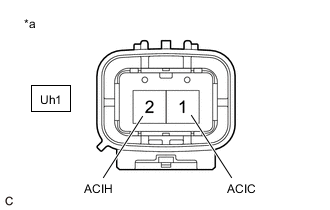
*a Inlet AC Charger Cable
(HV Battery Charger Wire Side)
Using a megohmmeter set to 500 V, measure the resistance according to the value(s) in the table below.
Note
Be sure to set the megohmmeter to 500 V when performing this test. Using a setting higher than 500V can result in damage to the component being inspected.
Standard Resistance Tester Connection Condition Specified Condition Uh1-2 (ACIH) - Body ground Power switch off 10 MΩ or higher Uh1-1 (ACIC) - Body ground Power switch off 10 MΩ or higher -
Reconnect the Uh1 inlet AC charger cable connector.
Result Proceed to OK NG
OK
REPLACE HV BATTERY CHARGER WIRE Click here
NG
REPLACE INLET AC CHARGER CABLE Click here
-