PLUG-IN CHARGE CONTROL SYSTEM Hybrid Battery SOC Indicator does not Come ON
DESCRIPTION
Electric vehicle charger assembly illuminates or turns off the indicator light assembly (SOC indicator) in accordance with the SOC of the HV battery.
WIRING DIAGRAM
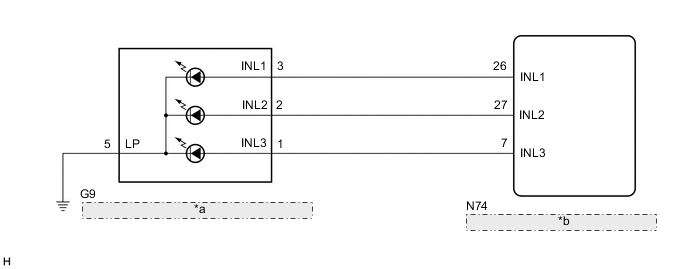
| *a | Indicator Light Assembly (SOC Indicator) |
| *b | Electric Vehicle Charger Assembly |
CAUTION / NOTICE / HINT
CAUTION:
-
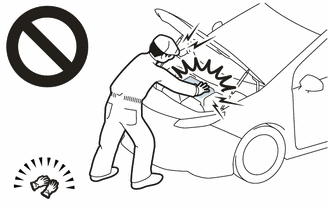
Before the following operations are conducted, take precautions to prevent electric shock by turning the power switch off, wearing insulated gloves, and removing the service plug grip from HV battery.
-
Inspecting the high-voltage system
-
Disconnecting the low voltage connector of the inverter with converter assembly
-
Disconnecting the low voltage connector of the HV battery
-
Disconnecting the low voltage connector of the electric vehicle charger assembly
-
Disconnecting the low voltage connector of the solar energy control unit
-
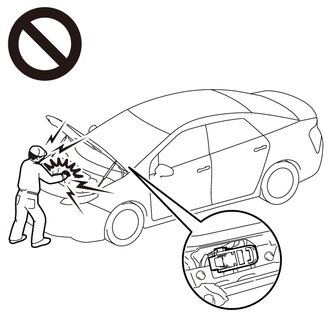
To prevent electric shock, make sure to remove the service plug grip to cut off the high voltage circuit before servicing the vehicle.
-
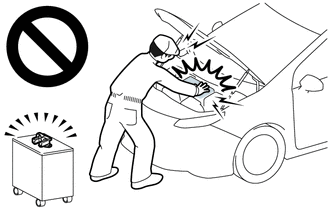
After removing the service plug grip from the HV battery, put it in your pocket to prevent other technicians from accidentally reconnecting it while you are working on the high-voltage system.
-

*a Without waiting for 10 minutes After removing the service plug grip, wait for at least 10 minutes before touching any of the high-voltage connectors or terminals. After waiting for 10 minutes, check the voltage at the terminals in the inspection point in the inverter with converter assembly. The voltage should be 0 V before beginning work.
Tech Tips
Waiting for at least 10 minutes is required to discharge the high-voltage capacitor inside the inverter with converter assembly and the electric vehicle charger assembly.
Note
After turning the power switch off, waiting time may be required before disconnecting the cable from the negative (-) auxiliary battery terminal. Therefore, make sure to read the disconnecting the cable from the negative (-) auxiliary battery terminal notices before proceeding with work.
Tech Tips
-
Connect the GTS to the DLC3.
-
Turn the power switch on (IG).
-
Turn the GTS on.
-
Enter the following menus: Powertrain / Hybrid Control / Data List / Hybrid Battery SOC.
-
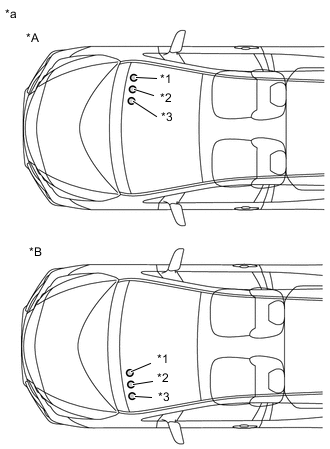
*A for LHD *B for RHD *a Position of SOC indicators (indicator light assembly) *1 1st Indicator *2 2nd Indicator *3 3rd Indicator Read the value displayed on the GTS.
Tester Display Condition Normal Condition Hybrid Battery SOC 1st Indicator Not Illuminated - Blinking 8.2 to 41.9% Illuminated 42.0% or more 2nd Indicator Not Illuminated 8.2 to 41.9% Blinking 42.0 to 79.9% Illuminated 80.0% or more 3rd Indicator Not Illuminated 8.2 to 79.9% Blinking 80.0% or more Illuminated 100% -
Turn the power switch off.
-
Connect the electric vehicle charger cable assembly to a known good AC power supply and plug-in charge the vehicle until each SOC indicator illuminates.
PROCEDURE
-
CHECK DTC OUTPUT (HEALTH CHECK)
-
Connect the GTS to the DLC3.
-
Turn the power switch on (IG).
-
Turn the GTS on.
-
Enter the following menus: Health Check.
-
Check DTCs.
Result Result Proceed to No DTCs are output. A DTCs are output. B -
Turn the power switch off.
B 
GO TO DTC CHART
A 
-
-
CHECK FOR VEHICLE CONTROL HISTORY
-
Connect the GTS to the DLC3.
-
Turn the power switch on (IG).
-
Turn the GTS on.
-
Enter the following menus: Powertrain / Plug-in Control / Utility / Vehicle Control History.
Powertrain > Plug-in Control > UtilityTester Display Vehicle Control History (RoB) -
Enter the following menus: Powertrain / Hybrid Control / Utility / Vehicle Control History.
Powertrain > Hybrid Control > UtilityTester Display Vehicle Control History (RoB) -
Check for Vehicle Control History.
Result Result Proceed to Vehicle Control History not stored A Vehicle Control History stored B -
Turn the power switch off.
B
GO TO VEHICLE CONTROL HISTORY PLUG-IN CHARGE CONTROL SYSTEM Click here HYBRID CONTROL SYSTEM Click here
A
-
-
CHARGE HV BATTERY (PLUG-IN CHARGE)
-
Connect the electric vehicle charger cable assembly to a known good AC power supply and plug-in charge the vehicle until the HV battery is fully charged.
-
Connect the GTS to the DLC3.
-
Turn the power switch on (IG).
-
Turn the GTS on.
-
Enter the following menus: Powertrain / Hybrid Control / Data List / Hybrid Battery SOC.
Powertrain > Hybrid Control > Data ListTester Display Hybrid Battery SOC -
Read the value displayed on the GTS.
Powertrain > Hybrid Control > Data ListTester Display Measurement Item Range Normal Condition Hybrid Battery SOC Hybrid Battery SOC 0.00 to 100.00% 100.00%: Fully charged
-
-
After the HV battery is fully charged, disconnect the electric vehicle charger cable assembly.
Result Proceed to NEXT
NEXT
-
-
READ VALUE USING GTS (HYBRID BATTERY SOC INDICATOR 1 STATUS, HYBRID BATTERY SOC INDICATOR 2 STATUS, HYBRID BATTERY SOC INDICATOR 3 STATUS)
-
Connect the GTS to the DLC3.
-
Turn the power switch on (IG).
-
Turn the GTS on.
-
Enter the following menus: Powertrain / Plug-in Control / Data List / Hybrid Battery SOC Indicator 1 Status, Hybrid Battery SOC Indicator 2 Status, Hybrid Battery SOC Indicator 3 Status.
Powertrain > Plug-in Control > Data ListTester Display Hybrid Battery SOC Indicator 1 Status Hybrid Battery SOC Indicator 2 Status Hybrid Battery SOC Indicator 3 Status -
Connect the electric vehicle charger cable assembly to a known good AC outlet and then connect the charging connector to the vehicle.
-
Read the value displayed on the GTS.
Powertrain > Plug-in Control > Data ListTester Display Measurement Item Range Normal Condition Hybrid Battery SOC Indicator 1 Status Hybrid battery SOC indicator 1 status ON or OFF Hybrid battery SOC indicator 1 illuminated: ON Hybrid Battery SOC Indicator 2 Status Hybrid battery SOC indicator 2 status ON or OFF Hybrid battery SOC indicator 2 illuminated: ON Hybrid Battery SOC Indicator 3 Status Hybrid battery SOC indicator 3 status ON or OFF Hybrid battery SOC indicator 3 illuminated: ON Tech Tips
If the HV battery is already fully charged when the electric vehicle charger cable assembly is connected, all 3 of the SOC indicators will illuminate for approximately 15 seconds.
Result Result Proceed to On the GTS screen, ON or OFF is displayed according to the state of each SOC indicator A On the GTS screen, ON and OFF are not displayed according to the condition of each SOC indicator B -
Disconnect the electric vehicle charger cable assembly.
-
Turn the power switch off.
A
GO TO PROBLEM SYMPTOMS TABLE (PLUG-IN CHARGE CONTROL SYSTEM) Click here
B
-
-
INSPECT INDICATOR LIGHT ASSEMBLY (SOC INDICATOR)
Result Proceed to OK NG
NG
REPLACE INDICATOR LIGHT ASSEMBLY Click here
OK
-
CHECK HARNESS AND CONNECTOR (ELECTRIC VEHICLE CHARGER ASSEMBLY - INDICATOR LIGHT ASSEMBLY (SOC INDICATOR))
CAUTION:
Be sure to wear insulated gloves.
-
Check that the service plug grip is not installed.
Note
After removing the service plug grip, do not turn the power switch on (READY), unless instructed by the repair manual because this may cause a malfunction.
-
Remove the EV charger duct.
-
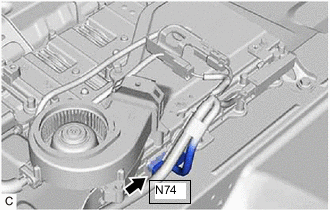
Disconnect the N74 electric vehicle charger assembly connector.
-
Disconnect the G9 indicator light assembly (Hybrid battery SOC indicator) connector.
-
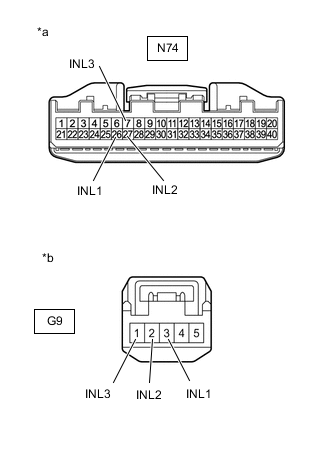
*a Front view of wire harness connector
(to Electric Vehicle Charger Assembly)
*b Front view of wire harness connector
(to Indicator Light Assembly (Hybrid Battery SOC Indicator))
Measure the resistance according to the value(s) in the table below.
Standard Resistance (Check for Open) Tester Connection Condition Specified Condition N74-26 (INL1) - G9-3 (INL1) Power switch off Below 1 Ω N74-27 (INL2) - G9-2 (INL2) Power switch off Below 1 Ω N74-7 (INL3) - G9-1 (INL3) Power switch off Below 1 Ω Standard Resistance (Check for Short) Tester Connection Condition Specified Condition N74-26 (INL1) or G9-3 (INL1) - Body ground and other terminals Power switch off 10 kΩ or higher N74-27 (INL2) or G9-2 (INL2) - Body ground and other terminals Power switch off 10 kΩ or higher N74-7 (INL3) or G9-1 (INL3) - Body ground and other terminals Power switch off 10 kΩ or higher -
Reconnect the G9 indicator light assembly (Hybrid battery SOC indicator) connector.
-
Reconnect the N74 electric vehicle charger assembly connector.
-
Install the EV charger duct.
Result Proceed to OK NG
NG
REPAIR OR REPLACE HARNESS OR CONNECTOR
OK
-
-
CHECK HARNESS AND CONNECTOR (INDICATOR LIGHT ASSEMBLY (SOC INDICATOR) - BODY GROUND)
-
Disconnect the G9 indicator light assembly (Hybrid battery SOC indicator) connector.
-
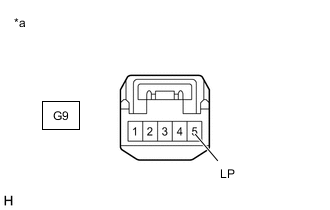
*a Front view of wire harness connector
(to Indicator Light Assembly (Hybrid Battery SOC Indicator))
Measure the resistance according to the value(s) in the table below.
Standard Resistance Tester Connection Condition Specified Condition G9-5 (LP) - Body ground Always Below 1 Ω -
Reconnect the G9 indicator light assembly (Hybrid battery SOC indicator) connector.
Result Proceed to OK NG
OK
CHECK FOR INTERMITTENT PROBLEMS Click here
NG
REPAIR OR REPLACE HARNESS OR CONNECTOR
-