HYBRID CONTROL SYSTEM, Diagnostic DTC:P1CDA00
| DTC Code | DTC Name |
|---|---|
| P1CDA00 | Hybrid/EV Powertrain Control Module Processor and Monitoring Processor Charging Permission Signal Stuck Off |
DTC SUMMARY
-
MALFUNCTION DESCRIPTION
When plug-in charging is started, the hybrid vehicle control ECU checks the plug-in charger gate permission signal (CHEN) output to the electric vehicle charger assembly and the answer back signal output by the electric vehicle charger assembly.
This DTC is stored if an answer back signal from the electric vehicle charger assembly is not received by the hybrid vehicle control ECU when it outputs the plug-in charger gate permission signal (CHEN). In this case, the operation of the plug-in charger gate permission signal cannot be assured.
The cause of this malfunction may be one of the following:
-
Hybrid Vehicle Control ECU malfunction
Hybrid vehicle control ECU internal malfunction
-
The connectors are not connected properly
-
Foreign matter or water on the connector terminals
-
Open or short in wire harness
Wire harness between the electric vehicle charger assembly and hybrid vehicle control ECU
-
Electric vehicle charger assembly malfunction
Electric Vehicle Charger Assembly internal malfunction
-
Communication malfunction between the electric vehicle charger assembly and hybrid vehicle control ECU
Communication Error
-
DESCRIPTION
Refer to the description for DTC P1CD800.
| DTC No. | Detection Item | DTC Detection Condition | Trouble Area | MIL | Warning Indicate |
|---|---|---|---|---|---|
| P1CDA00 | Hybrid/EV Powertrain Control Module Processor and Monitoring Processor Charging Permission Signal Stuck Off | An answer back signal is not received from the electric vehicle charger assembly when the hybrid vehicle control ECU outputs the plug-in charger gate permission signal. (1 trip detection logic) |
|
Comes on | Master Warning Light: Comes on |
| DTC No. | Data List |
|---|---|
| P1CDA00 |
|
CONFIRMATION DRIVING PATTERN
Tech Tips
After repair has been completed, clear the DTC and then check that the vehicle has returned to normal by performing the following All Readiness check procedure.
-
Connect the GTS to the DLC3.
-
Turn the power switch on (IG) and turn the GTS on.
-
Clear the DTCs (even if no DTCs are stored, perform the clear DTC procedure).
-
Enter the following menus: Powertrain / Hybrid Control / Data List.
-
Check that "Hybrid Battery SOC" shows 70% or less.
-
Turn the power switch off and wait for 2 minutes or more.
-
Connect the electric vehicle charger cable assembly, and plug-in charge the vehicle for 30 seconds or more.
-
Disconnect the electric vehicle charger cable assembly and wait for 10 seconds or more.
-
Turn the power switch on (IG) and turn the GTS on.
-
Enter the following menus: Powertrain / Hybrid Control / Utility / All Readiness.
-
Check the DTC judgment result.
Tech Tips
-
If the judgment result shows NORMAL, the system is normal.
-
If the judgment result shows ABNORMAL, the system has a malfunction.
-
If the judgment result shows INCOMPLETE or N/A, perform driving pattern again.
-
CAUTION / NOTICE / HINT
CAUTION:
-
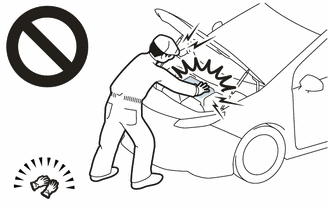
Before the following operations are conducted, take precautions to prevent electric shock by turning the power switch off, wearing insulated gloves, and removing the service plug grip from HV battery.
-
Inspecting the high-voltage system
-
Disconnecting the low voltage connector of the inverter with converter assembly
-
Disconnecting the low voltage connector of the HV battery
-
Disconnecting the low voltage connector of the electric vehicle charger assembly.
-
Disconnecting the low voltage connector of the solar energy control unit
-
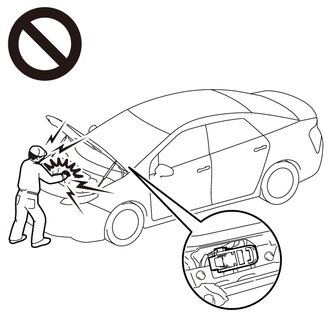
To prevent electric shock, make sure to remove the service plug grip to cut off the high voltage circuit before servicing the vehicle.
-
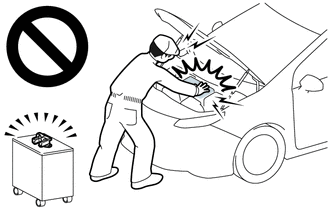
After removing the service plug grip from the HV battery, put it in your pocket to prevent other technicians from accidentally reconnecting it while you are working on the high-voltage system.
-
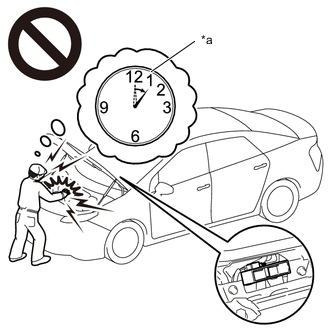
*a Without waiting for 10 minutes After removing the service plug grip, wait for at least 10 minutes before touching any of the high-voltage connectors or terminals. After waiting for 10 minutes, check the voltage at the terminals in the inspection point in the inverter with converter assembly. The voltage should be 0 V before beginning work.
Tech Tips
Waiting for at least 10 minutes is required to discharge the high-voltage capacitor inside the inverter with converter assembly.
Note
After turning the power switch off, waiting time may be required before disconnecting the cable from the negative (-) auxiliary battery terminal. Therefore, make sure to read the disconnecting the cable from the negative (-) auxiliary battery terminal notices before proceeding with work.
PROCEDURE
-
CHECK DTC OUTPUT (HYBRID CONTROL AND PLUG-IN CONTROL)
-
Connect the GTS to the DLC3.
-
Turn the power switch on (IG).
-
Enter the following menus: Powertrain / Hybrid Control and Plug-in Control / Trouble Codes.
-
Check for DTCs.
Powertrain > Hybrid Control > Trouble Codes
Powertrain > Plug-in Control > Trouble CodesResult Result Proceed to P1CDA00 only is output, or DTCs except the ones in the table below are also output. A DTCs of hybrid control system in the tables below are output. B DTCs of plug-in charge control system in the tables below are output. C Malfunction Content System Relevant DTC Microcomputer malfunction Hybrid control system P060647 Hybrid/EV Powertrain Control Module Processor Watchdog / Safety MCU Failure P060687 Hybrid/EV Powertrain Control Module Processor to Monitoring Processor Missing Message P060A47 Hybrid/EV Powertrain Control Module Monitoring Processor Watchdog / Safety MCU Failure P060A87 Hybrid/EV Powertrain Control Module Processor from Monitoring Processor Missing Message P1C9E9F Hybrid/EV System Reset Stuck Off Plug-in charge control system P060B49 Plug-in Control Module A/D Processing Internal Electronic Failure Communication system malfunction Plug-in charge control system U019B87 Lost Communication with Hybrid/EV Battery Charger Control Module Missing Message Tech Tips
-
P1CDA00 may be output as a result of the malfunction indicated by the DTCs above.
-
The chart above is listed in inspection order of priority.
-
Check DTCs that are output at the same time by following the listed order. (The main cause of the malfunction can be determined without performing unnecessary inspections.)
-
-
Turn the power switch off.
B 
GO TO DTC CHART (HYBRID CONTROL SYSTEM) Click here
C
GO TO DTC CHART (PLUG-IN CHARGE CONTROL SYSTEM) Click here
A 
-
-
CHECK CONNECTOR CONNECTION CONDITION (HYBRID VEHICLE CONTROL ECU CONNECTOR)
Result Proceed to OK NG
-
Check the connector connections and contact pressure of the relevant terminals for the hybrid vehicle control ECU connectors.
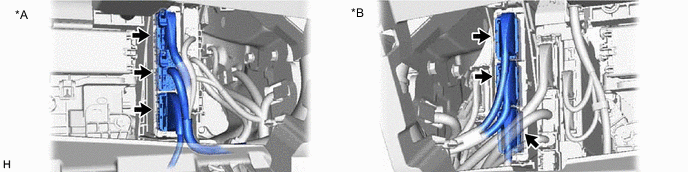
*A for LHD *B for RHD OK The connectors are connected securely and there are no contact pressure problems. Result Proceed to OK NG
NG
CONNECT SECURELY
OK
-
-
CHECK CONNECTOR CONNECTION CONDITION (ELECTRIC VEHICLE CHARGER ASSEMBLY CONNECTOR)
Result Result Proceed to OK A NG (The connector is not connected securely.) B NG (The terminals are not making secure contact or are deformed, or water or foreign matter exists in the connector.) C CAUTION:
Be sure to wear insulated gloves.
-
Check that the service plug grip is not installed.
Note
After removing the service plug grip, do not turn the power switch on (READY), unless instructed by the repair manual because this may cause a malfunction.
-
Remove the EV charger duct.
-
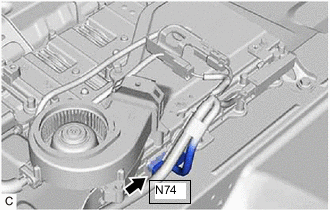
Check the connection condition of the N74 electric vehicle charger assembly connector and the contact pressure of each terminal. Check the terminals for deformation, and check the connector for water ingress and foreign matter.
OK - The connector is connected securely. - The terminals are not deformed and are connected securely. - No water or foreign matter in the connector. -
Install the EV charger duct.
Result Result Proceed to OK A NG (The connector is not connected securely.) B NG (The terminals are not making secure contact or are deformed, or water or foreign matter exists in the connector.) C
B
CONNECT SECURELY
C
REPAIR OR REPLACE HARNESS OR CONNECTOR
A
-
-
CHECK HARNESS AND CONNECTOR (HYBRID VEHICLE CONTROL ECU - ELECTRIC VEHICLE CHARGER ASSEMBLY)
CAUTION:
Be sure to wear insulated gloves.
-
Check that the service plug grip is not installed.
Note
After removing the service plug grip, do not turn the power switch on (READY), unless instructed by the repair manual because this may cause a malfunction.
-
Disconnect the I2 hybrid vehicle control ECU connector.
-
Remove the EV charger duct.
-
Disconnect the N74 electric vehicle charger assembly connector.
-
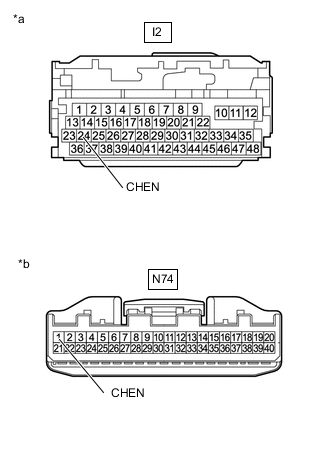
*a Front view of wire harness connector
(to Hybrid Vehicle Control ECU)
*b Front view of wire harness connector
(to Electric Vehicle Charger Assembly)
Measure the resistance according to the value(s) in the table below.
Standard Resistance Tester Connection Condition Specified Condition I2-24 (CHEN) - N74-1(CHEN) Power switch off Below 1 Ω I2-24 (CHEN) - Body ground Power switch off 10 kΩ or higher -
Reconnect the N74 electric vehicle charger assembly connector.
-
Install the EV charger duct.
-
Reconnect the I2 hybrid vehicle control ECU connector.
Result Proceed to OK NG
NG
REPAIR OR REPLACE HARNESS OR CONNECTOR
OK
-
-
CHECK HYBRID VEHICLE CONTROL ECU
CAUTION:
Be sure to wear insulated gloves.
-
Check that the service plug grip is not installed.
Note
After removing the service plug grip, do not turn the power switch on (READY), unless instructed by the repair manual because this may cause a malfunction.
-
Remove the EV charger duct.
-
Disconnect the N74 electric vehicle charger assembly connector.
-
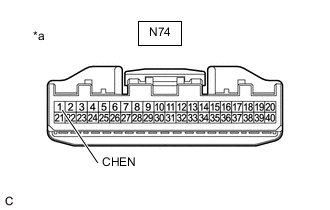
*a Front view of wire harness connector
(to Electric Vehicle Charger Assembly)
Measure the resistance according to the value(s) in the table below.
Standard Resistance Tester Connection Condition Specified Condition N74-1 (CHEN) - Body ground Power switch off 10 kΩ or higher -
Reconnect the N74 electric vehicle charger assembly connector.
-
Install the EV charger duct.
Result Proceed to OK NG
NG
REPLACE HYBRID VEHICLE CONTROL ECU Click here
OK
-
-
CHECK HYBRID VEHICLE CONTROL ECU (+B2 VOLTAGE)
-
Disconnect the I3 hybrid vehicle control ECU connector.
-
Turn the power switch on (IG).
-
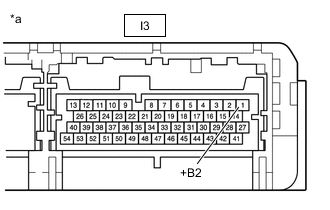
*a Component without harness connected
(to Hybrid Vehicle Control ECU)
Measure the voltage according to the value(s) in the table below.
Standard Voltage Tester Connection Condition Specified Condition I3-1 (+B2) - Body ground Power switch on (IG) 8 V or higher Note
Turning the power switch on (IG) with the hybrid vehicle control ECU connector disconnected causes other DTCs to be stored. Clear the DTCs after performing this inspection.
-
Turn the power switch off.
-
Reconnect the I3 hybrid vehicle control ECU connector.
Result Proceed to OK NG
OK
REPLACE ELECTRIC VEHICLE CHARGER ASSEMBLY Click here
NG
REPLACE HYBRID VEHICLE CONTROL ECU Click here
-