HYBRID CONTROL SYSTEM, Diagnostic DTC:P308F49
| DTC Code | DTC Name |
|---|---|
| P308F49 | High Voltage Charging Circuit Short during Pre-Charge |
DTC SUMMARY
-
MALFUNCTION DESCRIPTION
The hybrid vehicle control ECU monitors the high-voltage wiring between the HV battery and electric vehicle charger assembly or HV battery and solar energy control unit and detects an open circuit malfunction.
The cause of this malfunction may be one of the following:
-
Voltage sensor (VCHG) malfunction
-
Electric vehicle charger assembly malfunction
-
Communication (wire harness) malfunction
Electric vehicle charger voltage sensor (VCHG) internal circuit malfunction
-
HV battery malfunction
-
No. 1 HV battery junction block assembly malfunction
-
No. 2 HV battery junction block assembly malfunction
-
Inverter with converter assembly malfunction
-
High-voltage wire harness malfunction
-
High-voltage connector or connection malfunction
High voltage system malfunction
-
Hybrid vehicle control ECU malfunction
-
No. 1 HV battery junction block assembly malfunction
-
No. 2 HV battery junction block assembly malfunction
-
Low voltage wire harness malfunction
-
Low voltage connector malfunction
Low-voltage circuit (12 V) malfunction
-
Battery current sensor (IB) malfunction
-
Communication (wire harness) malfunction
Battery current sensor (IB) circuit malfunction
-
Voltage sensor (VSOL) malfunction
-
Solar energy control unit malfunction
-
Communication (wire harness) malfunction
Solar energy control unit voltage sensor (VSOL) internal circuit malfunction*1
-
Solar energy control unit malfunction
High voltage system malfunction*1
*1: w/ Solar Charging System
-
-
INSPECTION DESCRIPTION
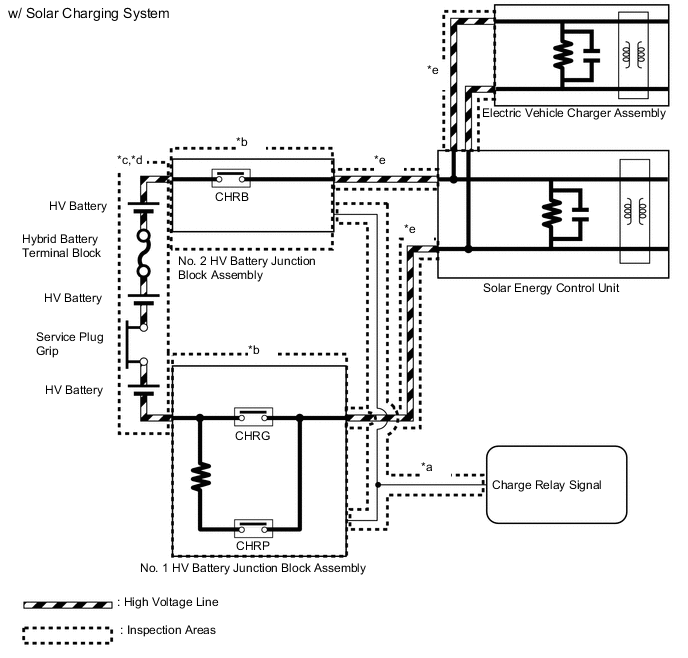
System Diagram Range Inspection Content Reason Inspection Step *a Check connection condition and wire harness continuity between battery ECU assembly and HV battery junction block assembly In order to check whether connectors are connected properly and to check for an open circuit in the CHRP and CHRB primary lines 3 to 9 *b Check Charge relay Check whether CHRB and CHRP stuck OFF 10, 11 *c Check connection condition and high-voltage cable continuity between HV battery and HV battery junction block assembly Check for open circuit and defective connection (arc marks) due to looseness 12 to 17 *d Check HV battery Check whether HV battery voltage has drastically dropped below normal range 18 to 24 *e Check high-voltage cable and connection condition between electric vehicle charger assembly - HV battery junction block assembly and solar energy control unit - HV battery junction block assembly Check for open circuit and defective connection (arc marks) due to looseness 25 to 39 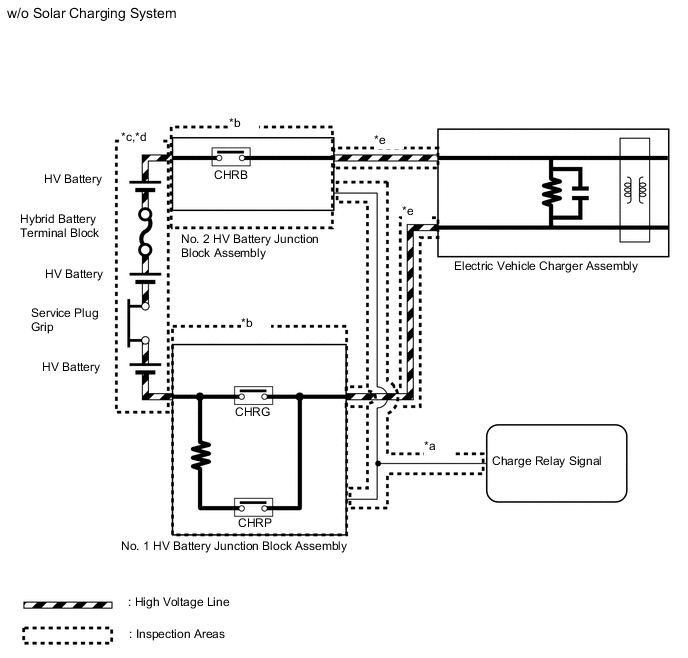
System Diagram Range Inspection Content Reason Inspection Step *a Check connection condition and wire harness continuity between battery ECU assembly and HV battery junction block assembly In order to check whether connectors are connected properly and to check for an open circuit in the CHRP and CHRB primary lines 3 to 9 *b Check Charge relay Check whether CHRB and CHRP stuck OFF 10, 11 *c Check connection condition and high-voltage cable continuity between HV battery and HV battery junction block assembly Check for open circuit and defective connection (arc marks) due to looseness 12 to 17 *d Check HV battery Check whether HV battery voltage has drastically dropped below normal range 18 to 24 *e Check high-voltage cable and connection condition between electric vehicle charger assembly - HV battery junction block assembly Check for open circuit and defective connection (arc marks) due to looseness 25 to 31
DESCRIPTION
Refer to the description for DTC P0D0700.
| DTC No. | Detection Item | DTC Detection Condition | Trouble Area | MIL | Warning Indicate |
|---|---|---|---|---|---|
| P308F49 | High Voltage Charging Circuit Short during Pre-Charge | The output voltage of the electric vehicle charger assembly is not boosted during precharging (from when CHRP is turned on until CHRG is turned on). (1 trip detection logic) |
|
Comes on | Master Warning Light: Comes on |
*1: w/ Solar Charging System
| DTC No. | Data List |
|---|---|
| P308F49 |
|
CONFIRMATION DRIVING PATTERN
Tech Tips
After repair has been completed, clear the DTC and then check that the vehicle has returned to normal by performing the following All Readiness check procedure.
-
Connect the GTS to the DLC3.
-
Turn the power switch on (IG) and turn the GTS on.
-
Clear the DTCs (even if no DTCs are stored, perform the clear DTC procedure).
-
Enter the following menus: Powertrain / Hybrid Control / Data List.
-
Check that "Hybrid Battery SOC" shows 70% or less.
-
Turn the power switch off and wait for 2 minutes or more.
-
Connect the electric vehicle charger cable assembly, and plug-in charge the vehicle for at least 30 seconds.
-
Disconnect the electric vehicle charger cable assembly and wait for 10 seconds or more.
-
Turn the power switch on (IG) and turn the GTS on.
-
Enter the following menus: Powertrain / Hybrid Control / Utility / All Readiness.
-
Check the DTC judgment result.
Tech Tips
-
If the judgment result shows NORMAL, the system is normal.
-
If the judgment result shows ABNORMAL, the system has a malfunction.
-
If the judgment result shows INCOMPLETE or N/A, perform driving pattern again.
-
WIRING DIAGRAM
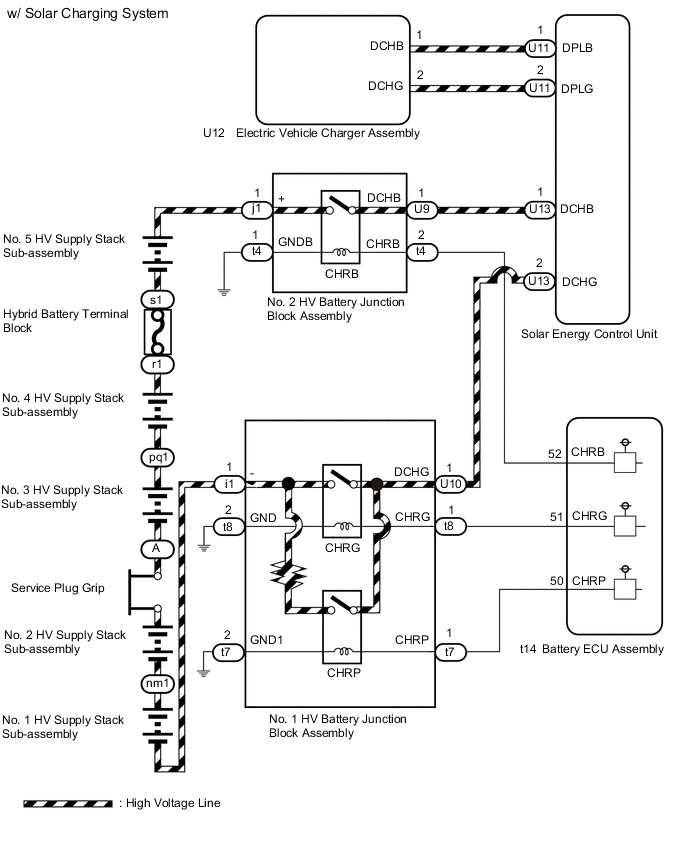
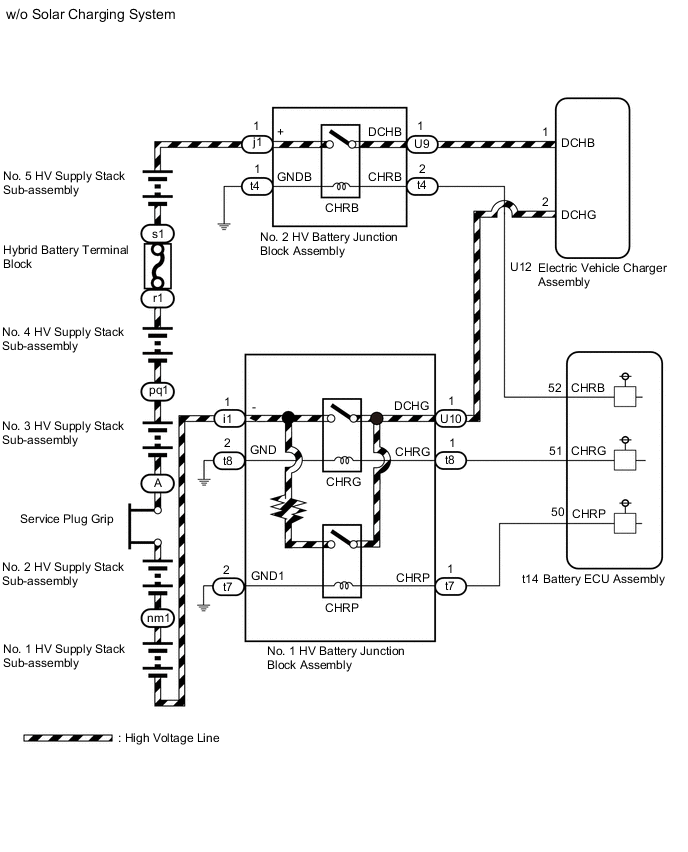
CAUTION / NOTICE / HINT
CAUTION:
-
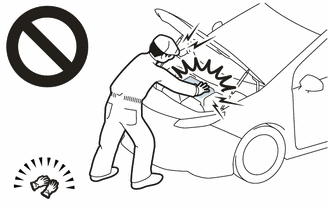
Before the following operations are conducted, take precautions to prevent electric shock by turning the power switch off, wearing insulated gloves, and removing the service plug grip from HV battery.
-
Inspecting the high-voltage system
-
Disconnecting the low voltage connector of the inverter with converter assembly
-
Disconnecting the low voltage connector of the HV battery
-
Disconnecting the low voltage connector of the electric vehicle charger assembly
-
Disconnecting the low voltage connector of the solar energy control unit
-
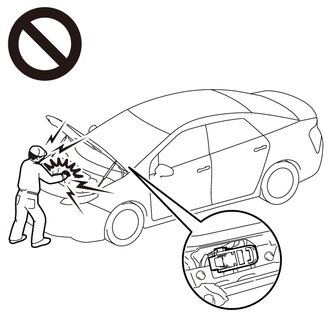
To prevent electric shock, make sure to remove the service plug grip to cut off the high voltage circuit before servicing the vehicle.
-
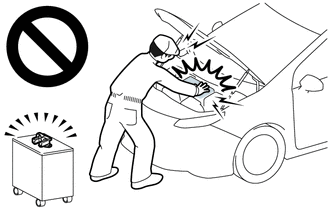
After removing the service plug grip from the HV battery, put it in your pocket to prevent other technicians from accidentally reconnecting it while you are working on the high-voltage system.
-
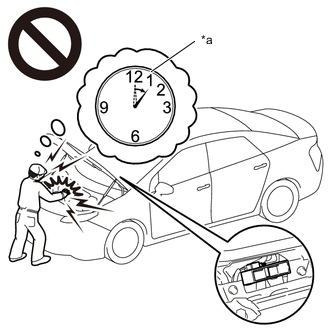
*a Without waiting for 10 minutes After removing the service plug grip, wait for at least 10 minutes before touching any of the high-voltage connectors or terminals. After waiting for 10 minutes, check the voltage at the terminals in the inspection point in the inverter with converter assembly. The voltage should be 0 V before beginning work.
Tech Tips
Waiting for at least 10 minutes is required to discharge the high-voltage capacitor inside the inverter with converter assembly.
-
Make sure to insulate the high-voltage connectors and terminals of the HV battery with insulating tape after removing it.
If the HV battery stored without insulating the connectors and terminals, electric shock or fire may result.
-
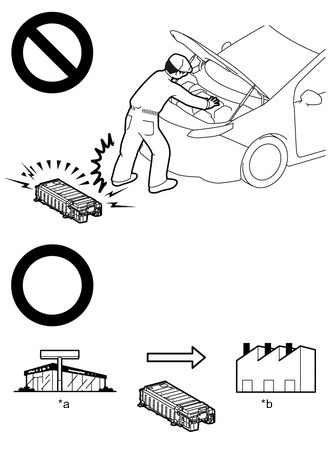
*a Dealer *b Battery Collection Agent When disposing of an HV battery, make sure to return it through an authorized collection agent who is capable of handling it safely. If the HV battery is returned via the manufacturer specified route, it will be returned properly and in a safe manner by an authorized collection agent.
-
Accidents such as electric shock may result if the HV battery is disposed of improperly or abandoned. Therefore, make sure to return all HV batteries through an authorized collection agent.
-
Before returning the HV battery, make sure to perform a recovery inspection.
-
Before returning the HV supply stack sub-assembly, make sure to perform a recovery inspection.
-
Make a note of the output DTCs as some of them may be necessary for recovery inspection of the HV battery and HV supply stack sub-assemblies.
-
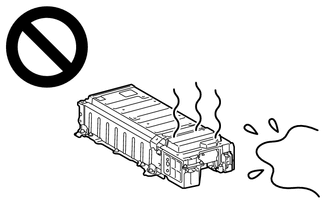
After removing the HV battery, keep it away from water. Exposure to water may cause the HV battery to produce heat, resulting in a fire.
Note
After turning the power switch off, waiting time may be required before disconnecting the cable from the negative (-) auxiliary battery terminal. Therefore, make sure to read the disconnecting the cable from the negative (-) auxiliary battery terminal notices before proceeding with work.
PROCEDURE
-
CHECK DTC OUTPUT (HYBRID CONTROL, HV BATTERY, PLUG-IN CONTROL AND SOLAR CHARGING CONTROL)
-
Connect the GTS to the DLC3.
-
Turn the power switch on (IG).
-
Enter the following menus: Powertrain / Hybrid Control, HV Battery, Plug-in Control and Solar Charging Control / Trouble Codes.
-
Check for DTCs.
Powertrain > Hybrid Control > Trouble Codes
Powertrain > HV Battery > Trouble Codes
Powertrain > Plug-in Control > Trouble Codes
Powertrain > Solar Charging Control > Trouble CodesResult Result Proceed to P308F49 only is output, or DTCs except the ones in the table below are also output. (w/ Solar Charging System) A P308F49 only is output, or DTCs except the ones in the table below are also output. (w/o Solar Charging System) B DTCs of hybrid control system in the tables below are output. C DTCs of hybrid battery system in the tables below are output. D DTCs of plug-in charge control system in the tables below are output. E DTCs of solar charging system in the tables below are output. F Malfunction Content System Relevant DTC Microcomputer malfunction Hybrid control system P060687 Hybrid/EV Powertrain Control Module Processor to Monitoring Processor Missing Message P060A47 Hybrid/EV Powertrain Control Module Monitoring Processor Watchdog / Safety MCU Failure P060A87 Hybrid/EV Powertrain Control Module Processor from Monitoring Processor Missing Message P060B49 Hybrid/EV Powertrain Control Module A/D Processing Internal Electronic Failure Hybrid battery system P060B16 Hybrid/EV Battery Energy Control Module A/D Processing Circuit Voltage Below Threshold Plug-in charge control system P060B49 Plug-in Control Module A/D Processing Internal Electronic Failure P0E5E87 Plug-in Control Module Processor from Hybrid/EV Battery Charger Control Module Processor Missing Message P1C1F49 Hybrid/EV Battery Charger Control Module A/D Processing Internal Electronic Failure Solar charging system P1EDB49*1 Solar Charger Control Module A/D Processing Internal Electronic Failure Communication system malfunction Hybrid control system U011187 Lost Communication with Hybrid/EV Battery Energy Control Module "A" Missing Message U019B87 Lost Communication with Hybrid/EV Battery Charger Control Module Missing Message U113A87*1 Lost Communication with Solar Charging Control Module Missing Message Plug-in charge control system U115087 Lost Communication with Hybrid Powertrain Control Module (Hybrid/EV Battery Local Bus) Missing Message Solar charging system U010087*1 Lost Communication with ECM/PCM "A" Missing Message U029387*1 Lost Communication with Hybrid/EV Powertrain Control Module Missing Message U115087*1 Lost Communication with Hybrid Powertrain Control Module (Hybrid/EV Battery Local Bus) Missing Message Sensor and actuator circuit malfunction Hybrid control system P0ABF00 Hybrid/EV Battery Current Sensor "A" Circuit Range/Performance P1EA41C*1 Hybrid/EV Control Battery Voltage Sensor / Solar Charging Voltage Sensor Voltage Out of Range Hybrid battery system P0ABF11 Hybrid/EV Battery Current Sensor "A" Circuit Short to Ground P0ABF15 Hybrid/EV Battery Current Sensor "A" Circuit Short to Auxiliary Battery or Open P0ABF28 Hybrid/EV Battery Current Sensor "A" Signal Bias Level Out of Range / Zero Adjustment Failure P0ABF2A Hybrid/EV Battery Current Sensor "A" Signal Stuck In Range P0B0E11 Hybrid/EV Battery Current Sensor "B" Circuit Short to Ground P0B0E15 Hybrid/EV Battery Current Sensor "B" Circuit Short to Auxiliary Battery or Open P0B1362 Hybrid/EV Battery Current Sensor "A"/"B" Signal Compare Failure P0D0A11 Hybrid/EV Battery Charging System Positive Contactor Control Circuit Short to Ground P0D0A15 Hybrid/EV Battery Charging System Positive Contactor Control Circuit Short to Auxiliary Battery or Open P0D1111 Hybrid/EV Battery Charging System Negative Contactor Control Circuit Short to Ground P0D1115 Hybrid/EV Battery Charging System Negative Contactor Control Circuit Short to Auxiliary Battery or Open P0E6D11 Hybrid/EV Battery Charging System Precharge Contactor Control Circuit Short to Ground P0E6D15 Hybrid/EV Battery Charging System Precharge Contactor Control Circuit Short to Auxiliary Battery or Open P1CBB12 Hybrid/EV Battery Current Sensor Power Supply Circuit Short to Auxiliary Battery P1CBB14 Hybrid/EV Battery Current Sensor Power Supply Circuit Short to Ground or Open Plug-in charge control system P0D4C12 Hybrid/EV Battery Charger Hybrid/EV Battery Input Voltage Sensor Circuit Short to Auxiliary Battery P0D4C14 Hybrid/EV Battery Charger Hybrid/EV Battery Input Voltage Sensor Circuit Short to Ground or Open Solar charging system P1EA412*1 Solar Charging Voltage Sensor Circuit Short to Auxiliary Battery P1EA414*1 Solar Charging Voltage Sensor Circuit Short to Ground or Open System malfunction Hybrid control system P0A1F94 Hybrid/EV Battery Energy Control Module Unexpected Operation P0D4C1C Hybrid/EV Battery Charger Hybrid/EV Battery Input Voltage Sensor Voltage Out of Range P1AC413 Hybrid/EV Battery Stack 1 Current Interrupt Device Circuit Open P1C8449 High Voltage Power Resource Circuit Short during Ready ON P300449 High Voltage Power Resource Circuit Short during Pre-Charge P309F49 High Voltage Charging Circuit Consumption Circuit Short *1: w/ Solar Charging System
Tech Tips
-
P308F49 may be output as a result of the malfunction indicated by the DTCs above.
-
The chart above is listed in inspection order of priority.
-
Check DTCs that are output at the same time by following the listed order. (The main cause of the malfunction can be determined without performing unnecessary inspections.)
-
-
Turn the power switch off.
B 
GO TO STEP 3 Click here
C 
GO TO DTC CHART (HYBRID CONTROL SYSTEM) Click here
D
GO TO DTC CHART (HYBRID BATTERY SYSTEM) Click here
E
GO TO DTC CHART (PLUG-IN CHARGE CONTROL SYSTEM) Click here
F
GO TO DTC CHART (SOLAR CHARGING SYSTEM) Click here
A 
-
-
CHECK FREEZE FRAME DATA (HYBRID CONTROL)
-
Connect the GTS to the DLC3.
-
Turn the power switch on (IG).
-
Enter the following menus: Powertrain / Hybrid Control / Trouble Codes.
-
Read the freeze frame data of DTC P308F49.
Powertrain > Hybrid Control > Trouble CodesTech Tips
Record the status of both "AC Charging" and "Solar Charging" of the freeze frame data.
Result Proceed to NEXT -
Turn the power switch off.
NEXT
-
-
CHECK CONNECTOR CONNECTION CONDITION (BATTERY ECU ASSEMBLY CONNECTOR)
Result Proceed to OK NG CAUTION:
Be sure to wear insulated gloves and protective goggles.
-
Check that the service plug grip is not installed.
Note
After removing the service plug grip, do not turn the power switch on (READY), unless instructed by the repair manual because this may cause a malfunction.
-
Remove the upper hybrid battery cover sub-assembly.
-
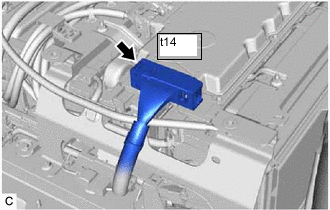
Check the connector connections and contact pressure of the relevant terminal of the t14 battery ECU assembly connector.
OK The connectors are connected securely and there are no contact pressure problems. -
Install the upper hybrid battery cover sub-assembly.
Result Proceed to OK NG
NG
CONNECT SECURELY
OK
-
-
CHECK CONNECTOR CONNECTION CONDITION (NO. 2 HV BATTERY JUNCTION BLOCK ASSEMBLY CONNECTOR)
Result Proceed to OK NG CAUTION:
Be sure to wear insulated gloves and protective goggles.
-
Check that the service plug grip is not installed.
Note
After removing the service plug grip, do not turn the power switch on (READY), unless instructed by the repair manual because this may cause a malfunction.
-
Remove the upper hybrid battery cover sub-assembly.
-
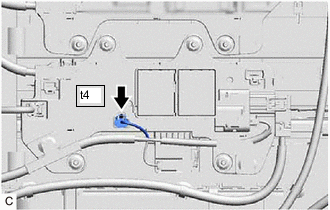
Check the connector connections and contact pressure of the relevant terminals of the t4 No. 2 HV battery junction block assembly connector.
OK The connectors are connected securely and there are no contact pressure problems. -
Install the upper hybrid battery cover sub-assembly.
Result Proceed to OK NG
NG
CONNECT SECURELY
OK
-
-
CHECK CONNECTOR CONNECTION CONDITION (NO. 1 HV BATTERY JUNCTION BLOCK ASSEMBLY CONNECTOR)
Result Proceed to OK NG CAUTION:
Be sure to wear insulated gloves and protective goggles.
-
Check that the service plug grip is not installed.
Note
After removing the service plug grip, do not turn the power switch on (IG), unless instructed by the repair manual because this may cause a malfunction.
-
Remove the upper hybrid battery cover sub-assembly.
-
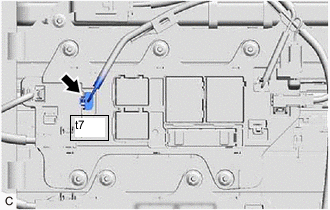
Check the connector connections and contact pressure of the relevant terminals of the t7 No. 1 HV battery junction block assembly connector.
OK The connectors are connected securely and there are no contact pressure problems. -
Install the upper hybrid battery cover sub-assembly.
Result Proceed to OK NG
NG
CONNECT SECURELY
OK
-
-
CHECK HARNESS AND CONNECTOR (BATTERY ECU ASSEMBLY - NO. 2 HV BATTERY JUNCTION BLOCK ASSEMBLY)
CAUTION:
Be sure to wear insulated gloves and protective goggles.
-
Check that the service plug grip is not installed.
Note
After removing the service plug grip, do not turn the power switch on (READY), unless instructed by the repair manual because this may cause a malfunction.
-
Remove the upper hybrid battery cover sub-assembly.
-
Disconnect the t4 No. 2 HV battery junction block assembly connector.
-
Disconnect the t14 battery ECU assembly connector.
-
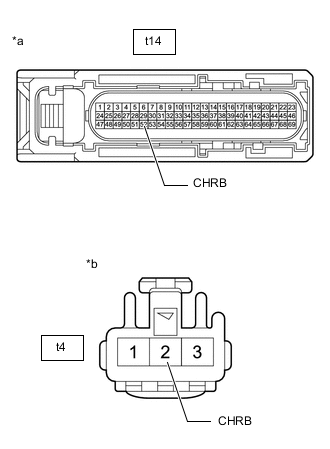
*a Front view of wire harness connector
(to Battery ECU Assembly)
*b Front view of wire harness connector
(to No. 2 HV Battery Junction Block Assembly)
Measure the resistance according to the value(s) in the table below.
Standard Resistance Tester Connection Condition Specified Condition t14-52 (CHRB) - t4-2 (CHRB) Power switch off Below 1 Ω -
Reconnect the t14 battery ECU assembly.
-
Reconnect the t4 No. 2 HV battery junction block assembly connector.
-
Install the upper hybrid battery cover sub-assembly.
Result Proceed to OK NG
NG
REPAIR OR REPLACE HARNESS OR CONNECTOR
OK
-
-
CHECK HARNESS AND CONNECTOR (BATTERY ECU ASSEMBLY - NO. 1 HV BATTERY JUNCTION BLOCK ASSEMBLY)
CAUTION:
Be sure to wear insulated gloves and protective goggles.
-
Check that the service plug grip is not installed.
Note
After removing the service plug grip, do not turn the power switch on (READY), unless instructed by the repair manual because this may cause a malfunction.
-
Remove the upper hybrid battery cover sub-assembly.
-
Disconnect the t7 No. 1 HV battery junction block assembly connector.
-
Disconnect the t14 battery ECU assembly connector.
-
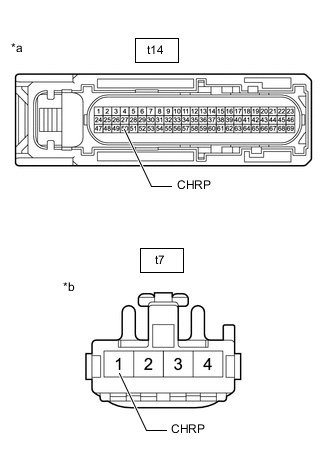
*a Front view of wire harness connector
(to Battery ECU Assembly)
*b Front view of wire harness connector
(to No. 1 HV Battery Junction Block Assembly)
Measure the resistance according to the value(s) in the table below.
Standard Resistance Tester Connection Condition Specified Condition t14-50 (CHRP) - t7-1 (CHRP) Power switch off Below 1 Ω -
Reconnect the t14 battery ECU assembly.
-
Reconnect the t7 No. 1 HV battery junction block assembly connector.
-
Install the upper hybrid battery cover sub-assembly.
Result Proceed to OK NG
NG
REPAIR OR REPLACE HARNESS OR CONNECTOR
OK
-
-
CHECK HARNESS AND CONNECTOR (NO. 2 HV BATTERY JUNCTION BLOCK ASSEMBLY - BODY GROUND)
Result Proceed to OK NG CAUTION:
Be sure to wear insulated gloves and protective goggles.
-
Check that the service plug grip is not installed.
Note
After removing the service plug grip, do not turn the power switch on (READY), unless instructed by the repair manual because this may cause a malfunction.
-
Remove the upper hybrid battery cover sub-assembly.
-
Disconnect the t4 No. 2 HV battery junction block assembly connector.
-
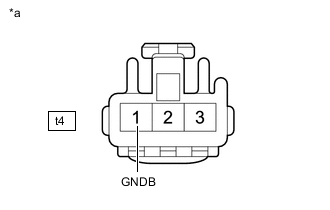
*a Front view of wire harness connector
(to No. 2 HV Battery Junction Block Assembly)
Measure the resistance according to the value(s) in the table below.
Standard Resistance Tester Connection Condition Specified Condition t4-1 (GNDB) - Body ground Power switch off Below 1 Ω -
Reconnect the t4 No. 2 HV battery junction block assembly connector.
-
Install the upper hybrid battery cover sub-assembly.
Result Proceed to OK NG
NG
REPAIR OR REPLACE HARNESS OR CONNECTOR
OK
-
-
CHECK HARNESS AND CONNECTOR (NO. 1 HV BATTERY JUNCTION BLOCK ASSEMBLY - BODY GROUND)
Result Proceed to OK NG CAUTION:
Be sure to wear insulated gloves and protective goggles.
-
Check that the service plug grip is not installed.
Note
After removing the service plug grip, do not turn the power switch on (READY), unless instructed by the repair manual because this may cause a malfunction.
-
Remove the upper hybrid battery cover sub-assembly.
-
Disconnect the t7 No. 1 HV battery junction block assembly connector.
-
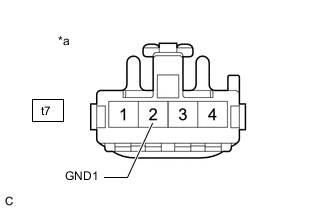
*a Front view of wire harness connector
(to No. 1 HV Battery Junction Block Assembly)
Measure the resistance according to the value(s) in the table below.
Standard Resistance Tester Connection Condition Specified Condition t7-2 (GND1) - Body ground Power switch off Below 1 Ω -
Reconnect the t7 No. 1 HV battery junction block assembly connector.
-
Install the upper hybrid battery cover sub-assembly.
Result Proceed to OK NG
NG
REPAIR OR REPLACE HARNESS OR CONNECTOR
OK
-
-
INSPECT NO. 2 HV BATTERY JUNCTION BLOCK ASSEMBLY (SMRB)
CAUTION:
Be sure to wear insulated gloves and protective goggles.
-
Check that the service plug grip is not installed.
Note
After removing the service plug grip, do not turn the power switch on (READY), unless instructed by the repair manual because this may cause a malfunction.
-
Remove the No. 2 HV battery junction block assembly.
-
Measure the resistance according to the value(s) in the table below.
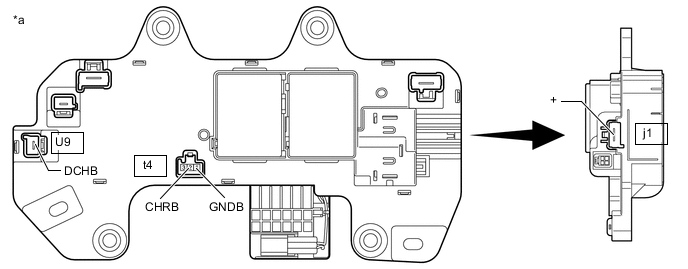
*a Component without harness connected
(No. 2 HV Battery Junction Block Assembly)
- - Standard Resistance Tester Connection Condition Specified Condition j1-1 (+) - U9-1 (DCHB) Auxiliary battery voltage applied between terminals t4-2 (CHRB) and t4-1 (GNDB) Below 1 Ω -
Measure the resistance according to the value(s) in the table below.
Standard Resistance Tester Connection Condition Specified Condition t4-2 (CHRB) - t4-1 (GNDB) -40 to 80°C (-40 to 176°F) 20.6 to 40.8 Ω -
Install the No. 2 HV battery junction block assembly.
Result Proceed to OK NG
NG
REPLACE NO. 2 HV BATTERY JUNCTION BLOCK ASSEMBLY Click here
OK
-
-
INSPECT NO. 1 HV BATTERY JUNCTION BLOCK ASSEMBLY (SMRP)
CAUTION:
Be sure to wear insulated gloves and protective goggles.
-
Check that the service plug grip is not installed.
Note
After removing the service plug grip, do not turn the power switch on (READY), unless instructed by the repair manual because this may cause a malfunction.
-
Remove the No. 1 HV battery junction block assembly.
-
Measure the resistance according to the value(s) in the table below.
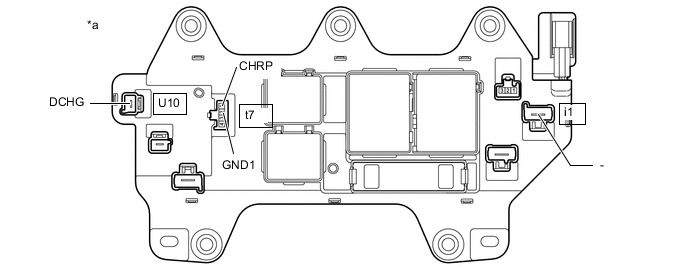
*a Component without harness connected
(No. 1 HV Battery Junction Block Assembly)
- - Standard Resistance Tester Connection Condition Specified Condition i1-1 (-) - U10-1 (DCHG) Auxiliary battery voltage applied between terminals t7-1 (CHRP) and t7-2 (GND1) 28.5 to 31.5 Ω -
Measure the resistance according to the value(s) in the table below.
Standard Resistance Tester Connection Condition Specified Condition t7-1 (CHRP) - t7-2 (GND1) -40 to 80°C (-40 to 176°F) 140 to 290 Ω -
Install the No. 1 HV battery junction block assembly.
Result Proceed to OK NG
NG
REPLACE NO. 1 HV BATTERY JUNCTION BLOCK ASSEMBLY Click here
OK
-
-
CHECK NO. 2 HV BATTERY JUNCTION BLOCK ASSEMBLY (HV BATTERY HIGH VOLTAGE CONNECTOR CONNECTION CONDITION)
Result Result Proceed to The terminals are connected securely and there are no contact problems. There are no arc marks. A The terminals are not connected securely and there is a contact problem. There are arc marks. B The terminals are not connected securely and there is a contact problem. There are no arc marks. C The terminals are connected securely and there are no contact problems. There are arc marks. B CAUTION:
Be sure to wear insulated gloves and protective goggles.
-
Check that the service plug grip is not installed.
Note
After removing the service plug grip, do not turn the power switch on (READY), unless instructed by the repair manual because this may cause a malfunction.
-
Remove the upper hybrid battery cover sub-assembly.
-
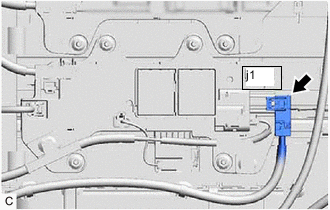
Check the j1 HV battery high voltage connector is connected securely, and there are no contact problems.
-
Disconnect the j1 HV battery high voltage connector from the No. 2 HV battery junction block assembly.
Note
Insulate each disconnected high-voltage connector with insulating tape. Wrap the connector from the wire harness side to the end of the connector.
-
Check for arc marks on the terminals of the j1 HV battery high voltage connector and No. 2 HV battery junction block assembly.
Result Result Proceed to The terminals are connected securely and there are no contact problems. There are no arc marks. A The terminals are not connected securely and there is a contact problem. There are arc marks. B The terminals are not connected securely and there is a contact problem. There are no arc marks. C The terminals are connected securely and there are no contact problems. There are arc marks. B -
Reconnect the j1 HV battery high voltage connector.
-
Install the upper hybrid battery cover sub-assembly.
B
REPLACE MALFUNCTIONING PARTS
C
CONNECT SECURELY
A
-
-
CHECK NO. 1 HV BATTERY JUNCTION BLOCK ASSEMBLY (HV BATTERY HIGH VOLTAGE CONNECTOR CONNECTION CONDITION)
Result Result Proceed to The terminals are connected securely and there are no contact problems. There are no arc marks. A The terminals are not connected securely and there is a contact problem. There are arc marks. B The terminals are not connected securely and there is a contact problem. There are no arc marks. C The terminals are connected securely and there are no contact problems. There are arc marks. B CAUTION:
Be sure to wear insulated gloves and protective goggles.
-
Check that the service plug grip is not installed.
Note
After removing the service plug grip, do not turn the power switch on (READY), unless instructed by the repair manual because this may cause a malfunction.
-
Remove the upper hybrid battery cover sub-assembly.
-
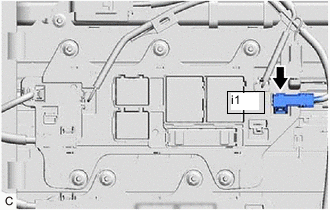
Check the i1 HV battery high voltage connector is connected securely, and there are no contact problems.
-
Disconnect the i1 HV battery high voltage connector from the No. 1 HV battery junction block assembly.
Note
Insulate each disconnected high-voltage connector with insulating tape. Wrap the connector from the wire harness side to the end of the connector.
-
Check for arc marks on the terminals of the i1 HV battery high voltage connector and No. 1 HV battery junction block assembly.
Result Result Proceed to The terminals are connected securely and there are no contact problems. There are no arc marks. A The terminals are not connected securely and there is a contact problem. There are arc marks. B The terminals are not connected securely and there is a contact problem. There are no arc marks. C The terminals are connected securely and there are no contact problems. There are arc marks. B -
Reconnect the i1 HV battery high voltage connector.
-
Install the upper hybrid battery cover sub-assembly.
B
REPLACE MALFUNCTIONING PARTS
C
CONNECT SECURELY
A
-
-
CHECK HYBRID BATTERY TERMINAL BLOCK (HV BATTERY HIGH VOLTAGE CONNECTOR CONNECTION CONDITION)
Result Result Proceed to The terminals are connected securely and there are no contact problems. There are no arc marks. A The terminals are not connected securely and there is a contact problem. There are arc marks. B The terminals are not connected securely and there is a contact problem. There are no arc marks. C The terminals are connected securely and there are no contact problems. There are arc marks. B CAUTION:
Be sure to wear insulated gloves and protective goggles.
-
Check that the service plug grip is not installed.
Note
After removing the service plug grip, do not turn the power switch on (READY), unless instructed by the repair manual because this may cause a malfunction.
-
Remove the upper hybrid battery cover sub-assembly.
-
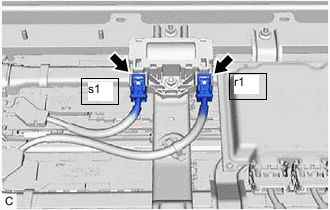
Check the s1 and r1 HV battery high voltage connectors are connected securely, and there are no contact problems.
-
Disconnect the s1 and r1 HV battery high voltage connectors from the hybrid battery terminal block.
Note
Insulate each disconnected high-voltage connector with insulating tape. Wrap the connector from the wire harness side to the end of the connector.
-
Check for arc marks on the terminals of the s1 and r1 HV battery high voltage connectors and hybrid battery terminal block.
Result Result Proceed to The terminals are connected securely and there are no contact problems. There are no arc marks. A The terminals are not connected securely and there is a contact problem. There are arc marks. B The terminals are not connected securely and there is a contact problem. There are no arc marks. C The terminals are connected securely and there are no contact problems. There are arc marks. B -
Reconnect the s1 and r1 HV battery high voltage connectors.
-
Install the upper hybrid battery cover sub-assembly.
B
REPLACE MALFUNCTIONING PARTS
C
CONNECT SECURELY
A
-
-
CHECK HV SUPPLY STACK SUB-ASSEMBLY (HV BATTERY HIGH VOLTAGE CONNECTOR CONNECTION CONDITION)
Result Result Proceed to The terminals are connected securely and there are no contact problems. There are no arc marks. A The terminals are not connected securely and there is a contact problem. There are arc marks. B The terminals are not connected securely and there is a contact problem. There are no arc marks. C The terminals are connected securely and there are no contact problems. There are arc marks. B CAUTION:
Be sure to wear insulated gloves.
-
Check that the service plug grip is not installed.
Note
After removing the service plug grip, do not turn the power switch on (READY), unless instructed by the repair manual because this may cause a malfunction.
-
Remove the No. 2 HV battery shield panel.
-
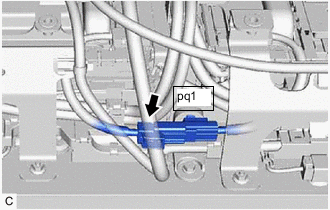
Check that the pq1 HV battery high voltage connector is connected securely, and there are no contact problems.
-
Disconnect the pq1 HV battery high voltage connector.
Note
Insulate each disconnected high-voltage connector with insulating tape. Wrap the connector from the wire harness side to the end of the connector.
-
Check for arc marks on the terminals of the pq1 HV battery high voltage connector.
Result Result Proceed to The terminals are connected securely and there are no contact problems. There are no arc marks. A The terminals are not connected securely and there is a contact problem. There are arc marks. B The terminals are not connected securely and there is a contact problem. There are no arc marks. C The terminals are connected securely and there are no contact problems. There are arc marks. B -
Connect the pq1 HV battery high voltage connector.
-
Install the No. 2 HV battery shield panel.
B
REPLACE MALFUNCTIONING PARTS
C
CONNECT SECURELY
A
-
-
CHECK ELECTRIC VEHICLE BATTERY PLUG (HV BATTERY HIGH VOLTAGE CONNECTOR CONNECTION CONDITION)
Result Result Proceed to The terminals are connected securely and there are no contact problems. There are no arc marks. A The terminals are not connected securely and there is a contact problem. There are arc marks. B The terminals are not connected securely and there is a contact problem. There are no arc marks. C The terminals are connected securely and there are no contact problems. There are arc marks. B CAUTION:
Be sure to wear insulated gloves and protective goggles.
-
Check that the service plug grip is not installed.
Note
After removing the service plug grip, do not turn the power switch on (READY), unless instructed by the repair manual because this may cause a malfunction.
-
Remove the upper hybrid battery cover sub-assembly.
-
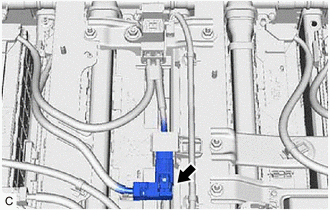
Check that the electric vehicle battery plug connector is connected securely, and there are no contact problems.
-
Disconnect the electric vehicle battery plug connector.
Note
Insulate each disconnected high-voltage connector with insulating tape. Wrap the connector from the wire harness side to the end of the connector.
-
Check for arc marks on the terminals of the electric vehicle battery plug connector.
Result Result Proceed to The terminals are connected securely and there are no contact problems. There are no arc marks. A The terminals are not connected securely and there is a contact problem. There are arc marks. B The terminals are not connected securely and there is a contact problem. There are no arc marks. C The terminals are connected securely and there are no contact problems. There are arc marks. B -
Connect the EV battery plug connector.
-
Install the upper hybrid battery cover sub-assembly.
B
REPLACE MALFUNCTIONING PARTS
C
CONNECT SECURELY
A
-
-
CHECK HV SUPPLY STACK SUB-ASSEMBLY (HV BATTERY HIGH VOLTAGE CONNECTOR CONNECTION CONDITION)
Result Result Proceed to The terminals are connected securely and there are no contact problems. There are no arc marks. A The terminals are not connected securely and there is a contact problem. There are arc marks. B The terminals are not connected securely and there is a contact problem. There are no arc marks. C The terminals are connected securely and there are no contact problems. There are arc marks. B CAUTION:
Be sure to wear insulated gloves and protective goggles.
-
Check that the service plug grip is not installed.
Note
After removing the service plug grip, do not turn the power switch on (READY), unless instructed by the repair manual because this may cause a malfunction.
-
Remove the No. 1 HV battery shield panel.
-
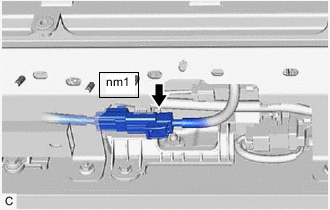
Check that the nm1 HV battery high voltage connector is connected securely, and there are no contact problems.
-
Disconnect the nm1 HV battery high voltage connector.
Note
Insulate each disconnected high-voltage connector with insulating tape. Wrap the connector from the wire harness side to the end of the connector.
-
Check for arc marks on the terminals of the nm1 HV battery high voltage connector.
Result Result Proceed to The terminals are connected securely and there are no contact problems. There are no arc marks. A The terminals are not connected securely and there is a contact problem. There are arc marks. B The terminals are not connected securely and there is a contact problem. There are no arc marks. C The terminals are connected securely and there are no contact problems. There are arc marks. B -
Connect the nm1 HV battery high voltage connector.
-
Install the No. 1 HV battery shield panel.
B
REPLACE MALFUNCTIONING PARTS
C
CONNECT SECURELY
A
-
-
CHECK HYBRID BATTERY TERMINAL BLOCK
Result Proceed to OK NG CAUTION:
Be sure to wear insulated gloves and protective goggles.
-
Check that the service plug grip is not installed.
Note
After removing the service plug grip, do not turn the power switch on (READY), unless instructed by the repair manual because this may cause a malfunction.
-
Remove the upper hybrid battery cover sub-assembly.
-
Disconnect the s1 and r1 HV battery high voltage connectors from the hybrid battery terminal block.
Note
Insulate each disconnected high-voltage connector with insulating tape. Wrap the connector from the wire harness side to the end of the connector.
-
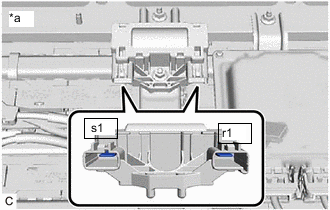
*a Component without harness connected
(Hybrid Battery Terminal Block)
Measure the resistance according to the value(s) in the table below.
Standard Resistance Tester Connection Condition Specified Condition s1-1 - r1-1 Power switch off Below 1 Ω -
Reconnect the s1 and r1 HV battery high voltage connectors to the hybrid battery terminal block.
-
Install the upper hybrid battery cover sub-assembly.
Result Proceed to OK NG
NG
REPLACE HYBRID BATTERY TERMINAL BLOCK Click here
OK
-
-
CHECK ELECTRIC VEHICLE BATTERY PLUG
Result Proceed to OK NG CAUTION:
Be sure to wear insulated gloves and protective goggles.
-
Check that the service plug grip is not installed.
Note
After removing the service plug grip, do not turn the power switch on (READY), unless instructed by the repair manual because this may cause a malfunction.
-
Remove the upper hybrid battery cover sub-assembly.
-
Disconnect the electric vehicle battery plug connector.
Note
Insulate each disconnected high-voltage connector with insulating tape. Wrap the connector from the wire harness side to the end of the connector.
-
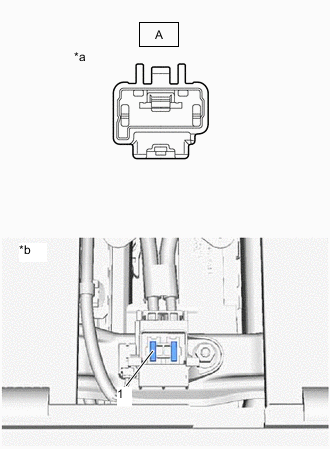
*a EV Battery Plug Connector
(Electric Vehicle Battery Plug Side)
*b Service Plug Grip Removed
(Service Plug Grip Connecting Terminals)
Measure the resistance according to the value(s) in the table below.
Standard Resistance Tester Connection Condition Specified Condition A - Service plug grip connecting terminal 1 Power switch off Below 1 Ω -
Reconnect the electric vehicle battery plug connector.
-
Install the upper hybrid battery cover sub-assembly.
Result Proceed to OK NG
NG
REPLACE NO. 2 HV SUPPLY STACK SUB-ASSEMBLY Click here
OK
-
-
CHECK NO. 5 HV SUPPLY STACK SUB-ASSEMBLY
Result Proceed to OK NG CAUTION:
Be sure to wear insulated gloves and protective goggles.
-
Check that the service plug grip is not installed.
Note
After removing the service plug grip, do not turn the power switch on (READY), unless instructed by the repair manual because this may cause a malfunction.
-
Remove the upper hybrid battery cover sub-assembly.
-
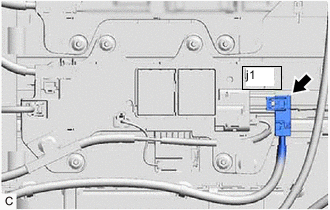
Disconnect the j1 HV battery high voltage connector from the No. 2 HV battery junction block assembly.
Note
Insulate each disconnected high-voltage connector with insulating tape. Wrap the connector from the wire harness side to the end of the connector.
-
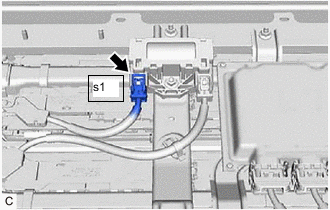
Disconnect the s1 HV battery high voltage connector from the hybrid battery terminal block.
Note
Insulate each disconnected high-voltage connector with insulating tape. Wrap the connector from the wire harness side to the end of the connector.
-
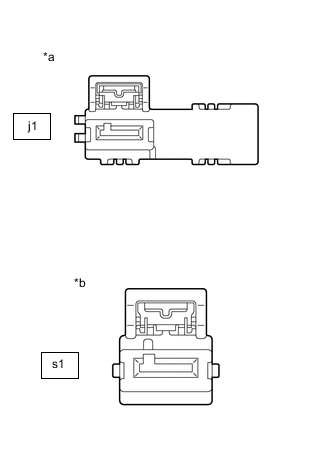
*a No. 5 HV Supply Stack Sub-assembly Connector
(No. 2 HV Battery Junction Block Assembly Side)
*b No. 5 HV Supply Stack Sub-assembly Connector
(Hybrid Battery Terminal Block Side)
Measure the voltage according to the value(s) in the table below.
Standard Voltage Tester Connection Condition Specified Condition j1-1 - s1-1 Power switch off 38 V or higher CAUTION:
Do not allow the probes of the electrical tester to contact each other during this inspection.
-
Reconnect the s1 HV battery high voltage connector.
-
Reconnect the j1 HV battery high voltage connector.
-
Install the upper hybrid battery cover sub-assembly.
Result Proceed to OK NG
NG
REPLACE NO. 5 HV SUPPLY STACK SUB-ASSEMBLY Click here
OK
-
-
CHECK NO. 4 HV SUPPLY STACK SUB-ASSEMBLY
Result Proceed to OK NG CAUTION:
Be sure to wear insulated gloves and protective goggles.
-
Check that the service plug grip is not installed.
Note
After removing the service plug grip, do not turn the power switch on (READY), unless instructed by the repair manual because this may cause a malfunction.
-
Remove the upper hybrid battery cover sub-assembly.
-
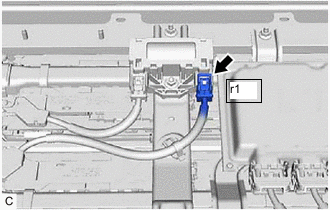
Disconnect the r1 HV battery high voltage connector from the hybrid battery terminal block.
Note
Insulate each disconnected high-voltage connector with insulating tape. Wrap the connector from the wire harness side to the end of the connector.
-
Disconnect the pq1 HV battery high voltage connector.
Note
Insulate each disconnected high-voltage connector with insulating tape. Wrap the connector from the wire harness side to the end of the connector.
-
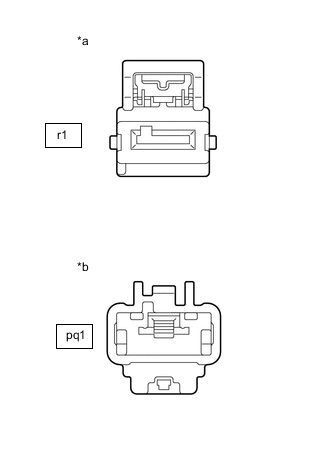
*a No. 4 HV Supply Stack Sub-assembly Connector
(Hybrid Battery Terminal Block Side)
*b pq1 HV Battery High Voltage Connector
(No. 4 HV Supply Stack Sub-assembly Side)
Measure the voltage according to the value(s) in the table below.
Standard Voltage Tester Connection Condition Specified Condition r1-1 - pq1-1 Power switch off 38 V or higher CAUTION:
Do not allow the probes of the electrical tester to contact each other during this inspection.
-
Reconnect the pq1 HV battery high voltage connector.
-
Reconnect the r1 HV battery high voltage connector.
-
Install the upper hybrid battery cover sub-assembly.
Result Proceed to OK NG
NG
REPLACE NO. 4 HV SUPPLY STACK SUB-ASSEMBLY Click here
OK
-
-
CHECK NO. 3 HV SUPPLY STACK SUB-ASSEMBLY
Result Proceed to OK NG CAUTION:
Be sure to wear insulated gloves and protective goggles.
-
Check that the service plug grip is not installed.
Note
After removing the service plug grip, do not turn the power switch on (READY), unless instructed by the repair manual because this may cause a malfunction.
-
Remove the upper hybrid battery cover sub-assembly.
-
Disconnect the pq1 HV battery high voltage connector.
Note
Insulate each disconnected high-voltage connector with insulating tape. Wrap the connector from the wire harness side to the end of the connector.
-
Disconnect the electric vehicle battery plug connector.
Note
Insulate each disconnected high-voltage connector with insulating tape. Wrap the connector from the wire harness side to the end of the connector.
-
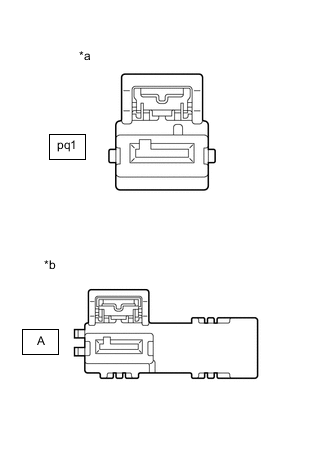
*a pq1 HV Battery High Voltage Connector
(No. 3 HV Supply Stack Sub-assembly Side)
*b EV Battery Plug Connector
(No. 3 HV Supply Stack Sub-assembly Side)
Measure the voltage according to the value(s) in the table below.
Standard Voltage Tester Connection Condition Specified Condition pq1-1 - A-1 Power switch off 38 V or higher CAUTION:
Do not allow the probes of the electrical tester to contact each other during this inspection.
-
Reconnect the pq1 HV battery high voltage connector.
-
Reconnect the electric vehicle battery plug connector.
-
Install the upper hybrid battery cover sub-assembly.
Result Proceed to OK NG
NG
REPLACE NO. 3 HV SUPPLY STACK SUB-ASSEMBLY Click here
OK
-
-
CHECK NO. 2 HV SUPPLY STACK SUB-ASSEMBLY
Result Proceed to OK NG CAUTION:
Be sure to wear insulated gloves and protective goggles.
-
Check that the service plug grip is not installed.
Note
After removing the service plug grip, do not turn the power switch on (READY), unless instructed by the repair manual because this may cause a malfunction.
-
Remove the upper hybrid battery cover sub-assembly.
-
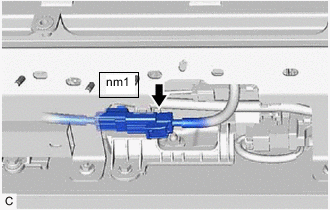
Disconnect the nm1 HV battery high voltage connector.
Note
Insulate each disconnected high-voltage connector with insulating tape. Wrap the connector from the wire harness side to the end of the connector.
-
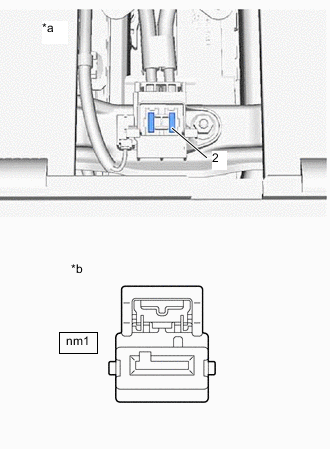
*a Service Plug Grip Removed
(Electric Vehicle Battery Plug Side)
*b nm1 HV Battery High Voltage Connector
(No. 2 HV Supply Stack Sub-assembly Side)
Measure the voltage according to the value(s) in the table below.
Standard Voltage Tester Connection Condition Specified Condition Service plug grip connecting terminal 2 - nm1-1 Power switch off 38 V or higher CAUTION:
Do not allow the probes of the electrical tester to contact each other during this inspection.
-
Reconnect the nm1 HV battery high voltage connector.
-
Install the upper hybrid battery cover sub-assembly.
Result Proceed to OK NG
NG
REPLACE NO. 2 HV SUPPLY STACK SUB-ASSEMBLY Click here
OK
-
-
CHECK NO. 1 HV SUPPLY STACK SUB-ASSEMBLY
Result Proceed to OK NG CAUTION:
Be sure to wear insulated gloves and protective goggles.
-
Check that the service plug grip is not installed.
Note
After removing the service plug grip, do not turn the power switch on (READY), unless instructed by the repair manual because this may cause a malfunction.
-
Remove the upper hybrid battery cover sub-assembly.
-
Disconnect the nm1 HV battery high voltage connector.
Note
Insulate each disconnected high-voltage connector with insulating tape. Wrap the connector from the wire harness side to the end of the connector.
-
Disconnect the i1 HV battery high voltage connector from the No. 1 HV battery junction block assembly.
Note
Insulate each disconnected high-voltage connector with insulating tape. Wrap the connector from the wire harness side to the end of the connector.
-
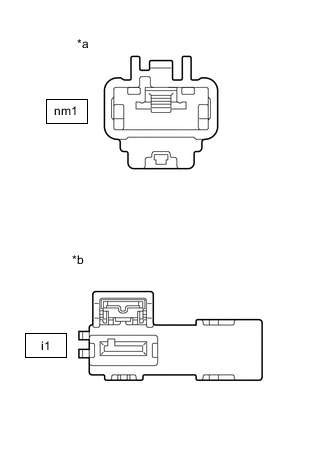
*a nm1 HV Battery High Voltage Connector
(No. 1 HV Supply Stack Sub-assembly Side)
*b No. 1 HV Supply Stack Sub-assembly Connector
(No. 1 HV Battery Junction Block Assembly Side)
Measure the voltage according to the value(s) in the table below.
Standard Voltage Tester Connection Condition Specified Condition nm1-1 - i1-1 Power switch off 38 V or higher CAUTION:
Do not allow the probes of the electrical tester to contact each other during this inspection.
-
Reconnect the i1 HV battery high voltage connector.
-
Reconnect the nm1 HV battery high voltage connector.
-
Install the upper hybrid battery cover sub-assembly.
Result Proceed to OK NG
NG
REPLACE NO. 1 HV SUPPLY STACK SUB-ASSEMBLY Click here
OK
-
-
CHECK NO. 2 HV BATTERY JUNCTION BLOCK ASSEMBLY (HV BATTERY CHARGER WIRE CONNECTOR CONNECTION CONDITION)
CAUTION:
Be sure to wear insulated gloves.
-
Check that the service plug grip is not installed.
Note
After removing the service plug grip, do not turn the power switch on (READY), unless instructed by the repair manual because this may cause a malfunction.
-
Remove the No. 1 HV battery shield panel.
-
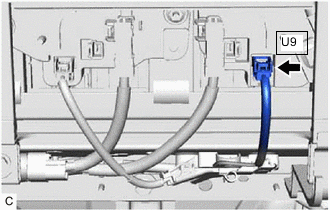
Check the U9 HV battery charger wire connector is connected securely, and there are no contact problems.
-
Disconnect the U9 HV battery charger wire connector from the No. 2 HV battery junction block assembly.
-
Check for arc marks on the terminals of the U9 HV battery charger wire connector and No. 2 HV battery junction block assembly.
Result Result Proceed to The terminals are connected securely and there are no contact problems. There are no arc marks. A The terminals are not connected securely and there is a contact problem. There are arc marks. B The terminals are not connected securely and there is a contact problem. There are no arc marks. C The terminals are connected securely and there are no contact problems. There are arc marks. B -
Reconnect the U9 HV battery charger wire connector.
-
Install the No. 1 HV battery shield panel.
B
REPLACE MALFUNCTIONING PARTS
C
CONNECT SECURELY
A
-
-
CHECK NO. 1 HV BATTERY JUNCTION BLOCK ASSEMBLY (HV BATTERY CHARGER WIRE CONNECTOR CONNECTION CONDITION)
CAUTION:
Be sure to wear insulated gloves.
-
Check that the service plug grip is not installed.
Note
After removing the service plug grip, do not turn the power switch on (READY), unless instructed by the repair manual because this may cause a malfunction.
-
Remove the No. 1 HV battery shield panel.
-
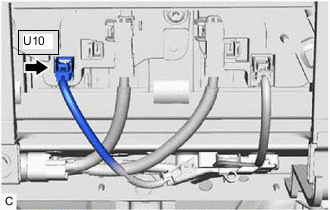
Check the U10 HV battery charger wire connector is connected securely, and there are no contact problems.
-
Disconnect the U10 HV battery charger wire connector from the No. 1 HV battery junction block assembly.
-
Check for arc marks on the terminals of the U10 No. 1 HV battery junction block assembly.
Result Result Proceed to The terminals are connected securely and there are no contact problems. There are no arc marks. A
(*1 or *3)
B
(*2)
The terminals are not connected securely and there is a contact problem. There are arc marks. C The terminals are not connected securely and there is a contact problem. There are no arc marks. D The terminals are connected securely and there are no contact problems. There are arc marks. C *1: When the value of "AC Charging" is Able
*2: When the value of "Solar Charging" is Able
*3: w/o Solar Charging System
-
Reconnect the U10 HV battery charger wire connector.
-
Install the No. 1 HV battery shield panel.
B
CHECK SOLAR ENERGY CONTROL UNIT (HV BATTERY CHARGER WIRE CONNECTOR CONNECTION CONDITION) Click here
C
REPLACE MALFUNCTIONING PARTS
D
CONNECT SECURELY
A
-
-
CHECK ELECTRIC VEHICLE CHARGER ASSEMBLY (HV BATTERY CHARGER WIRE CONNECTOR CONNECTION CONDITION)
CAUTION:
Be sure to wear insulated gloves.
-
Check that the service plug grip is not installed.
Note
After removing the service plug grip, do not turn the power switch on (READY), unless instructed by the repair manual because this may cause a malfunction.
-
Remove the rear under side cover RH.
-
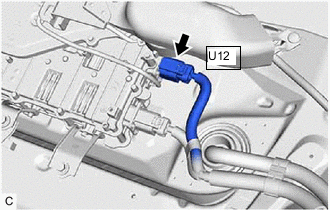
Check the U12 HV battery charger wire connector is connected securely, and there are no contact problems.
-
Disconnect the U12 HV battery charger wire connector from the electric vehicle charger assembly.
-
Check for arc marks on the terminals of the U12 HV battery charger wire connector and electric vehicle charger assembly.
Result Result Proceed to The terminals are connected securely and there are no contact problems. There are no arc marks. A The terminals are not connected securely and there is a contact problem. There are arc marks. B The terminals are not connected securely and there is a contact problem. There are no arc marks. C The terminals are connected securely and there are no contact problems. There are arc marks. B -
Reconnect the U12 HV battery charger wire connector.
-
Install the rear under side cover RH.
B
REPLACE MALFUNCTIONING PARTS
C
CONNECT SECURELY
A
-
-
CHECK HV BATTERY CHARGER WIRE
CAUTION:
Be sure to wear insulated gloves.
-
Check that the service plug grip is not installed.
Note
After removing the service plug grip, do not turn the power switch on (READY), unless instructed by the repair manual because this may cause a malfunction.
-
Remove the rear under side cover RH.
-
Disconnect the U12 HV battery charger wire connectors from the electric vehicle charger assembly.
-
Remove the No. 1 HV battery shield panel.
-
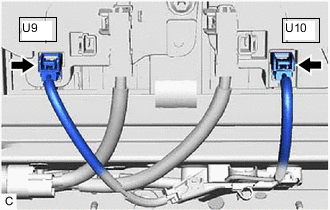
Disconnect the U9 and U10 HV battery charger wire connectors from the HV battery junction block assembly.
-
Measure the resistance according to the value(s) in the table below.
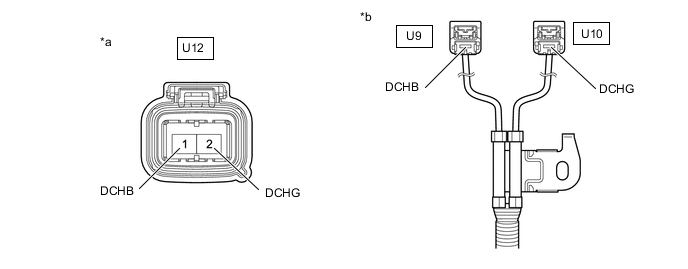
*a HV Battery Charger Wire
(Electric Vehicle Charger Assembly Side)
*b HV Battery Charger Wire
(HV Battery Junction Block Assembly Side)
Standard Resistance Tester Connection Condition Specified Condition U12-1 (DCHB) - U9-1 (DCHB) Power switch off Below 1 Ω U12-2 (DCHG) - U10-1 (DCHG) Power switch off Below 1 Ω Note
Be sure not to damage or deform the terminal being inspected.
-
Reconnect the U9 and U10 HV battery charger wire connectors to the HV battery junction block assembly.
-
Install the No. 1 HV battery shield panel.
-
Reconnect the U12 HV battery charger wire connectors to the electric vehicle charger assembly.
-
Install the rear under side cover RH.
Result Proceed to OK NG (w/ Solar Charging System) NG (w/o Solar Charging System)
NG (w/ Solar Charging System)
CHECK SOLAR ENERGY CONTROL UNIT (HV BATTERY CHARGER WIRE CONNECTOR CONNECTION CONDITION) Click here
NG (w/o Solar Charging System)
REPAIR OR REPLACE HARNESS OR CONNECTOR
OK
-
-
CHECK FOR INTERMITTENT PROBLEMS
-
Check for intermittent problems.
Result Result Proceed to Problem symptom does not recur. A Problem symptom recurs. B Tech Tips
-
Since 2 trip detection logic is used, the DTC detection condition must be met twice.
-
If DTC P300449 is output again after performing the inspection, replace the inverter with converter assembly. If DTC P300449 is not output again, replace the HV battery junction block assembly.
-
B
REPLACE ELECTRIC VEHICLE CHARGER ASSEMBLY Click here
A
-
-
REPLACE NO. 1 HV BATTERY JUNCTION BLOCK ASSEMBLY AND NO. 2 HV BATTERY JUNCTION BLOCK ASSEMBLY
Result Proceed to NEXT
NEXT
-
CHECK HV BATTERY JUNCTION BLOCK ASSEMBLY (CHECK FOR NORMAL OPERATION)
CAUTION:
Be sure to wear insulated gloves.
-
Install the service plug grip.
-
Turn the power switch on (IG).
-
Clear the DTCs.
-
Enter the following menus: Powertrain / Hybrid Control / Data List / Hybrid Battery SOC.
-
Check that "Hybrid Battery SOC" shows 70% or less.
Powertrain > Hybrid Control > Data ListTester Display Hybrid Battery SOC -
Turn the power switch off and wait for 2 minutes or more.
-
Connect the electric vehicle charger cable assembly, and plug-in charge the vehicle for 30 seconds or more.
-
Disconnect the electric vehicle charger cable assembly and wait for 10 seconds or more.
-
Turn the power switch on (READY).
-
Enter the following menus: Powertrain / Hybrid Control / Data List / Hybrid Battery Voltage, Charging Voltage for Hybrid Battery.
-
According to the display on the Techstream, read the Data List and monitor the values of "Hybrid Battery Voltage" and "Charging Voltage for Hybrid Battery" for 3 minutes.
Powertrain > Hybrid Control > Data ListTester Display Hybrid Battery Voltage Charging Voltage for Hybrid Battery Result Result Proceed to Difference between "Hybrid Battery Voltage" and "Charging Voltage for Hybrid Battery" is always less than 50 V. A Difference between "Hybrid Battery Voltage" and "Charging Voltage for Hybrid Battery" is 50 V or more. B -
Turn the power switch off.
A
END
B
REPLACE BATTERY ECU ASSEMBLY AND HV BATTERY JUNCTION BLOCK ASSEMBLY BATTERY ECU ASSEMBLY: Click here
REPLACE BATTERY ECU ASSEMBLY AND HV BATTERY JUNCTION BLOCK ASSEMBLY NO. 1 HV BATTERY JUNCTION BLOCK ASSEMBLY AND NO. 2 HV BATTERY JUNCTION BLOCK ASSEMBLY: Click here -
-
CHECK SOLAR ENERGY CONTROL UNIT (HV BATTERY CHARGER WIRE CONNECTOR CONNECTION CONDITION)
CAUTION:
Be sure to wear insulated gloves.
-
Check that the service plug grip is not installed.
Note
After removing the service plug grip, do not turn the power switch on (READY), unless instructed by the repair manual because this may cause a malfunction.
-
Remove the rear seat console box assembly.
-
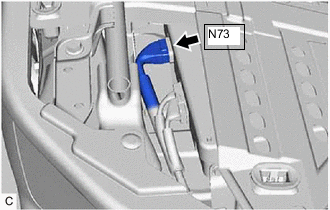
Disconnect the N73 solar energy control unit connector.
-
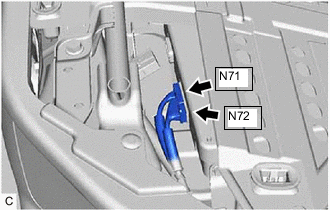
Disconnect the N71 and N72 solar energy control unit connectors.
-
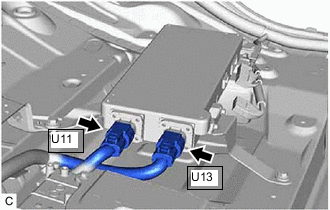
Check the U11 and U13 HV battery charger wire connector is connected securely, and there are no contact problems.
-
Disconnect the U11 and U13 HV battery charger wire connector from the solar energy control unit.
-
Check for arc marks on the terminals of the U11 and U13 HV battery charger wire connector and solar energy control unit.
Result Result Proceed to The terminals are connected securely and there are no contact problems. There are no arc marks. A The terminals are not connected securely and there is a contact problem. There are arc marks. B The terminals are not connected securely and there is a contact problem. There are no arc marks. C The terminals are connected securely and there are no contact problems. There are arc marks. B -
Reconnect the U11 and U13 HV battery charger wire connector.
-
Reconnect the N73 solar energy control unit connector.
-
Reconnect the N71 and N72 solar energy control unit connectors.
-
Install the rear seat console box assembly.
B
REPLACE MALFUNCTIONING PARTS
C
CONNECT SECURELY
A
-
-
CHECK HV BATTERY CHARGER WIRE
CAUTION:
Be sure to wear insulated gloves.
-
Check that the service plug grip is not installed.
Note
After removing the service plug grip, do not turn the power switch on (READY), unless instructed by the repair manual because this may cause a malfunction.
-
Remove the rear seat console box assembly.
-
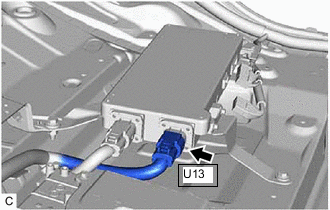
Disconnect the U13 HV battery charger wire connectors from the solar energy control unit.
-
Disconnect the N73 solar energy control unit connector.
-
Disconnect the N71 and N72 solar energy control unit connectors.
-
Remove the No. 1 HV battery shield panel.
-
Disconnect the U9 and U10 HV battery charger wire connectors from the HV battery junction block assembly.
-
Measure the resistance according to the value(s) in the table below.
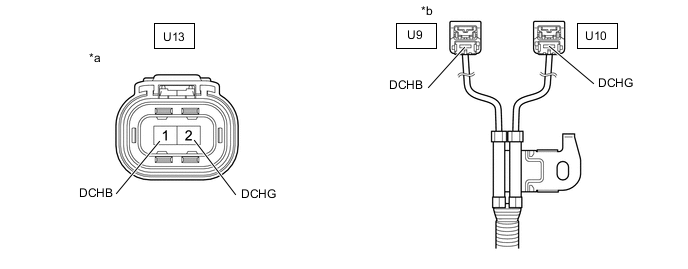
*a HV Battery Charger Wire
(Solar Energy Control Unit Side)
*b HV Battery Charger Wire
(HV Battery Junction Block Assembly Side)
Standard Resistance Tester Connection Condition Specified Condition U13-1 (DCHB) - U9-1 (DCHB) Power switch off Below 1 Ω U13-2 (DCHG) - U10-1 (DCHG) Power switch off Below 1 Ω Note
Be sure not to damage or deform the terminal being inspected.
-
Reconnect the U9 and U10 HV battery charger wire connectors to the HV battery junction block assembly.
-
Install the No. 1 HV battery shield panel.
-
Reconnect the U12 HV battery charger wire connectors to the electric vehicle charger assembly.
-
Reconnect the N73 solar energy control unit connector.
-
Reconnect the N71 and N72 solar energy control unit connectors.
-
Install the rear under side cover RH.
Result Proceed to OK NG
NG
REPAIR OR REPLACE HARNESS OR CONNECTOR
OK
-
-
CHECK FOR INTERMITTENT PROBLEMS
-
Check for intermittent problems.
Result Result Proceed to Problem symptom does not recur. A Problem symptom recurs. B Tech Tips
-
Since 2 trip detection logic is used, the DTC detection condition must be met twice.
-
If DTC P300449 is output again after performing the inspection, replace the inverter with converter assembly. If DTC P300449 is not output again, replace the HV battery junction block assembly.
-
B
REPLACE SOLAR ENERGY CONTROL UNIT Click here
A
-
-
REPLACE NO. 1 HV BATTERY JUNCTION BLOCK ASSEMBLY AND NO. 2 HV BATTERY JUNCTION BLOCK ASSEMBLY
Result Proceed to NEXT
NEXT
-
CHECK HYBRID VEHICLE CONTROL ECU (CHECK FOR NORMAL OPERATION)
Result Result Proceed to Difference between "Hybrid Battery Voltage" and "Charging Voltage for Hybrid Battery" is always less than 50 V. A Difference between "Hybrid Battery Voltage" and "Charging Voltage for Hybrid Battery" is 50 V or more. B CAUTION:
Be sure to wear insulated gloves.
-
Install the service plug grip.
-
Turn the power switch on (IG).
-
Clear the DTCs.
-
Turn the power switch off and wait for 2 minutes or more.
-
Turn the power switch on (READY).
-
Enter the following menus: Powertrain / Hybrid Control / Data List / Hybrid Battery Voltage, VL-Voltage before Boosting.
-
According to the display on the GTS, read the Data List and monitor the values of "Hybrid Battery Voltage" and "VL-Voltage before Boosting" for 3 minutes.
Powertrain > Hybrid Control > Data ListTester Display VL-Voltage before Boosting Hybrid Battery Voltage Result Result Proceed to Difference between "Hybrid Battery Voltage" and "VL-Voltage before Boosting" is always less than 100 V. A Difference between "Hybrid Battery Voltage" and "VL-Voltage before Boosting" is 100 V or more. B -
Turn the power switch off.
A
END
B
REPLACE BATTERY ECU ASSEMBLY AND HV BATTERY JUNCTION BLOCK ASSEMBLY BATTERY ECU ASSEMBLY: Click here
REPLACE BATTERY ECU ASSEMBLY AND HV BATTERY JUNCTION BLOCK ASSEMBLY NO. 1 HV BATTERY JUNCTION BLOCK ASSEMBLY AND NO. 2 HV BATTERY JUNCTION BLOCK ASSEMBLY: Click here -
-
CHECK SOLAR ENERGY CONTROL UNIT (HV BATTERY CHARGER WIRE CONNECTOR CONNECTION CONDITION)
CAUTION:
Be sure to wear insulated gloves.
-
Check that the service plug grip is not installed.
Note
After removing the service plug grip, do not turn the power switch on (READY), unless instructed by the repair manual because this may cause a malfunction.
-
Remove the rear seat console box assembly.
-
Disconnect the N73 solar energy control unit connector.
-
Disconnect the N71 and N72 solar energy control unit connectors.
-
Check the U11 and U13 HV battery charger wire connector is connected securely, and there are no contact problems.
-
Disconnect the U11 and U13 HV battery charger wire connector from the solar energy control unit.
-
Check for arc marks on the terminals of the U11 and U13 HV battery charger wire connector and solar energy control unit.
Result Result Proceed to The terminals are connected securely and there are no contact problems. There are no arc marks. A The terminals are not connected securely and there is a contact problem. There are arc marks. B The terminals are not connected securely and there is a contact problem. There are no arc marks. C The terminals are connected securely and there are no contact problems. There are arc marks. B -
Reconnect the U11 and U13 HV battery charger wire connector.
-
Reconnect the N73 solar energy control unit connector.
-
Reconnect the N71 and N72 solar energy control unit connectors.
-
Install the rear seat console box assembly.
B
REPLACE MALFUNCTIONING PARTS
C
CONNECT SECURELY
A
-
-
CHECK HV BATTERY CHARGER WIRE
CAUTION:
Be sure to wear insulated gloves.
-
Check that the service plug grip is not installed.
Note
After removing the service plug grip, do not turn the power switch on (READY), unless instructed by the repair manual because this may cause a malfunction.
-
Remove the rear seat console box assembly.
-
Disconnect the N73 solar energy control unit connector.
-
Disconnect the N71 and N72 solar energy control unit connectors.
-
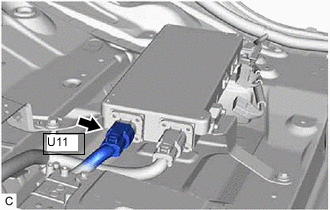
Disconnect the U11 HV battery charger wire connector from the solar energy control unit.
-
Disconnect the U12 HV battery charger wire connector from the electric vehicle charger assembly.
-
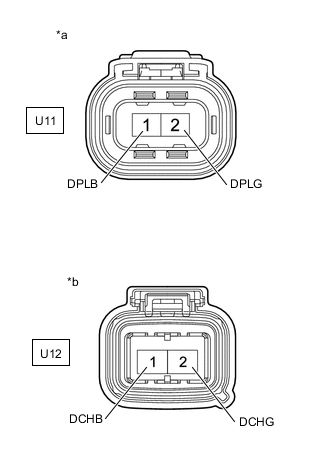
*a HV Battery Charger Wire
(Solar Energy Control Unit Side)
*b HV Battery Charger Wire
(Electric Vehicle Charger Assembly Side)
Measure the resistance according to the value(s) in the table below.
Standard Resistance Tester Connection Condition Specified Condition U11-1 (DPLB) - U12-1 (DCHB) Power switch off Below 1 Ω U11-2 (DPLG) - U12-2 (DCHG) Power switch off Below 1 Ω Note
Be sure not to damage or deform the terminal being inspected.
-
Reconnect the U12 HV battery charger wire connector to the electric vehicle charger assembly.
-
Reconnect the U11 HV battery charger wire connector to the solar energy control unit.
-
Reconnect the N73 solar energy control unit connector.
-
Reconnect the N71 and N72 solar energy control unit connectors.
-
Install the rear seat console box assembly.
Result Proceed to OK NG
NG
REPAIR OR REPLACE HARNESS OR CONNECTOR
OK
-
-
CHECK HV BATTERY CHARGER WIRE
CAUTION:
Be sure to wear insulated gloves.
-
Check that the service plug grip is not installed.
Note
After removing the service plug grip, do not turn the power switch on (READY), unless instructed by the repair manual because this may cause a malfunction.
-
Remove the rear seat console box assembly.
-
Disconnect the N73 solar energy control unit connector.
-
Disconnect the N71 and N72 solar energy control unit connectors.
-
Disconnect the U13 HV battery charger wire connectors from the solar energy control unit.
-
Remove the No. 1 HV battery shield panel.
-
Disconnect the U9 and U10 HV battery charger wire connectors from the HV battery junction block assembly.
-
Measure the resistance according to the value(s) in the table below.
*a HV Battery Charger Wire
(Solar Energy Control Unit Side)
*b HV Battery Charger Wire
(HV Battery Junction Block Assembly Side)
Standard Resistance Tester Connection Condition Specified Condition U13-1 (DCHB) - U9-1 (DCHB) Power switch off Below 1 Ω U13-2 (DCHG) - U10-1 (DCHG) Power switch off Below 1 Ω Note
Be sure not to damage or deform the terminal being inspected.
-
Reconnect the U9 and U10 HV battery charger wire connectors to the HV battery junction block assembly.
-
Install the No. 1 HV battery shield panel.
-
Reconnect the U13 HV battery charger wire connectors to the solar energy control unit.
-
Reconnect the N73 solar energy control unit connector.
-
Reconnect the N71 and N72 solar energy control unit connectors.
-
Install the rear under side cover RH.
Result Proceed to OK NG
OK
REPLACE SOLAR ENERGY CONTROL UNIT Click here
NG
REPAIR OR REPLACE HARNESS OR CONNECTOR
-