POWER MIRROR CONTROL SYSTEM OPERATION CHECK
-
CHECK POWER RETRACTABLE MIRROR FUNCTION
-
Turn the power switch on (ACC).
-

When the outer rear view mirror assembly LH and outer rear view mirror assembly RH are in the driving position, press the mirror retract switch in the outer mirror switch assembly and check that they move to the retracted position.
Tech Tips
If both mirrors are moved to the driving/retracted position by hand, the mirrors will not retract/return with the first switch operation. Another switch operation is required to retract/return the mirrors.
-
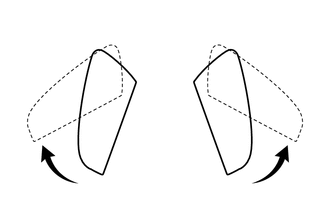
When the outer rear view mirror assembly LH and outer rear view mirror assembly RH are in the retracted position, press the mirror retract switch in the outer mirror switch assembly and check that they move to the driving position.
Tech Tips
If both mirrors are moved to the driving/retracted position by hand, the mirrors will not retract/return with the first switch operation. Another switch operation is required to retract/return the mirrors.
-
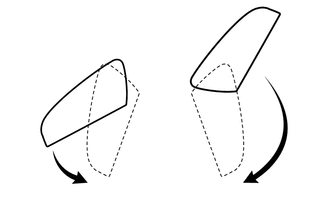
When the outer rear view mirror assembly LH and outer rear view mirror assembly RH are in the driving position, move either of them forward by hand, and then press the mirror retract switch in the outer mirror switch assembly and check that both outer rear view mirror assemblies move to the retracted position.
-
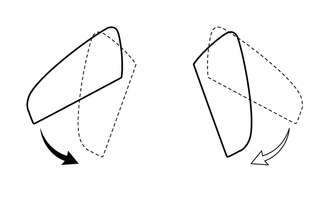
When the outer rear view mirror assembly LH and outer rear view mirror assembly RH are in the driving position, move either of them to the retracted position by hand, and then press the mirror retract switch in the outer mirror switch assembly and check that the other outer rear view mirror assembly moves to the retracted position.
-
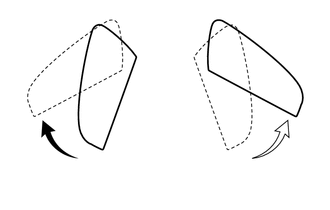
When the outer rear view mirror assembly LH and outer rear view mirror assembly RH are in the retracted position, move either of them to the driving position by hand, and then press the mirror retract switch in the outer mirror switch assembly and check that the other outer rear view mirror assembly moves to the driving position.
-
While the outer rear view mirror assemblies are operating, stop either outer rear view mirror assembly by hand and check that its operation stops. Then press the mirror retract switch in the outer mirror switch assembly and check that the operation resumes.
-
-
CHECK AUTO POWER RETRACTABLE MIRROR FUNCTION
-
When the power switch is off and the doors are unlocked by the entry or wireless check that the outer rear view mirror assemblies move from the retracted position to the driving position and stop in the driving position.
Tech Tips
If the outer rear view mirror assemblies are retracted by pressing the mirror retract switch in the outer mirror switch assembly, the mirrors will not move to the driving position with the auto power retract mirror function.
-
When the power switch is off and the doors are locked by the entry or wireless check that the outer rear view mirror assemblies move from the driving position to the retracted position and stop in the retracted position.
-
-
CHECK MEMORY AND MIRROR RESTORING OPERATION
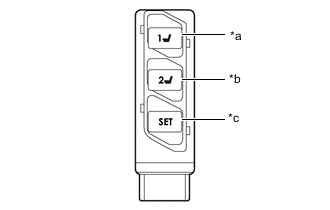
*a M1 Switch *b M2 Switch *c SET Switch Tech Tips
If the M1 switch and M2 switch are simultaneously pressed while the SET switch is pressed and held, the seat position will not be stored.
-
Turn the power switch on (IG) and move the shift lever to P.
-
Check the M1 switch.
-
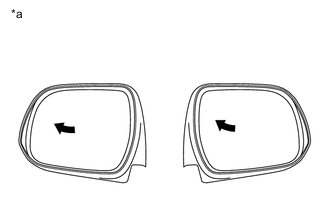
*a Turn to Left Fully Using the outer mirror switch assembly, turn the mirror surface to the full left position.
-
Check that the buzzer sounds for 0.5 seconds and the mirror surface position is memorized when the M1 switch is pressed within 3 seconds after the SET switch is pressed.
Note
-
The mirror surface position will also be stored when the M1 switch is pressed after first pressing and holding the SET switch.
-
The mirror surface position will not be stored when the SET switch and M1 switch are pressed simultaneously.
-
The mirror surface position will not be stored when the seat memory switches are pressed simultaneously (for example, M1 and M2) after first pressing the SET switch.
-
-
Using the outer mirror switch assembly, turn the mirror surface to the full right position.
-
Press the M1 switch.
-
Check that the buzzer sounds for 0.1 seconds and the outer mirror automatically moves to the memorized full left position.
-
-
Check the M2 switch.
-
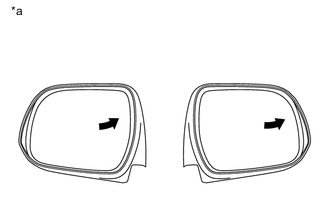
*a Turn to Right Fully Using the outer mirror switch assembly, turn the mirror surface to the full right position.
-
Check that the buzzer sounds for 0.5 seconds and the mirror surface position is memorized when the M2 switch is pressed within 3 seconds after the SET switch is pressed.
Note
-
The mirror surface position will also be stored when the M2 switch is pressed after first pressing and holding the SET switch.
-
The mirror surface position will not be stored when the SET switch and M2 switch are pressed simultaneously.
-
The mirror surface position will not be stored when the seat memory switches are pressed simultaneously (for example, M1 and M2) after first pressing the SET switch.
-
-
Using the outer mirror switch assembly, turn the mirror surface to the full left position.
-
Press the M2 switch.
-
Check that the buzzer sounds for 0.1 seconds and the outer mirror automatically moves to the memorized full right position.
-
-
-
CHECK REVERSE SHIFT-LINKED OPERATION OF MIRRORS
-
Turn the power switch on (IG).
-
Set the mirror select switch to L or R.
-
Check that the mirror surface turns downward when the shift lever is moved to R.
-
Check that the mirror surface position returns to the original position when one of the following conditions is met:
-
Shift lever is moved to any position other than R.
-
Mirror select switch is in the neutral position (off).
-
Power switch is turned off.
-
-
-
CHECK REVERSE SHIFT-LINKED MIRROR POSITION MEMORIZATION FUNCTION
-
Turn the power switch on (IG).
-
Set the mirror select switch to L or R.
-
Check that selected mirror surface turns downward when the shift lever is moved to R.
-
While the mirror is in the reverse shift-linked operation position, move the mirror to the desired position.
-
Check that the mirror moves to its normal position when the shift lever is moved to a different position from R, and then moves back to the memorized position when the shift lever is moved to R again.
-
-
CHECK MEMORY CALL FUNCTION
-
Memory call function check.
-
With a transmitter key recognition code registered:
With the recognition code of the transmitter registered in memory, perform an entry unlock or wireless unlock operation. Open the driver door and check that the front seat, steering wheel (tilt and telescopic) and outer mirror surface position automatically move to the positions memorized in memory.
-
-
Memory registration.
-
Prepare by memorizing the driving position through the seat memory switch (M1 or M2).
-
Turn the power switch on (IG), move the shift lever to P and driver side door is closed.
-
Press and hold both of the following: a seat memory switch (M1 or M2) and door control switch on the multiplex network master switch assembly (LOCK or UNLOCK). Continue holding the switches until the answer-back buzzer sounds once (0.5 seconds).
Note
Do not bring 2 or more keys into the vehicle.
-
-
Memory erasure.
-
Press and hold both of the following: the SET switch and door control switch on the multiplex network master switch assembly (LOCK or UNLOCK). Continue holding the switches until the answer-back buzzer sounds twice (0.1 seconds each time).
Note
Do not bring 2 or more keys into the vehicle.
-
-
-
CHECK MEMORY CALL EMERGENCY STOP FUNCTION
-
While a memory call function is operating, check that any one of the following actions will stop the memory call operation: 1) pressing the SET, M1 or M2 switch, 2) moving the shift lever to R, 3) moving the mirror surface manually, or 4) moving the mirror surface to the uppermost, lowermost, leftmost or rightmost position.
-
-
CHECK MIRROR HEATER
-
Turn the power switch on (IG).
-
Check that pressing the rear window defogger switch illuminates the indicator and warms the mirror surface.
-
Check that after approximately 15 minutes, the indicator light turns off and the mirror heater deactivates.
Tech Tips
There is a timer extension function which can operate the mirror heater system for up to an additional 45 minutes.
-