WIRELESS CHARGING SYSTEM OPERATION CHECK
-
CHECK WIRELESS CHARGING SYSTEM OPERATION
-
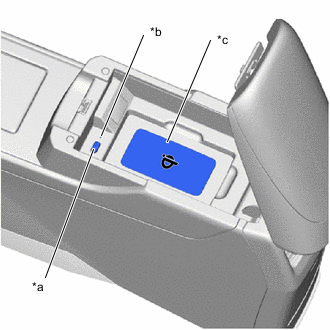
*a Wireless Charger Switch *b Indicator (Green/Amber) *c Charging Area Turn the power switch on (ACC) or on (IG).
Tech Tips
When the wireless charging system is on and the power switch is turned off, the wireless charging system turns on the next time the power switch is turned on (ACC) or on (IG).
-
When the wireless charging system is turned on, check that the indicator illuminates green.
-
When the Qi-compatible device is placed on the charging area, check that the indicator illuminates amber and charging starts.
-
When the Qi-compatible device charging completes, check that the indicator illuminates green.
Tech Tips
Even when using a Qi-compatible device, case or accessory, the indicator may fail to illuminate green when the charging is complete. In this case, check the charge condition on the device.
-
When the wireless charging system is turned off, check that the indicator turns off.
-