WIRELESS DOOR LOCK BUZZER REMOVAL
CAUTION / NOTICE / HINT
Tech Tips
-
Use the same procedure for the RHD and LHD vehicles.
-
The procedure listed below is for the LHD vehicles.
PROCEDURE
-
REMOVE FRONT WHEEL
-
REMOVE FRONT WHEEL OPENING EXTENSION PAD LH (for LHD)
-
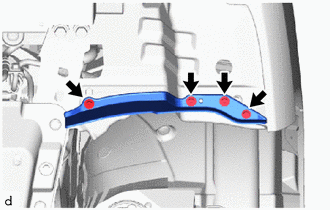
Remove the 4 screws and front wheel opening extension pad LH.
-
-
INSTALL FRONT WHEEL OPENING EXTENSION PAD RH (for RHD)
-
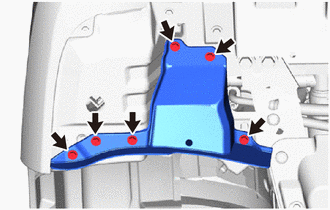
Remove the 6 screws and front wheel opening extension pad RH.
-
-
REMOVE FRONT FENDER SPLASH SHIELD SUB-ASSEMBLY LH
-
Using a screwdriver, turn the pin hold clip 90 degrees clockwise to remove the 2 pin hold clips.
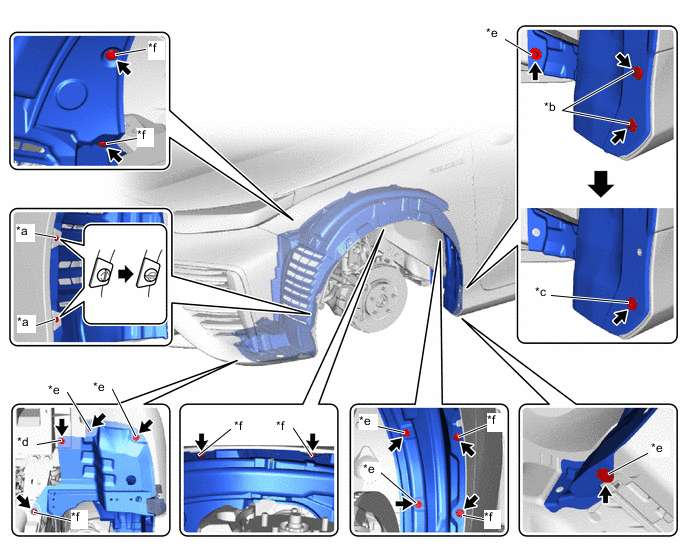
*a Pin Hold Clip *b Hexagon Screw *c Grommet *d Bolt *e Screw *f Clip -
Using a hexagon socket wrench 4, remove the 2 hexagon screws.
-
Using a clip remover, remove the grommet.
-
Remove the bolt.
-
Remove the 6 screws.
-
Using a clip remover, remove the 7 clips and front fender splash shield sub-assembly LH.
-
-
REMOVE WIRELESS DOOR LOCK BUZZER
-
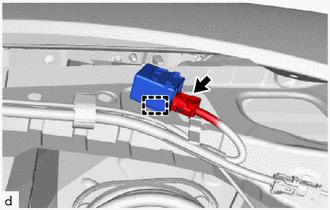
Disconnect the connector.
-
Using a clip remover, disengage the clamp to remove the wireless door lock buzzer.
-