DOOR CONTROL SWITCH INSTALLATION
CAUTION / NOTICE / HINT
Tech Tips
-
Use the same procedure for the RHD and LHD vehicles.
-
The procedure listed below is for the LHD vehicles.
PROCEDURE
-
INSTALL MULTIPLEX NETWORK MASTER SWITCH ASSEMBLY (for Driver Side)
-
Install the multiplex network master switch assembly with the 3 screws.
-
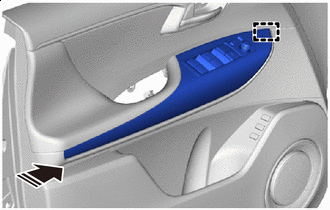

Install in this Direction Engage the guide as shown in the illustration.
-
Install the front door armrest base panel assembly LH with the 8 screws.
-
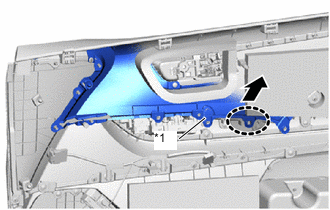
*1 Door Trim Upper Panel Assembly LH 
Place Hands Here 
Raise Up As shown in the illustration, slightly raise up the door trim upper panel assembly LH.
Tech Tips
Raise up the door trim upper panel assembly LH far enough that the front door pull handle LH can be installed.
-
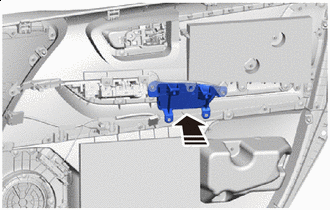
Install in this Direction Install the front door pull handle LH as shown in the illustration.
-
Install the 7 screws.
-
Connect the 2 connectors.
-
-
INSTALL FRONT DOOR TRIM BOARD SUB-ASSEMBLY LH
-
INSTALL COURTESY LIGHT ASSEMBLY
-
INSTALL NO. 1 FRONT DOOR STIFFENER CUSHION
-
INSTALL FRONT DOOR ARMREST COVER LH
-
INSTALL FRONT DOOR INSIDE HANDLE BEZEL PLUG LH