BRAKE SYSTEM ON-VEHICLE INSPECTION

CAUTION / NOTICE / HINT
Note
DTCs may be stored during the inspection procedure. Be sure to clear the DTCs and check that no DTCs are output after the inspection is finished.
PROCEDURE
-
INSPECT PRESSURE SENSOR
-
Check auxiliary battery voltage.
Standard voltage 11 to 14 V (while the power switch is off) -
Set a pedal effort gauge and SST and connect the GTS.
-
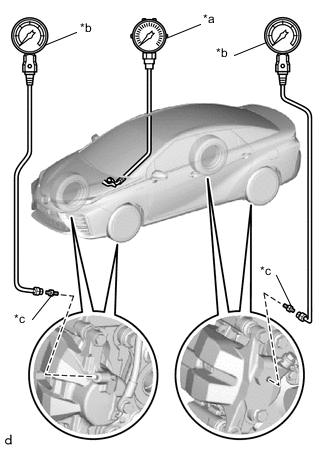
*a Pedal Effort Gauge *b SST (LSPV Gauge) *c SST (No. 1 Nipple) Set a pedal effort gauge and SST.
- SST
- 09709-29018 ( 09709-00060 )
-
Connect the GTS to the DLC3 with the power switch off, park (P) selected and parking brake applied.
-
Turn the power switch on (IG) and turn the GTS on.
-
Bleed air from SST (LSPV gauge).
-
-
Inspect the wheel cylinder pressure sensor and regulator pressure sensor.
-
Enter the following menus: Chassis / ABS/VSC/TRC / Active Test / Power Supply Air Bleeding Pattern 1.
Chassis > ABS/VSC/TRAC > Active TestActive Test Display Power Supply Air Bleeding Pattern1 Data List Display Regulator Pressure Sensor Output Wheel Cylinder Pressure Sensor -
Select "Wheel Cylinder Pressure Sensor" and "Regulator Pressure Sensor Output".
-
Check the value output from "Wheel Cylinder Pressure Sensor" and "Regulator Pressure Sensor Output" by depressing the brake pedal.
Standard Result Pedal Effort Regulator Pressure Sensor Output
(V)
Rear Right Wheel Hydraulic Pressure Rear Left Wheel Hydraulic Pressure 50 N (5 kgf, 11.2 lbf) 0.57 to 1.37 0.31 to 4.31 MPa (3.2 to 43.9 kgf/cm2, 45 to 625 psi)
0.31 to 4.31 MPa (3.2 to 43.9 kgf/cm2, 45 to 625 psi)
100 N (10 kgf, 22.5 lbf) 1.50 to 2.30 4.88 to 8.88 MPa (49.8 to 90.6 kgf/cm2, 708 to 1288 psi)
4.88 to 8.88 MPa (49.8 to 90.6 kgf/cm2, 708 to 1288 psi)
150 N (15 kgf, 33.7 lbf) 2.44 to 3.24 9.45 to 13.45 MPa (96.4 to 137.2 kgf/cm2, 1370 to 1950 psi)
9.45 to 13.45 MPa (96.4 to 137.2 kgf/cm2, 1370 to 1950 psi)
200 N (20 kgf, 45.0 lbf) 3.37 to 4.17 14.01 to 18.01 MPa (142.9 to 183.7 kgf/cm2, 2031 to 2611 psi)
14.01 to 18.01 MPa (142.9 to 183.7 kgf/cm2, 2031 to 2611 psi)
Standard Result Pedal Effort Wheel Cylinder Pressure Sensor
(V)
Front Right Wheel Hydraulic Pressure Front Left Wheel Hydraulic Pressure 50 N (5 kgf, 11.2 lbf) 0.51 to 1.31 0.00 to 3.98 MPa (0 to 40.6 kgf/cm2, 0 to 577 psi)
0.00 to 3.98 MPa (0 to 40.6 kgf/cm2, 0 to 577 psi)
100 N (10 kgf, 22.5 lbf) 1.30 to 2.10 3.89 to 7.89 MPa (39.7 to 80.5 kgf/cm2, 564 to 1144 psi)
3.89 to 7.89 MPa (39.7 to 80.5 kgf/cm2, 564 to 1144 psi)
150 N (15 kgf, 33.7 lbf) 2.10 to 2.90 7.80 to 11.80 MPa (79.5 to 120.3 kgf/cm2, 1131 to 1711 psi)
7.80 to 11.80 MPa (79.5 to 120.3 kgf/cm2, 1131 to 1711 psi)
200 N (20 kgf, 45.0 lbf) 2.89 to 3.69 11.68 to 15.68 MPa (119.1 to 159.9 kgf/cm2, 1694 to 2274 psi)
11.68 to 15.68 MPa (119.1 to 159.9 kgf/cm2, 1694 to 2274 psi)
-
After inspection, turn "Power Supply Air Bleeding Pattern 1" off.
-
-
Remove the pedal effort gauge and SST.
-
Remove the pedal effort gauge and SST, and bleed the brake line.
-
-
Inspect the accumulator sensor.
-
Enter the following menus: Chassis / ABS/VSC/TRC / Data List / Accumulator Sensor.
Chassis > ABS/VSC/TRAC > Data ListTester Display Accumulator Sensor -
Depress the brake pedal 4 or 5 times and operate the booster pump motor.
-
After confirming that the booster pump motor stops, check the output voltage.
Standard voltage 2.9 to 4.2 V
-
-
-
INSPECT BRAKE BOOSTER WITH MASTER CYLINDER ASSEMBLY
-
Check auxiliary battery voltage.
Standard voltage 11 to 14 V (while the power switch is off) -
Connect the GTS and set a pedal effort gauge.
-
Set a pedal effort gauge.
-
Connect the GTS to the DLC3 with the power switch off, park (P) selected and parking brake applied.
-
Turn the power switch on (IG) and turn the GTS on.
-
Clear the DTCs.
-
-
Check operation without the brake booster.
-
Inspect and adjust the brake pedal height.
-
for LHD:
-
for RHD:
-
-
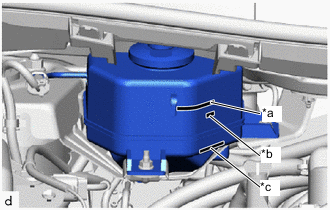
*a MAX Line *b Fluid Level Support Line *c MIN Line Adjust the brake fluid level in the reservoir between the MIN line and fluid level support line.
-
Turn the GTS on and enter the following menus: Chassis / ABS/VSC/TRC / Utility / ECB (Electronically Controlled Brake system) Utility / Zero Down.
Chassis > ABS/VSC/TRAC > UtilityTester Display ECB Utility Note
Go to the next step without turning the power switch off.
-
Enter the following menus: Chassis / ABS/VSC/TRC / Data List / Wheel Cylinder Pressure Sensor, Stroke Sensor and Stroke Sensor 2.
Chassis > ABS/VSC/TRAC > Data ListTester Display Stroke Sensor Stroke Sensor2 Wheel Cylinder Pressure Sensor -
Check the values output from "Wheel Cylinder Pressure Sensor", "Stroke Sensor" and "Stroke Sensor 2" by depressing the brake pedal.
Standard Voltage Pedal Effort Wheel Cylinder Pressure Sensor
(V)
Stroke Sensor
(V)
Stroke Sensor 2
(V)
200 N (20 kgf, 45.0 lbf) 0.50 to 1.30 0.97 to 1.67 3.33 to 4.03 500 N (51 kgf, 112.4 lbf) 1.10 to 1.90 1.15 to 1.85 3.15 to 3.85 -
Turn the power switch off to finish "Zero Down".
-
Turn the power switch on (IG) and wait for 20 seconds, then enter the following menus: Chassis / ABS/VSC/TRC / Data List / Accumulator Sensor, and check the output voltage.
Chassis > ABS/VSC/TRAC > Data ListTester Display Accumulator Sensor Standard voltage 2.9 to 4.2 V
-
-
-
INSPECT STROKE SIMULATOR
-
Check auxiliary battery voltage.
Standard voltage 11 to 14 V (while the power switch is off) -
Connect the GTS and set a pedal effort gauge.
-
Set a pedal effort gauge.
-
Connect the GTS to the DLC3 with the power switch off, park (P) selected and parking brake applied.
-
Turn the power switch on (IG) and turn the GTS on.
-
Clear the DTCs.
-
-
Check operation with the brake booster.
-
Turn the power switch on (IG).
-
Enter the following menus: Chassis / ABS/VSC/TRC / Data List / Stroke Sensor and Stroke Sensor2.
Chassis > ABS/VSC/TRAC > Data ListTester Display Stroke Sensor Stroke Sensor2 -
Depress the brake pedal 4 or 5 times.
-
Check the values output from "Stroke Sensor" and "Stroke Sensor2" by depressing the brake pedal.
Standard Voltage Pedal Effort Stroke Sensor
(V)
Stroke Sensor2
(V)
50 N (5 kgf, 11.2 lbf) 1.07 to 1.77 3.23 to 3.93 100 N (10 kgf, 22.5 lbf) 1.25 to 1.95 3.05 to 3.75 150 N (15 kgf, 33.7 lbf) 1.35 to 2.05 2.95 to 3.65
-
-