BRAKE PEDAL(for LHD) ADJUSTMENT
PROCEDURE
-
INSPECT AND ADJUST BRAKE PEDAL HEIGHT
Note
Inspect and adjust the brake pedal height with the floor carpet turn back.
-
Check the brake pedal height.
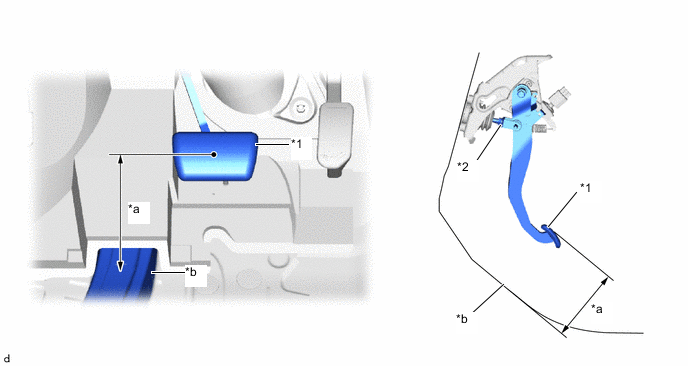
*1 Brake Pedal *2 Clevis Lock Nut *a Brake Pedal Height *b Measuring Plane of Floor Panel Brake pedal height from floor panel 128.4 to 138.4 mm (5.06 to 5.45 in.) -
Adjust the brake pedal height.
-
Remove the stop light switch assembly.
-
Loosen the clevis lock nut.
-
Adjust the brake pedal height by turning the push rod.
Brake pedal height from floor panel 128.4 to 138.4 mm (5.06 to 5.45 in.) -
Tighten the clevis lock nut.
- Torque:
- 25.5 N*m { 260 kgf*cm, 19 ft.*lbf }
-
Install the stop light switch assembly.
-
-
-
INSPECT AND ADJUST BRAKE PEDAL STROKE SENSOR ASSEMBLY
-
INSPECT BRAKE PEDAL FREE PLAY
-
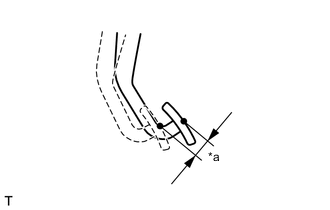
*a Brake Pedal Free Play Depress the brake pedal until a slight resistance is felt. Measure the brake pedal free play as shown in the illustration.
Brake pedal free play 1.0 to 6.0 mm (0.0394 to 0.236 in.) If the pedal free play is not as specified, check the stop light switch clearance.
If the pedal free play is as specified, proceed to the Inspect Brake Pedal Reserve Distance procedure.
-
-
INSPECT BRAKE PEDAL RESERVE DISTANCE
-
With the power switch on (READY), depress the brake pedal and measure the pedal reserve distance.
Brake pedal reserve distance from floor panel at 196 N (20 kgf, 44 lbf) More than 75 mm (2.95 in.) Note
-
Check the brake pedal reserve distance at the same location as that used when checking the brake pedal height.
-
Inspect and adjust the brake pedal height with the floor carpet turn back.
-
-
-
PERFORM INITIALIZATION AND CALIBRATION OF LINEAR SOLENOID VALVE