TIRE PRESSURE WARNING SYSTEM INITIALIZATION

Note
-
Initialization can be confirmed through the tire pressure warning light.
-
The order in which the data is received is random.
-
If the signals from all the tire pressure warning valve and transmitters are received, initialization is completed.
-
Initialization is completed when the Data List "ID Tire Inflation Pressure" display shows the correct pressures.
-
Initialization is normally completed within a few minutes.
-
It may take a few minutes until the values are displayed. If the values are not displayed after a few minutes, perform troubleshooting according to the inspection procedure for DTCs C2121/21 to C2124/24.
-
If initialization has not been completed successfully, DTC C2177/77 is stored after a vehicle speed of 37 km/h (23 mph) or more is detected for 10 minutes or more.
-
During test mode (signal check mode), the system will not change to initialization mode even if the initialization procedure is performed.
-
While the answer-back function for the ID switching function is operating, the system will not change to initialization mode even if the tire pressure warning reset switch is pressed.
-
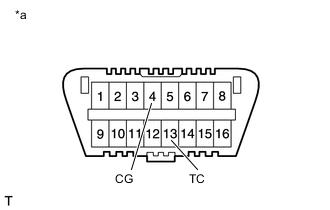
*a Front view of DLC3 Initialization can be terminated by connecting terminals 13 (TC) and 4 (CG) of the DLC3.
-
BEFORE INITIALIZATION
-
Set the tire pressure to the specified value.
Note
Refer to the link as the procedure for adjusting the tire pressures differs depending on the temperature of the tires.
-
-
INITIALIZATION PROCEDURE
Tech Tips
The tire pressure warning system illuminates the tire pressure warning light to warn the driver when the following condition is met:
-
Due to the operation of the steering pad switch assembly, the tire pressure drops to approximately 75% or less of the tire pressure set during system initialization.
-
Turn the power switch on (IG).
-
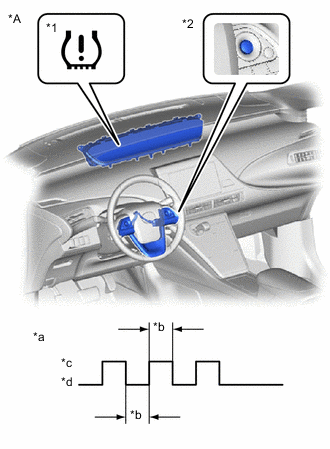
*A for LHD *1 Tire Pressure Warning Light *2 "ENTER" Switch (Steering Pad Switch Assembly) *a Tire Pressure Warning Light Output Pattern *b 1 sec. *c ON *d OFF 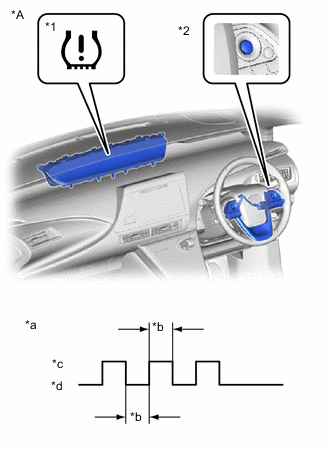
*A for RHD *1 Tire Pressure Warning Light *2 "ENTER" Switch (Steering Pad Switch Assembly) *a Tire Pressure Warning Light Output Pattern *b 1 sec. *c ON *d OFF Operate the steering pad switch assembly, select "TPMS" on the multi-information display and press and hold the "ENTER" switch (steering pad switch assembly) until the tire pressure warning light blinks 3 times.
-
Turn the power switch off.
-
Connect the GTS to the DLC3.
-
Turn the power switch on (IG) and turn the GTS on.
-
Enter the following menus: Chassis / Tire Pressure Monitor / Data List.
-
Check that initialization has been completed.
-
Confirm that the tire pressure data of all tires is displayed on the GTS screen.
-