LANE RECOGNITION CAMERA SENSOR INSTALLATION

PROCEDURE
-
INSTALL LANE DEPARTURE WARNING CAMERA
Note
-
When replacing the lane departure warning camera, make sure to replace it with a new one.
-
Do not touch the lens surface of the lane departure warning camera and the windshield in front of the lane departure warning camera.
-
If the lane departure warning camera is dropped, replace it with a new one.
-
If the camera is installed with any looseness or gaps, it may not be possible to perform camera axis learning and the system will not operate correctly, so make sure to install it correctly and securely.
-
If the windshield glass is replaced on a vehicle equipped with a lane departure warning camera, make sure to use a Toyota genuine part, as the lane departure warning camera may not be able to be installed due to a missing bracket or the lane departure alert system may not operate properly due to a difference in the transmissivity or ceramic line shape.
-
If the lane departure warning camera bracket is deformed or damaged, replace it together with the windshield glass.
-
When using a new lane departure warning camera:
-
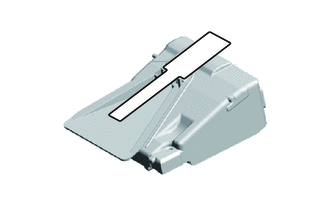
Remove the protective film from the lane departure warning camera.
Note
Do not touch the camera lens after removing the protective film.
-
-
As shown in the illustration, while pushing in the lane departure warning camera upwards, engage the 2 pins on the rear side of the lane departure warning camera into the guides of the bracket.
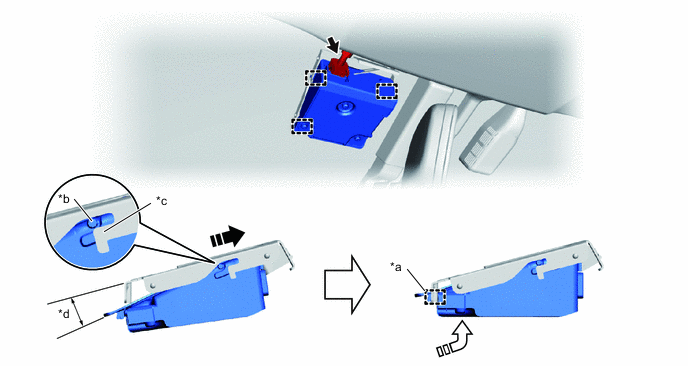
*a Pin on front of lane departure warning camera *b Pin on rear of lane departure warning camera *c Guide *d Approximately 10° 
Install in this Direction (1) 
Install in this Direction (2) Note
Do not touch the camera lens after removing the protective film.
Tech Tips
Insert the lane departure warning camera into the bracket at approximately 10°
-
Push the lane departure warning camera towards the rear, push up the front side of the lane departure warning camera, and engage the pin on the front side of the lane departure warning camera into the hole on the front side of the bracket.
Note
Check that the pin on the front side of the lane departure warning camera is inside the hole on the front side of the bracket.
-
Connect the connector.
-
-
INSTALL NO. 1 LANE RECOGNITION COVER
-
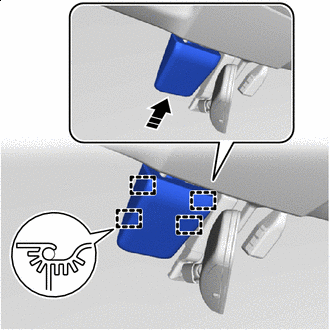
Install in this Direction Engage the 4 guides to install the No. 1 lane recognition cover as shown in the illustration.
-
-
ADJUST LANE DEPARTURE WARNING CAMERA
Tech Tips
After replacing or removing/installing the lane departure warning camera, or when the vehicle alignment has been adjusted, perform calibration of the lane departure warning camera.