ION EXCHANGER REMOVAL
CAUTION / NOTICE / HINT
The necessary procedures (adjustment, calibration, initialization, or registration) that must be performed after parts are removed, installed, or replaced during the FC cooling water ion exchanger assembly removal/installation are shown below.
| Replacement Part or Procedure | Necessary Procedure | Effects/Inoperative when not Performed | Link |
|---|---|---|---|
| FC cooling water ion exchanger assembly (FC cooling water ion exchanger element ) | Initialization | When the message "Ion filter replacement interval reached. Please replace ion filter at dealership.) is displayed on the multi-information display, the warning buzzer will also sound. |
PROCEDURE
-
PRECAUTION
Note
-
The coolant (Toyota genuine FC stack coolant) is an exclusive coolant.
-
The coolant (Toyota genuine FC stack coolant) cannot be reused, so when filling, be sure to fill with new coolant (Toyota genuine FC stack coolant).
-
To prevent degradation of coolant (Toyota genuine FC stack coolant) performance, do not add or fill any other substances such as tap water or battery electrolyte refill liquid.
-
Do not use cotton work gloves or other gloves that could shed fibers.
-
DO NOT use any container that has previously been used to fill substances such as oil.
-
To prevent foreign matter from contaminating the coolant (Toyota genuine FC stack coolant) passages, wash out the prepared container with tap water, then wipe away any water remaining inside the container before using it.
-
If the coolant (Toyota genuine FC stack coolant) passages are filled incorrectly, follow the countermeasures according to "Countermeasures when coolant (Toyota genuine FC stack coolant) passages are filled incorrectly".
-
When the vehicle is parked with the power switch off, if the FC control ECU judges that the FC stack temperature will go below 0°C (32°F), it activates the FC air compressor, hydrogen pump and FC cooling water pump for a maximum of 180 seconds and drains water from the FC stack assembly. When performing inspection or repairs with the power switch off (not on (IG) or on (READY)), disconnect the cable from the negative (-) auxiliary battery terminal before performing work.
-
-
REMOVE FRONT BUMPER LOWER ABSORBER
-
REMOVE NO. 2 MOTOR UNDER COVER
-
REMOVE FRONT FLOOR COVER LH
-
REMOVE FRONT FLOOR COVER RH
-
REMOVE SUSPENSION MEMBER TO FRONT CROSSMEMBER BRACE SUB-ASSEMBLY
-
DRAIN COOLANT (FC STACK COOLANT)
-
REMOVE COOL AIR INTAKE DUCT SEAL
-
REMOVE FC COOLING WATER ION EXCHANGER ASSEMBLY
-
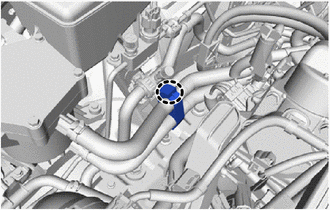
Disengage the claw and open the clamp.
-
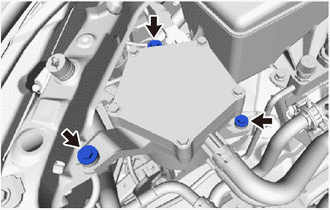
Remove the 3 bolts.
-
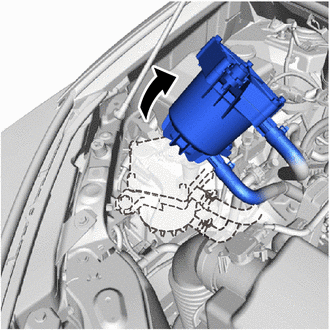
Lift up the FC cooling water ion exchanger assembly as shown in the illustration to send the coolant (Toyota genuine FC stack coolant) remaining in the FC cooling water ion exchanger assembly to the FC cooling ion exchanger inlet hose.
Tech Tips
This is done to prevent the coolant (Toyota genuine FC stack coolant) from spilling into the motor room after the FC cooling ion exchanger inlet hose is disconnected.
-
Return the FC cooling water ion exchanger assembly to its original location.
-
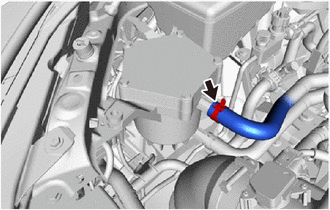
Slide the hose clip and disconnect the FC cooling ion exchanger outlet hose from the FC cooling ion exchanger assembly.
Note
-
When disconnecting, be careful not to damage the hose interior surface or port of FC cooling ion exchanger assembly portion.
-
Perform the work by hand. Do not use tools.
-
-
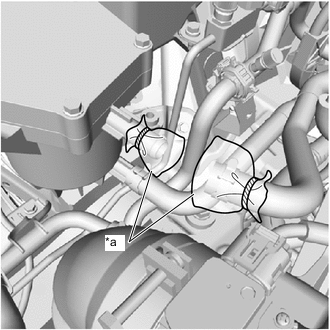
*a Plastic Bag To prevent contamination by foreign matter, cover the connecting portions of the FC cooling ion exchanger outlet hose and FC cooling ion exchanger assembly with plastic bags.
-
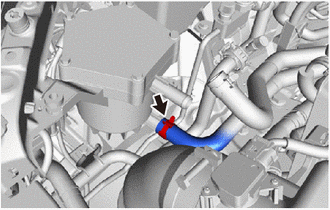
Slide the hose clip and disconnect the FC cooling ion exchanger inlet hose from the FC cooling ion exchanger assembly.
Note
-
When disconnecting, be careful not to damage the hose interior surface or port of FC cooling ion exchanger assembly portion.
-
Perform the work by hand. Do not use tools.
-
-
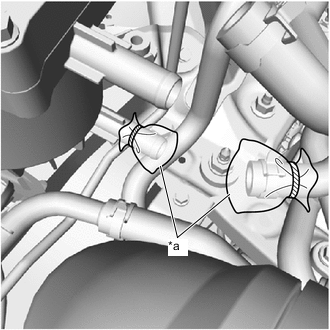
*a Plastic Bag To prevent contamination by foreign matter, cover the connecting portions of the FC cooling ion exchanger inlet hose and FC cooling ion exchanger assembly with plastic bags.
-
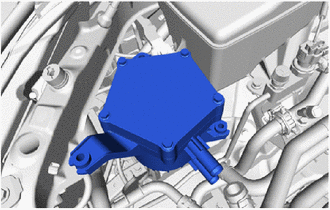
Remove the FC cooling ion exchanger assembly from the vehicle.
-
-
REMOVE FC COOLING WATER ION EXCHANGER BRACKET
Tech Tips
Only perform this procedure when replacement of the FC cooling water ion exchanger bracket is necessary.
-
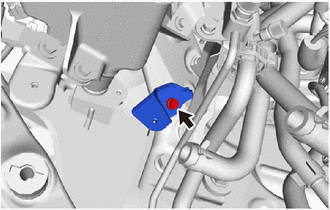
Remove the bolt and FC cooling water ion exchanger bracket from the No. 3 frame crossmember bracket sub-assembly RH.
-